
danh32162969
Participant
June 7, 2024
Question

'Drop Shadow' combined with 'Transform' rendering error with GPU acceleration disabled

  • June 7, 2024
  • 5 replies
  • 428 views

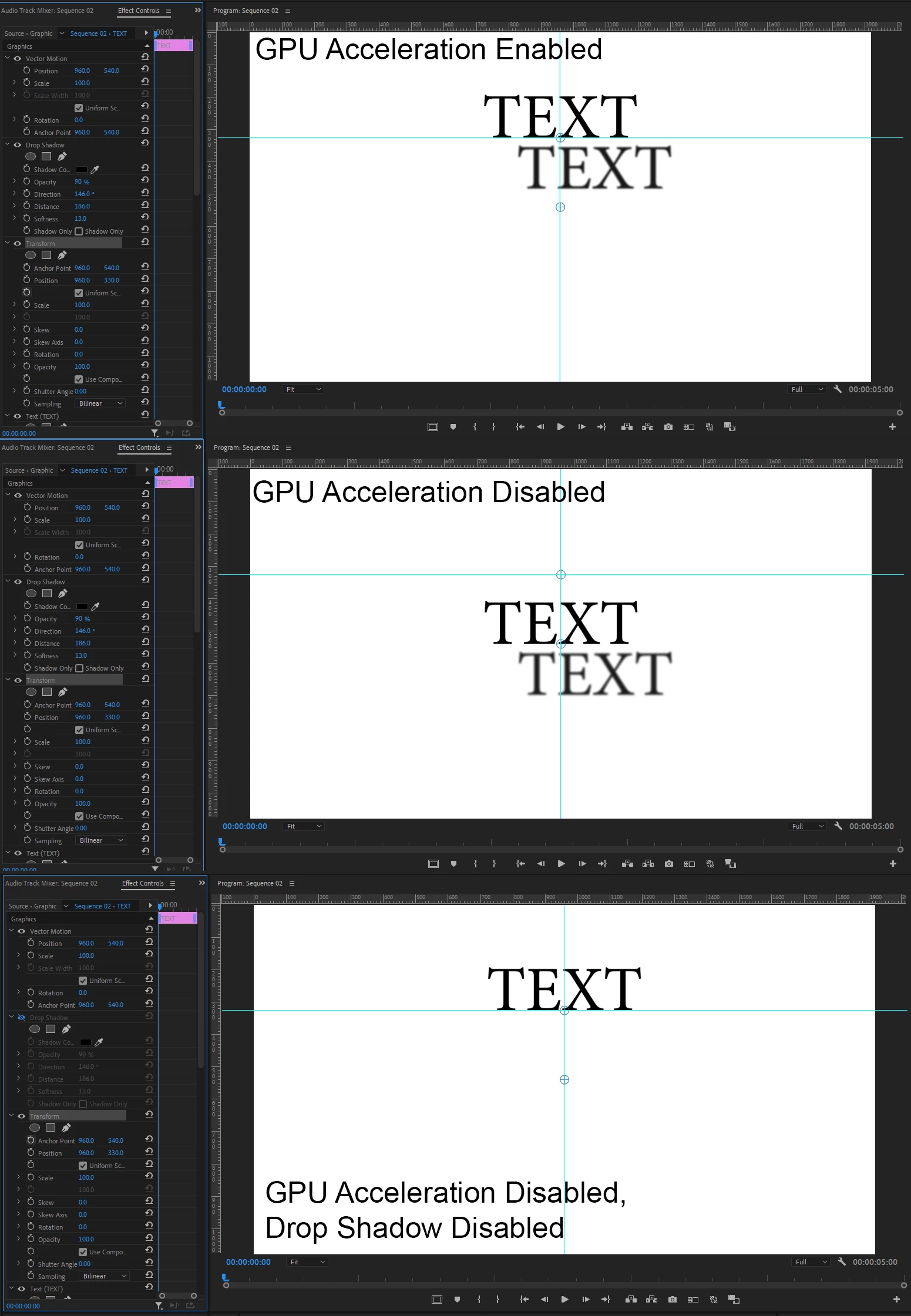
When the 'Drop Shadow' effect is appled to an Essential Graphics text layer in combination with the 'Transform' effect, there is a rendering error with GPU acceleration disabled.


Steps to reproduce:


  1. With either OpenCL or CUDA hardware acceleration enabled, Create a 1920x1080p sequence
  2. Create an Essential Graphics clip with a text layer
  3. Apply 'Drop Shadow' and 'Transform' to the Essential Graphics clip
  4. Decrease the vertical position property of the 'Transform' effect, the clip moves up as expected
  5. Disable harware acceleration, and observe that the layer moves back to its starting position


In this configuration, 'Transform' position paremeter values under 960,540 are not respected when GPU acceleration is disabled.


With hardware acceleration disabled, disabling the 'Drop Shadow' effect allows 'Transform' to function correctly again.


Version: Premiere 24.4.1

Intel i5 13600k

Nvidia GTX 1070

Nvidia Studio Drivers 555.85
 

This topic has been closed for replies.

5 replies

Participant
November 16, 2024

Hi @Kevin-Monahan,
I was the one who came across the problem initially. I think this problem has been fixed as of now. Having no issues with it. However, since you have mentioned the FX on the (old essential graphics, now) properties panel, I would like to some feedback- the Shadow FX on the properties panel, although it has the ability to stack multiple FX, you can not change the order of those FX. That means, after changing values of multiple shadows (in the properties panel), it is required to change all the values just to change the stack order. It would be great if there was a feature for that in a later update.

Thanks.


danh32162969
Participant
June 8, 2024

Hi Kev!


Not at the studio over the weekend to try that, it probably would be a functional workaround I imagine!

Another user came across this bug over on the /r/premiere subreddit and I was just putting it in the system 😉


https://www.reddit.com/r/premiere/comments/1da7e1c/comment/l7ikcvj/


- /u/smushkan from one of our several company accounts

Kevin-Monahan
Community Manager
Community Manager
June 7, 2024

Hi @danh32162969,

Thanks for posting your problem. Is it possible to solve this issue via nesting? If that is not working, can you try using the Drop Shadow in the Essential Graphics panel instead? Let us know if either of these ideas might work for you.


Thanks,
Kevin

Kevin Monahan - Sr. Community and Engagement Strategist – Adobe Pro Video and Audio
danh32162969
Participant
June 7, 2024

Changing the stacking order fixes the issue with 'Transform', but introduces a rendering error with 'Drop Shadow' instead.


In that configuration with hardware acceleration disabled, the 'Distance' and 'Direction' parameters appear to move both the graphic and the drop shadow proportionally.


With hardware acceleration enabled, the graphic remains stationary and only the shadow moves when adjusting the same parameters, as expected.

Ann Bens
Community Expert
Community Expert
June 7, 2024

Try changing the stacking order.