

rachelcenter
Legend
December 15, 2023
Question

Dupe Detection Bug

  • December 15, 2023
  • 8 replies
  • 1755 views

I'm on Version 24.1.0 (Build 85) and these past few days I notice a bug with dupe detection. If I put one clip on the timeline and then duplicate the clip on the timeline, dupe detection shows up. But then i delete the 2nd instance of the clip on the timeline, the dupe detector remains. Anyone else have this problem? Mac OS Sonoma 14.1.2.


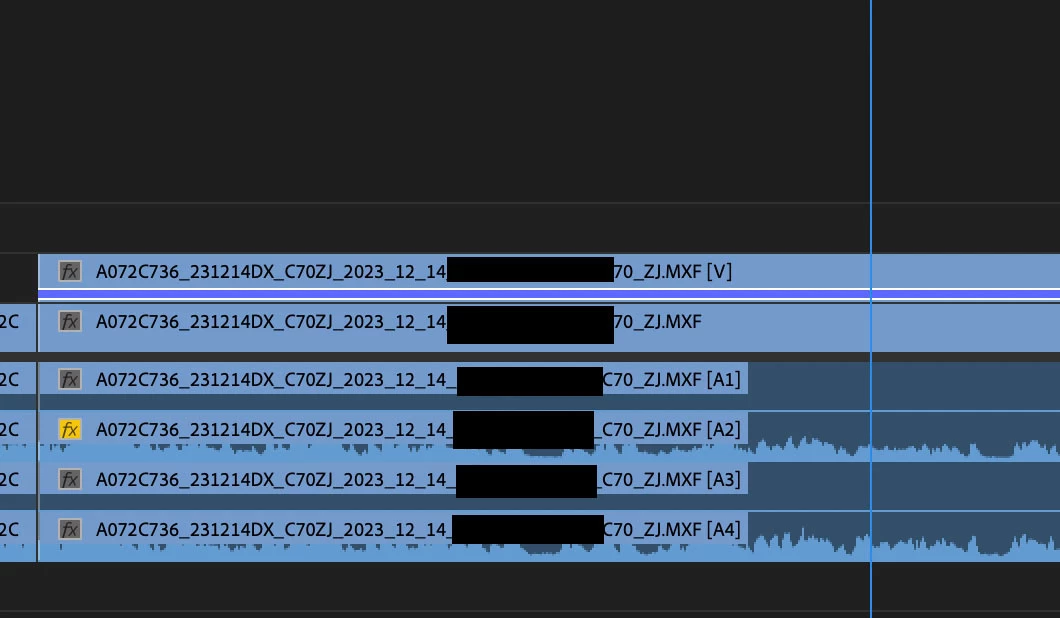
In this picture here, i put a clip on v1, then held down the option key while dragging the clip onto v2 , which creates a duplicate. So the dupe detector line should be showing up on both clips (the one on v1 and the one on v2) but there is only 1 dupe detector line showing up. So then I deleted the clip on v1 so it was no longer on the timeline, but the blue duplicate detection line remained on the clip that lives on v2, even though the duplicate is now gone from v1. Thoughts on this @Kevin-Monahan ?
This topic has been closed for replies.

8 replies

rachelcenter
Legend
July 15, 2024

To my knowledge the issue isnt on the latest versoin (24.5.0 build 57)

Participant
September 24, 2024

This issue still exsist. But If I copy the current sequence and work in the copied one, the errors seem not exsiting.

rachelcenter
Legend
September 24, 2024

I'm weirdly seeing this issue resurface as well. for instance, if i take a clip on track v3 and copy it to v4, the dupe line only shows up on the clip on track v4.  Premiere version 24.6.1 (build 2), mac os sequioa 15.0 @Kevin-Monahan 

Kevin-Monahan
Community Manager
Community Manager
July 15, 2024

Hi RachelCenter and others on the thread,

Are you still seeing this issue in the current version? Let the community know.


Thanks,
Kevin

Kevin Monahan - Sr. Community & Engagement Strategist – Pro Video and Audio
Participant
September 5, 2024

I am running 24.6.1 (build 2) and I'm definitely having this issue.


Running in win 10 on a PC.

Participating Frequently
May 27, 2024

Same here - very annoying...


(Premiere 24.3.0, 2021 Macbook, OS 14.4). 


Participant
April 3, 2024

I have the same problem. using v24 on a mac studio M1max. This isnn't one of those "nice to have" features you can live without. It's a vital tool, so urgent attention required imho!

Kevin-Monahan
Community Manager
Community Manager
March 1, 2024

Hello @rachelcenter,

Can you test it out in the Beta version (24.3)? There may be a fix along those lines. Let us know.


Thanks,
Kevin

Kevin Monahan - Sr. Community & Engagement Strategist – Pro Video and Audio
Participant
March 4, 2024
Hello,

It doesn't work even in the beta version.

Pilar
Participant
January 8, 2024

Yes I have the same issue, on both windows 11 et macOS Ventura 13.6.1 with the version Adobre Premiere 24.1.0 


Dupe detection working for some clip and not others, sometimes it's just offset the dupe at the entry point of the clip. 


Same as explained here : https://www.reddit.com/r/editors/comments/18xniwi/dupe_detection_in_premiere_messed_up_entirely/ 


Pilar 

rachelcenter
Legend
January 5, 2024

but i'm not on a macbook pro. i'm on an imac desktop

Collin K
Participating Frequently
January 5, 2024

Dupe detection in Premiere messed up entirely 


I came across someone mentioning this on Reddit regarding the issue possibly stemming from MacBook Pros (?). It looks like you're not the only one with this Dupe Detection/Duplicate Frames bug!