
Participant
April 10, 2018
Answered

.DV Not supported? Or did the codec get deleted?

  • April 10, 2018
  • 5 replies
  • 13136 views

I have been filming with a Mini DV camera for years (as well as now 4k cameras) and with the latest update, I have not been able to import my new footage. I import using an old version of iMovie HD 06 because for me, I can tell a difference in quality.
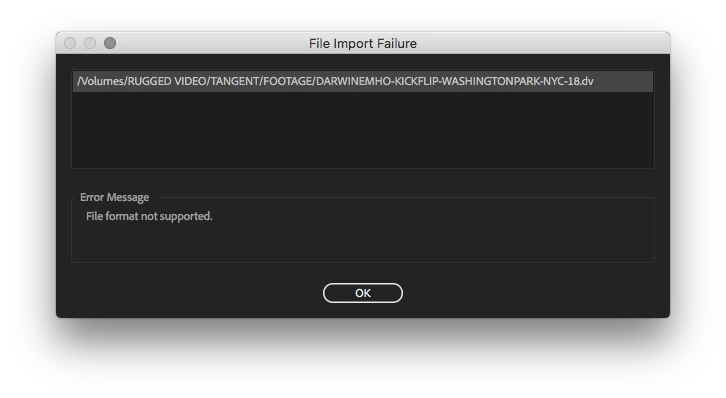
I'm not even able to batch convert them (not that I should have to) because Media Encoder gives me the same error. I had recently deleted a Final Cut Pro Trial as well as noticed my cc 2017 was still in my applications folder. I had just edited a 10 minute video using this camcorder last fall, what is going on?

Correct answer excited_Genie16B8

You can install an older version of Adobe Media Encoder along with the current version and use the older version to convert.

5 replies

Participant
May 30, 2023

Hi! I found a solution to this by opening the .dv files in Quicktime Player (I have Version 10.4 (928.13)) and clicking "Save" it prompts the Export As window, where I didn't change the name, nor added any extension, or anything. Just press Save and voilá! (takes a few seconds) Back in premiere, choose the offline clip > link media > locate > and remove the tick in "Display only exact name matches", select your file and it'll be back online in the timeline.

Hope this works for you too!

Warren Heaton
Community Expert
Community Expert
August 17, 2023

Great tip.

Just changing the .dv to .mov should work.

Known Participant
March 2, 2023

Adobe's excuse that Apple no longer supports is just BS  - there are umpteen 3rd party app that can do it and none have the number of expert staff that Adobe do - here a one man band in 'LiveFlix' has come up with a solution - it's simple and it works even if it doea cost $99 -https://www.lifeflix.com/. The reason Adobe don't think it's an issue is because they are software makers used toobsolescence - not video editors who draw on a whole range of sources and don't care what format if it is necessary for the current film and just whan to get the slow process of editing as simple and quick as possible. 

Participant
August 16, 2018

The daftest comment from Adobe on their page that announces the dropping of QuickTime 7 is in the "Workarounds" section:

  • "For import formats, transcode legacy footage to a newer codec."

How can you do this when Media Encoder ISN'T accepting the files anymore?

Thinking of going back to Avid or training on FCX.

juanmario
Participating Frequently
August 18, 2018

An AVI DV is not a legacy codec, in Windows it works fine., Premiere 12.1.2.

Format                                   : AVI

Format/Info                              : Audio Video Interleave

Commercial name                          : DVCPRO     <----------- Generated in QuickTime

File size                                : 96.8 MiB

Duration                                 : 27 s 840 ms

Overall bit rate mode                    : Constant

Overall bit rate                         : 29.2 Mb/s

Video

ID                                       : 0

Format                                   : DV

Commercial name                          : DVCPRO

Codec ID                                 : dvsd             <----------- DV

Codec ID/Hint                            : Sony          <----------- DV

Duration                                 : 27 s 840 ms

Bit rate mode                            : Constant

Bit rate                                 : 24.4 Mb/s

Encoded bit rate                         : 28.8 Mb/s

Width                                    : 720 pixels

Height                                   : 576 pixels

Display aspect ratio                     : 4:3

Frame rate mode                          : Constant

Frame rate                               : 25.000 FPS

Standard                                 : PAL

Color space                              : YUV

Chroma subsampling                       : 4:1:1

Bit depth                                : 8 bits

Scan type                                : Interlaced

Scan order                               : Bottom Field First

Compression mode                         : Lossy

Bits/(Pixel*Frame)                       : 2.357

Time code of first frame                 : 00:00:00:00

Time code source                         : Subcode time code

Stream size                              : 95.6 MiB (99%)

AVI DV Premiere

Format                                   : AVI

Format/Info                              : Audio Video Interleave

Commercial name                          : DV

File size                                : 8.47 MiB

Duration                                 : 2 s 336 ms

Overall bit rate mode                    : Constant

Overall bit rate                         : 30.4 Mb/s

Recorded date                            : 2018-08-18T01:34:53-03:00

Writing application                      : Adobe Premiere Pro CC 2018.1 (Windows)

Video

ID                                       : 0

Format                                   : DV

Codec ID                                 : dvsd             <----------- DV

Codec ID/Hint                            : Sony          <----------- DV

Duration                                 : 2 s 336 ms

Bit rate mode                            : Constant

Bit rate                                 : 24.4 Mb/s

Encoded bit rate                         : 28.8 Mb/s

Width                                    : 720 pixels

Height                                   : 480 pixels

Display aspect ratio                     : 4:3

Frame rate mode                          : Constant

Frame rate                               : 29.970 (30000/1001) FPS

Original frame rate                      : 29.970 (29970/1000) FPS

Standard                                 : NTSC

Color space                              : YUV

Chroma subsampling                       : 4:1:1

Bit depth                                : 8 bits

Scan type                                : Interlaced

Scan order                               : Bottom Field First

Compression mode                         : Lossy

Bits/(Pixel*Frame)                       : 2.357

Time code of first frame                 : 00:00:00:00 / 00:00:00:00

Time code source                         : Adobe tc_A / Adobe tc_O

Stream size                              : 8.01 MiB (95%)

lehestro
Inspiring
April 10, 2018

I'm dealing with this same issue. With none other than a – you guessed it – a documentary using legacy footage. I stupidly updated Premiere, because the project had been locked for 6 months. Now I needed to make a minor tweak, reviewed, and saw this patch of "media offline" frames.

I'm not a software engineer, so it would be nice to know why they ended support for legacy codecs. I mean, it can't be adding much bloat to the app, can it? Seems Adobe got a case of Apple-itis, and decided to slim down because some engineer has issues about streamlined code at the expense of usability. And yes I can recode, but when you have a locked timeline that has been color-corrected, and is to spec, introducing newly re-encoded material is really nerve-wracking and potentially problematic.

This was a $#!† move on Adobe's part.

Legend
April 11, 2018

it would be nice to know why they ended support for legacy codecs.

Here's the best I could find.

"Adobe continuously aims to keep up with the most modern workflows and support formats and codecs broadly used across the professional film and video industry. As a result, future versions of Premiere Pro will no longer support legacy QuickTime 7 era formats and codecs."  - Patrick J. Palmer

lehestro
Inspiring
April 13, 2018

I saw that. It's kind of a non-explanation. I don't that keeping up with modern codecs has to be mutually exclusive to supporting legacy ones. The two seemed to work be sympatico until Adobe decided they weren't.

Vinay Dwivedi
Adobe Employee
Adobe Employee
April 10, 2018

Hi Jordan,

This might be because of the removal of Legacy QT codecs.

As per this DV should import and export but if you are running into issues due to this please try the workarounds mentioned in the below link.

Dropped support for Quicktime 7 era formats and codecs

//Vinay

Participant
April 10, 2018

Why would this ever be a thing? What about documentaries with archival footage? And I can't even transcode them because Media Encoder can't import them either...

excited_Genie16B8Correct answer
Legend
April 10, 2018

You can install an older version of Adobe Media Encoder along with the current version and use the older version to convert.