Participant
May 17, 2023
Question

DVA Core Error. Premiere will not even open. Please Help!

  • May 17, 2023
  • 20 replies
  • 4947 views

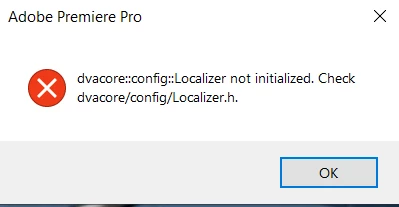
DVA Core Error. Premiere will not even open. Error Message reads "dvacore::config::Localizer not initialized. Check dvacore/config/Localizer.h." Any idea how I fix this?

20 replies

MyerPj
Community Expert
Community Expert
May 20, 2023

Please J, are you running US English, no other language, keyboard, etc. Win 10 or 11?

Participant
May 20, 2023

Where did you find the setting?

I'm having the exact same issue today.

I went to Windows security but couldn't find a solution.

MyerPj
Community Expert
Community Expert
May 20, 2023

I just found the setting, it's certainly worth a try. Mine was off. I turned it on, and got into PP no problem. It may have seemed slower, but I can't say for sure on that.

Participant
May 20, 2023

I'm on windows 11, got the same error. The way i got it to work was by allowing the blocked (premiere pro) apps in: Windows Security -> Manage Ransomware Protection -> Allow an app through Controlled folder access -> Add an allowed app. I don't know this even exists in Win10 but i hope this helped a little...

MyerPj
Community Expert
Community Expert
May 20, 2023

Localizer is typically a language element. I'm stumped if Adobe Cleaner does not work. I'll suggest you try contacting Adobe, here's a link: https://www.adobe.com/about-adobe/contact.html. Let us know what you find out.

Participant
May 19, 2023

Keyboard is in english. Running Windows 10

MyerPj
Community Expert
Community Expert
May 18, 2023

Do you have a non english keyboard, or are running in non-english? Windows I'm guessing

Participant
May 18, 2023

UPDATE: I work for a school and this is technically their computer. Even though I've had this computer for almost a year now and I've never had this problem before, for some reason this error now happens when I am at home, not when I am at school. Thankfully I am able to use Premiere at work. Any idea why this message comes up when I am at home? I tried using the Adobe cleaner utility, but no luck. (See previous comment). 

Participant
May 18, 2023

Looks like that didn't work. 😞

I ran the cleaner to it's max, running it on all adobe files and such. Had to reinstall creative cloud and Premiere, but the exact same message is still coming up.

MyerPj
Community Expert
Community Expert
May 17, 2023

It looks like you should reinstall. If it comes up with the same errors, you can run the Adobe Cleaner after you uninstall the programs and before you re-install them: Also, reboot your computer between steps even if you are not asked to...

https://helpx.adobe.com/creative-cloud/kb/cc-cleaner-tool-installation-problems.html

Be sure to backup your preferences, workspaces, etc before you run the cleaner.