
jiris16954964
Participant
November 4, 2016
Answered

Dynamic link from Ae is tiny/small in Pr after updating to 2017

  • November 4, 2016
  • 8 replies
  • 8641 views

Hi everyone,

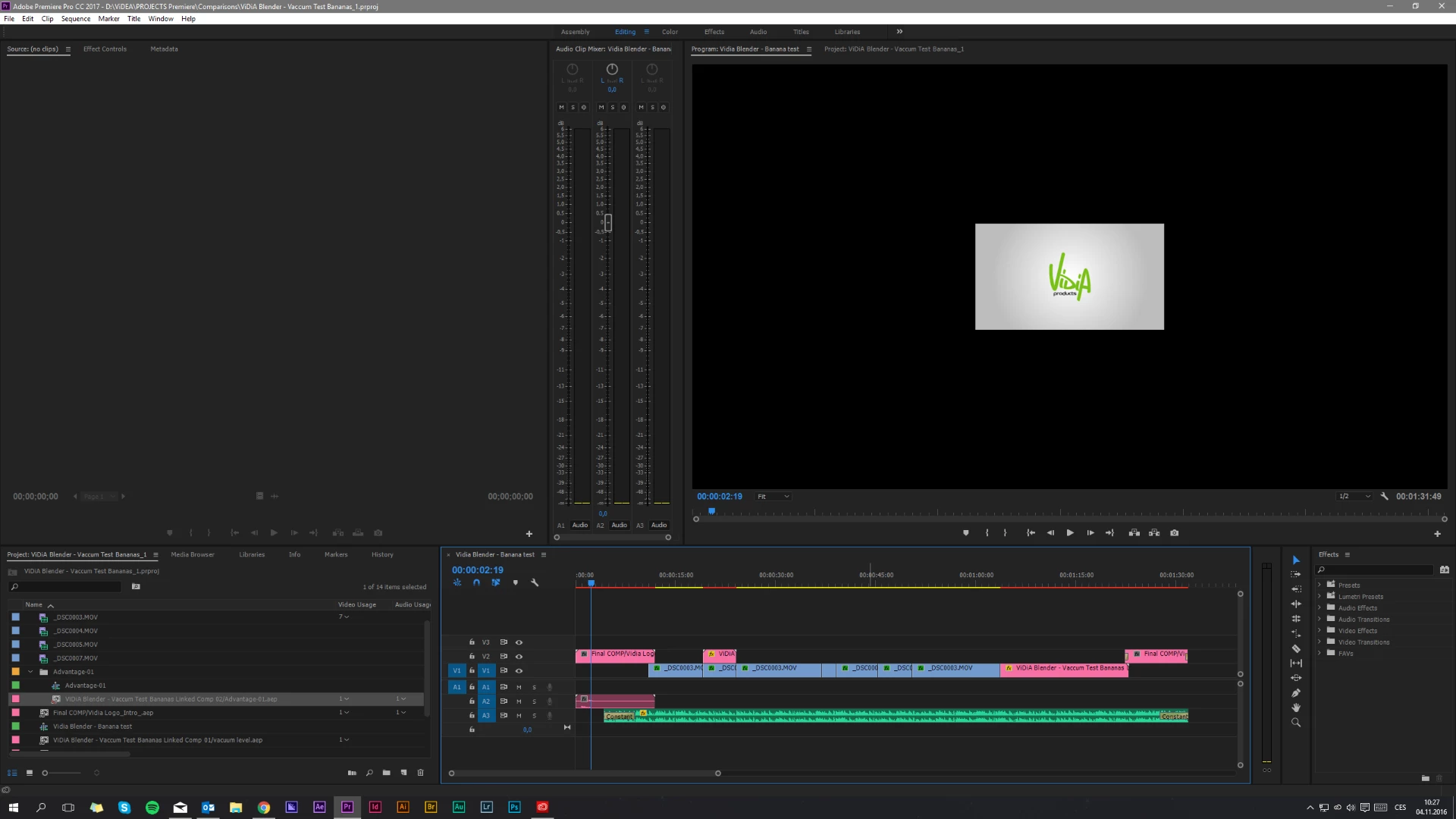
I just found out, that after 2017 update, opening and converting my last Pr project and Ae project files, some of my dynamic links are insanly small in Premiere. The resolution is the same. Any ideas to solve this issue?

I am already downgrading to previous version to finish this one, but I have couple Ae dynamic links, which I use for every video and will need to solve this, so I can use them in newer version of CC as well.

I already tried to: relinking the file, importing it again, saving with different name.

Thanks.

Tom
This topic has been closed for replies.
Correct answer Rameez_Khan

Hi all,

  1. Could you please open After Effects and try changing the resolution in the Comp panel to Full?
  2. Switch to Premiere Pro and see if the resolution in the Program Monitor changes?

Thanks,

Rameez

8 replies

JJHART
Participant
January 19, 2017

Same issue, I have one project where it only messed up the resolution on two clips, the rest were fine. I'll be working on another older project next week and I'm terrified to see how many shots are messed up considering the project is 84 mins long with about 100 AE links. Any word on when this will be fixed?

Participant
January 13, 2017

Had the same issue, in my case, setting the main composition settings to full did not work by itself. I had to go through every composition/pre-comp within my project and set them ALL on full. After I changed all the compositions within my project, Premiere Pro displayed them correctly.

ismael_ted
Participant
November 17, 2016

I´m amazed! Today I saw that there was a new update and I thought it would solve this problem.. but no, don´t resolve nothing. You still need to put all your compositions at full resolution to work fine through dynamic link.

I applaud you Adobe, thanks to do nothing. Is this what you do with the money that I pay you month by month? Make my job more difficult?

Participant
November 16, 2016

I have same problem Plus more with the latest version. It seems every time a new version comes out its has more problems that the version before. and there is all ways a different setting to fix it. How about Adobe don't fix what isn't broke???

Rameez_Khan
Rameez_KhanCorrect answer
Legend
November 4, 2016

Hi all,

  1. Could you please open After Effects and try changing the resolution in the Comp panel to Full?
  2. Switch to Premiere Pro and see if the resolution in the Program Monitor changes?

Thanks,

Rameez

alexthehamlin
Known Participant
November 5, 2016

I had the same problem, and this fixed it for me!

Participant
November 4, 2016

Exact same thing here. Will have to revert to last version.

Participant
November 4, 2016

Exact same thing here. Dynamic linked text has shrunk and falls apart when I scale it up. Will have to revert to previous version.

Participant
November 4, 2016

Same exact issue here, resaved my AE project in 2017, relinked media and still the same issue. PP Project was using an AE 2016 project file originally.

Mo Alani
Community Expert
Community Expert
November 4, 2016

If nothing worked, just export them in AE and bring them as regular footage in PP