
Inspiring
April 28, 2017
Answered

Editing and deleting previously created sequence presets

  • April 28, 2017
  • 1 reply
  • 1340 views

Hi folks,

I'm looking for help with 2 things:

1 - editing a previously created sequence preset.  I don't mean changing the settings of a sequence that I'm working on, but specifically changing the settings in the custom preset itself.  For example, I have created a custom preset with specific render settings.  I'd like to go back into that preset, and change those render settings to something else, so that every time I use that preset in the future, it has the new render settings that I want.  Possible?

2 - delete an entire custom preset from the list of sequence presets.  Is there somewhere that I can see the full list of presets available, and make changes?  Or is Premiere only capable of adding new sequence presets to the already existing list?

Thanks!
This topic has been closed for replies.
Correct answer Meg The Dog

1. In the New Sequence dialog box, click on the Sequence Setting you want to modify, change tabs to the the Settings tab, make your changes and Save with a new name (or the same name if you want to overwrite the old the preset).

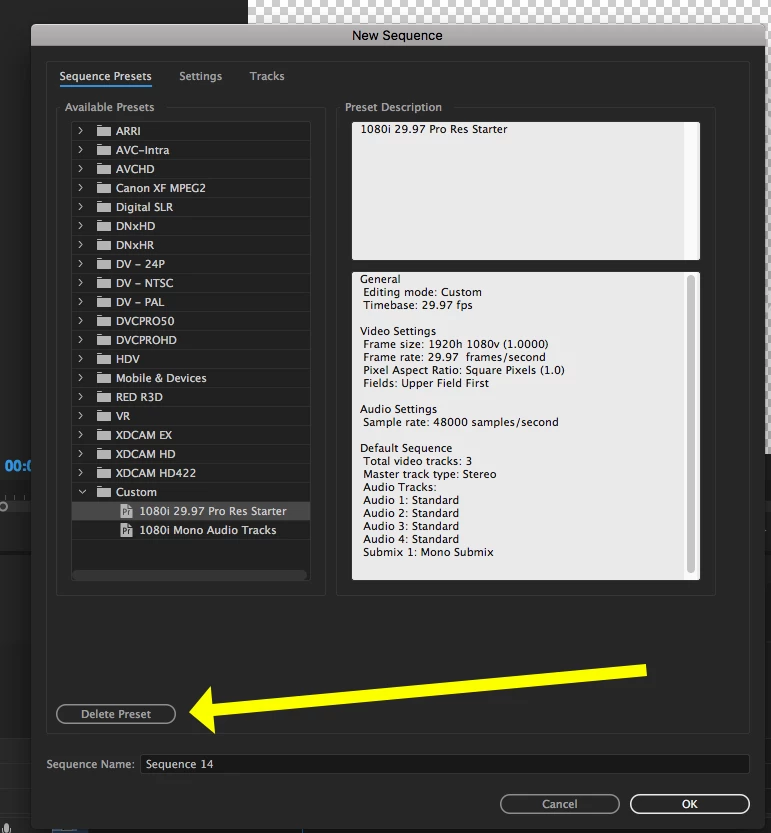
2. Click on the Preset to select it, the click the Delete Preset button - make sure you have selected the correct preset to delete, there is no conformation to proceed once you press that button.

MtD

1 reply

Meg The DogCorrect answer
Inspiring
April 28, 2017

1. In the New Sequence dialog box, click on the Sequence Setting you want to modify, change tabs to the the Settings tab, make your changes and Save with a new name (or the same name if you want to overwrite the old the preset).

2. Click on the Preset to select it, the click the Delete Preset button - make sure you have selected the correct preset to delete, there is no conformation to proceed once you press that button.

MtD

aynsbAuthor
Inspiring
April 28, 2017

Don't know how I missed that before... but I will say that having to create a new preset in order to edit previously existing ones is incredibly non-intuitive.  Thanks for your reply!