
Participant
July 5, 2020
Answered

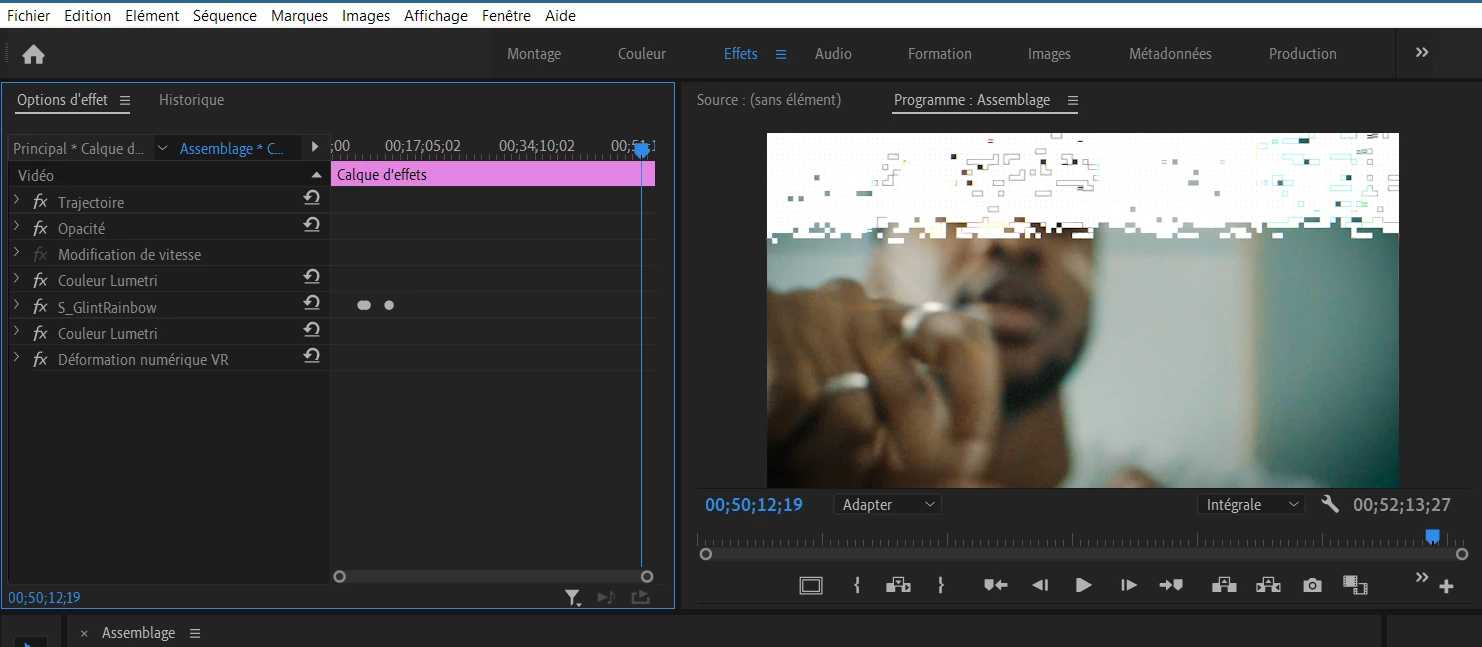
Effect render problem white glitch
  • July 5, 2020
  • 1 reply
  • 1061 views


Hello ,


As you can see when I put some lumetrie effect and other effects from Sapphire/Boris, I have those White glitch that appears in my program screen and it's impossible to render.


I've already tried to change the settings of the sequence or the setting of my graphic card. I've re installed Premiere pro and it does the same exact thing again and again. I've tried so many things, I REALLY NEEDS HELP ASAP. 


(The screenshot is in french).

This topic has been closed for replies.
Correct answer Sumeet_Kumar_Choubey

Hi Daykito,


Sorry about the poor experience. A similar issue has been reported on systems with NVIDIA GPUs running a specific driver version. If you are using NVIDIA GPU, please install the latest driver from NVIDA (v451.67). That should fix this issue. In case you are not using NVIDIA GPU, please let us know your system specifications (OS, CPU, GPU & RAM).


Thanks,

Sumeet

1 reply

Sumeet_Kumar_ChoubeyCommunity ManagerCorrect answer
Community Manager
July 10, 2020

Hi Daykito,


Sorry about the poor experience. A similar issue has been reported on systems with NVIDIA GPUs running a specific driver version. If you are using NVIDIA GPU, please install the latest driver from NVIDA (v451.67). That should fix this issue. In case you are not using NVIDIA GPU, please let us know your system specifications (OS, CPU, GPU & RAM).


Thanks,

Sumeet

DaykitoAuthor
Participant
July 15, 2020

Hello , thanks for your answer.


It works, it seems like everytime a driver is not up to date that error comes up, there was an update on my cpu driver and it makes the exact same thing. 

When I've updated it it worked again.