


Participating Frequently
June 5, 2023
Question

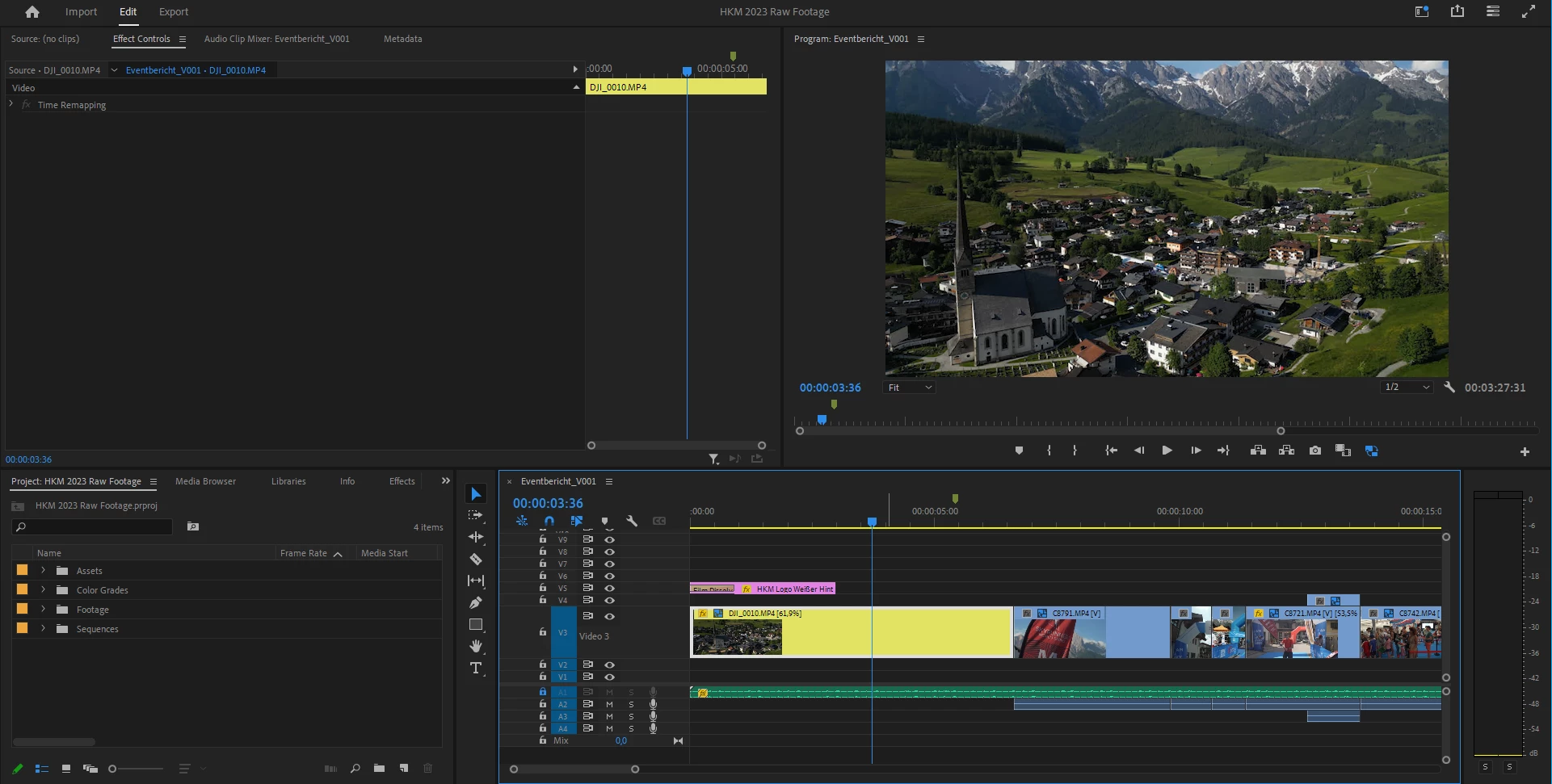
Effects Control Missing Motion effect tab
  • June 5, 2023
  • 4 replies
  • 1033 views

One second after the other I can not find the Motion effects controls for editing video footage in Premiere Pro, Tried to reset preferences / reset the workspaces  / reinstalled it, tried different Versions of Premiere. 

Deadline is in 24 Hours....

4 replies

Participating Frequently
June 5, 2023

If I re-drop the Footage into the timeline the "motion" options are there for the dropped Footage. 
So my best guess is something screwed up in the software itself for those timelines. Every single clip in every Sequence I have made so far has lost the options in the effect controls "motion".

This only happened to Video footage, Graphics such as PNG do still have that option.

notbyhalf
Inspiring
September 3, 2026


Did you ever find the cause or a solution? Googling this myself and the AI summary suggests that I have view filters enabled in my Effects panel. Learned something new about Premiere, but this didn’t help with my issue.

notbyhalf
Inspiring
September 3, 2026

In my case, I’ve been duplicating sequences and changing the dimensions for social deliverables. Not sure if that’s when the default Motion effect disappeared, but the only way I could get it back was by dragging the element back onto the timeline.