HoneyHeadFilms
Participant
September 3, 2020
Question

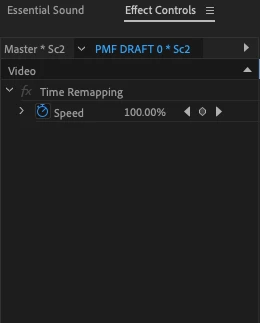
Effects Controls Only Shows Time Remapping

  • September 3, 2020
  • 1 reply
  • 693 views

Hello Community!


I am having a couple strange issues with my PremierePro. 


First, I can no longer find a way to get the opactiy bar to show up on my clips in the timeline. I thought I simply hadn't selected it from the settings in the timline, but it appears there isn't even an option to select. 


Second, my Effect Controls panel is now only displaying Time Remapping. I searched for "Opacity" in Effects and nothing shows up.


Is there something I am missing here? Major SOS.


Thanks!

HHF 
This topic has been closed for replies.

1 reply

Joëlle Bh
Community Expert
Community Expert
September 3, 2020

Please try to reset your workspace

Go to the menu Window > Workspaces > Reset to Saved Layout 

or

go to the menu Window > Effects

if it doesnt work please try to trash your preferences 

FAQ: How to reset (trash) preferences.

Participant
September 16, 2023

this did not work either.

Ann Bens
Community Expert
Community Expert
September 16, 2023

Post screenshot of entire ECP.