Participant
November 8, 2017
Answered

Effects not applying

  • November 8, 2017
  • 3 replies
  • 12779 views

I updated to Premiere 2018 and I'm having a problem applying video effects to clips - the entire clip needs to be rendered before the effect will display. This happens with lumetri color and even something simple like a horizontal flip. Any suggestions?
This topic has been closed for replies.
Correct answer Meg The Dog

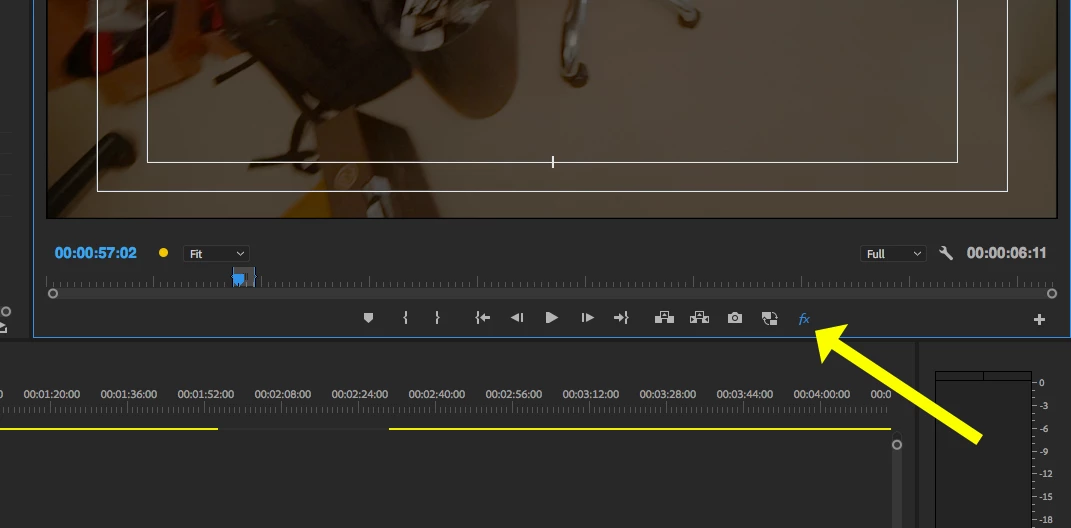
I think you have the Global Effects Mute toggled on.

MtD

3 replies

Participant
September 15, 2020

Thank You So much Brother. i forget this.

Meg The DogCorrect answer
Inspiring
November 8, 2017

I think you have the Global Effects Mute toggled on.

MtD

Participant
November 8, 2017

this fixed it!  Would this have been turned on in a converted project? or is there a hot key I could have pressed to turn this on?

I  had to add the button to my timeline so i couldn't have pressed it on accident.

My computer is used by freelancers periodically maybe something happened with one of them.

Ann Bens
Community Expert
Community Expert
November 8, 2017

No has noting to do with projects, its part of the transport controls.

If someone turns it on it stays on.

Ann Bens
Community Expert
Community Expert
November 8, 2017

Is this with a converted project or new one.

What is your OS and full comp specs.

what media is used.

Participant
November 8, 2017

Converted project.

Running on Sierra 10.12.15

3.5 GHZ 6-core intel xeon e5

48 GB 1866 MHz DDR3

AMD FirePro D700 6144 MB Graphics Card

All the media in the project is a7sii footage shot in 1080 with varying frame rates