
Participant
April 28, 2018
Answered

Effects show no change on the program monitor

  • April 28, 2018
  • 4 replies
  • 940 views

Hey!

When i apply effects (like lumetri-color or blur effects) they show no change in the program monitor.

But in the export monitor the effects are applied.

Its no difference if i apply the effect direct on the layer or on a adjustment layer.

Pls help.
This topic has been closed for replies.
Correct answer Meg The Dog

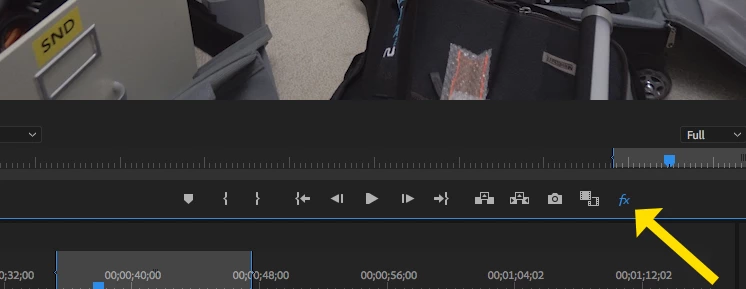
Make sure you don't have the Global Effects Mute toggled on in the Program Monitor:

MtD

4 replies

Inspiring
July 19, 2023

such a garbage fking program.. it changes the lumtri but then it doesnt and now it changed to a completely different lumetri.. fix your sht adobe i pay 60$ for a garbage software that i might aswell pirate

Legend
April 29, 2018

Make sure you've selected the right clip for adjustment.  I've made that dunce move on more than one occasion.

Participant
May 4, 2018

I did select the right clip

Meg The DogCorrect answer
Inspiring
April 28, 2018

Make sure you don't have the Global Effects Mute toggled on in the Program Monitor:

MtD

Participant
May 4, 2018

OMG i did muted the effects but then i hide the button. *ultimate facepalm*

thank you all for your help!

i feel right now pretty dumb...

Ann Bens
Community Expert
Community Expert
April 28, 2018
Participant
May 4, 2018

Premiere Pro CC 2018

All recent updates

Windows 10

Most H.264 in Mp4 but i tried some formats and i didnt do a difference

no errors

the problem is constant

last time it worked: march 2018

no other sofware running

no third party effects

the hardware shouldt be the problem because it recently worked

I am using CUDA but Software only is no really big difference

and it only happen in my preview

sorry for some language fails i am not really that good in english

thx