
Effects won't ... er... affect! (Originally titled "Masks/crops not doing anything")
[Be sure to also read my first comment below - I later discovered that this issue isn't just masks, but I decided to leave my original description as is.]
This should be simple: A presenter changed a Powerpoint slide too late, so I want to put the correct slide over the wrong one on a TV being used for projection. I've done this kind of thing before with no problem - just take a frame capture where the correct slide is shown, put the resulting still image on an upper track, and apply a mask of just the TV. But now nothing happens! I tried it with both the pen tool and the polygon, and even tried using the crop effect instead of a mask (a rectangular area would work in this case). Nothing becomes transparent - the image just sits there covering the whole frame. I also tried it on a piece of video instead of a still image - same result. I rebooted and recreated everything, but got the same result. Here is a screen shot - do you see anything wrong with a setting or something? All other tracks are muted for this screenshot, so everything except the TV should be black.
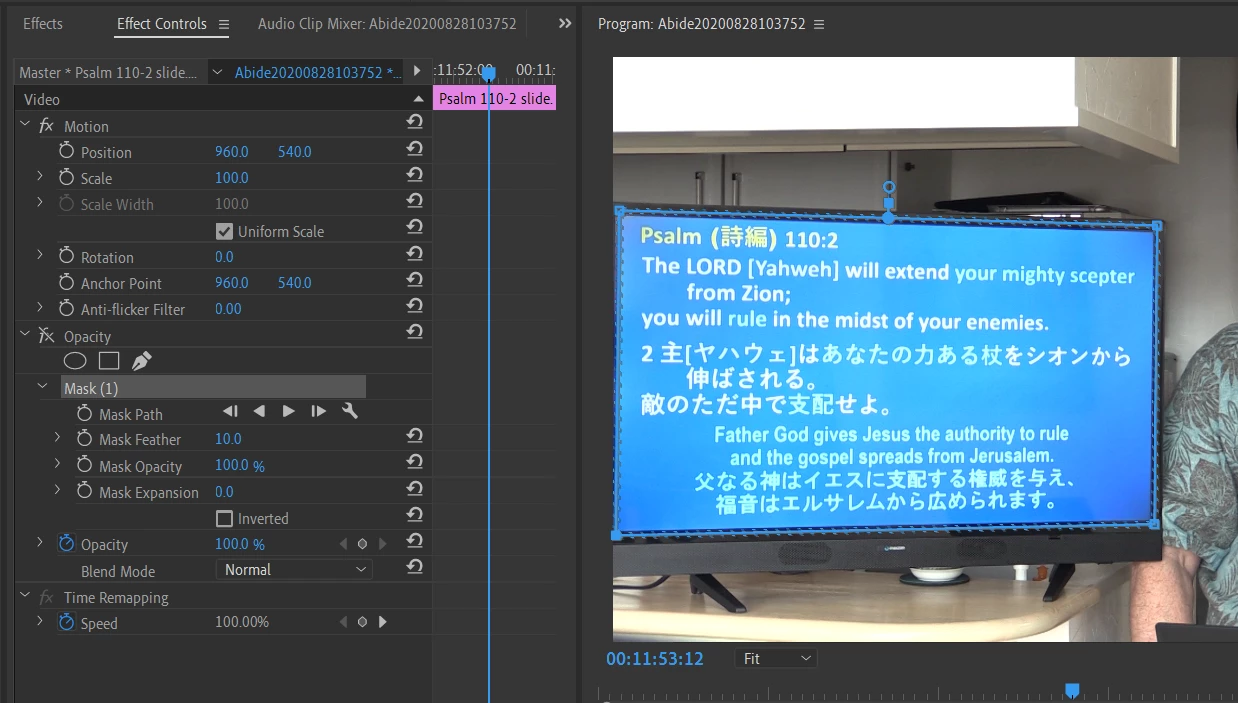
This summer I have been having troubles with display drivers - Toshiba's current version (released in May) screws up the preview in PPro, so I had to install a much older one (2015 - probably the original one that came with the PC) under guidance of Toshiba support. I don't know if this PC was updating to intermediate versions along the way - I never paid any attention to that driver until it messed up. But I did test exporting (in case it was just a display problem), and the exported video doesn't have transparency either, so I'm assuming it's not a driver issue but something I'm doing wrong. Any thoughts? I'm using PPro CC2019 (13.1.4 build 2).
 AdChoices