


Empty 1-frame clips when text based editing
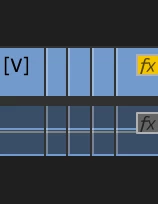
When using text based editing, especially when removing multiple pauses or filler words at once, there is a bug which causes there to be multiple 1-frame clips stuck between the actual video-clips. To fix it, I have to manually delete all of these excess single-frame clips, sometimes hundreds of them - as there is no way to automatically delete all clips with a length shorter than 2 frames, or something alike (this would practically solve the problem). This makes the text based editing feature borderline unusable for me, especially for long (30 min+) videos with lots of text.
Encounter this bug by going through the following steps:
1. Import a video file where someone is speaking
2. Use text based editing to automatically remove all (small) pauses
3. Find countless single-frame clips in your sequenc e, between the actual cut clips you want to use
 AdChoices