

ohmypro
Known Participant
August 22, 2022
Question

Empty Folder coming in when importing sequence in Productions

  • August 22, 2022
  • 3 replies
  • 881 views

OK, gang, here’s the skinny: this project is a long form doc and for various reasons I’m not going to get into here, it needed to be upgraded from one huge Premiere project to Productions. It involved a lot of reorganizing of footage into MEDIA ONLY projects and SEQUENCE ONLY projects. At first there were a lot of duplicate clips, but as they were discovered we brought them into the MEDIA ONLY projects and consolidated them. So far so good.

Now, sometimes when importing sequence from project to another within the Production, the sequence brings what appears to be an empty media folder with it. If I try to delete it I get a warning saying that it contains media attached to a sequence.
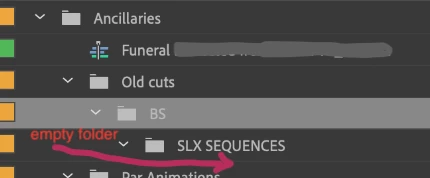
Normally, I would bring that folder into the appropriate MEDIA ONLY project and consolidate the clips, but since I can’t see what the media is, I can’t consolidate it into the correct bin.

So, I have to figure out how to reveal these “invisible” clips so I know where to drag them in, to then consolidate the dupes. Anyone have any suggestions?

3 replies

Known Participant
January 31, 2025

I find it absolutely ridiculous that it doesnt consolidate and automatically links to existing media but rather by default makes duplicate folders with hidden media. What an organizational mess and such a stupid thing which Adobe hasnt changed for years. Please stop developing AI tools that try to put the prosumer out of the picture and develop back end AI toold that can actually assist us, such as prep organizational etc. Nobody wants your auto editor bots. 


Kevin J. Monahan Jr.
Community Manager
Community Manager
January 31, 2025

Hello @lucyb91785867,

Thanks for the message. It sounds like you are experiencing the same issue as the OP. An engineering manager is on the thread, and has asked for a project file, so I believe the OP has gotten significant support from Adobe. The OP did not return to the thread to report on the solution, (or the lack of one). Unfortunately, we in Adobe Support have no control over the results of this investigation


If you are experiencing the problem the OP had, please give the team additional information. See: How do I write a bug report?


I hope the team can assist you after receiving more information. Sorry for the frustration.


Thanks,
Kevin


Kevin Monahan - Sr. Community and Engagement Strategist – Adobe Pro Video and Audio
Known Participant
February 1, 2025

I think the most useful piece of advice we prosumers can offer is that we are so way over having to spend our lives on forums for so many years getting over bugs on a software that and a system that continually stays outdated and continually rolls out with fresh issues that we have mostly given up even spending a second more of our time giving anymore to try to even explain where it all could be improved. I think its time for ADOBE to rethink the whole system and their prerogative. You either LISTEN to the professionals and incorporate them into the development of a new era or stop advertising that they even care. Please can someone file that compalint up to higher ups. Thanks for your time, but im over this platform, for years now. Plus its stupidly overpriced for a software that hasnt changed much in over a decade. We are all falling behind and its because we are stuck out of comfort in these outdated platforms.

Bruce Bullis
Community Manager
Community Manager
August 22, 2022

In the Project panel's context menu, enable "Show hidden". You should see something in those "empty" bins.

R Neil Haugen
Legend
August 22, 2022

Thanks for posting, Bruce ... and you know, I so rarely have anything 'hidden', I don't think of that as something to check when weird stuff ... stuffs. Probably should at times ...


Neil

Everyone's mileage always varies ...
ohmypro
ohmyproAuthor
Known Participant
August 23, 2022

I appreciate the effort, but alas, it does not solve the problem.  Nothing appears in the empty bins.

R Neil Haugen
Legend
August 22, 2022

I"ve heard one other user have this, and that was awhile back. I can't remember what the issue was. It might have something to do with nested sequences ... ? Something.


Maybe @Bruce Bullis can help ... please, Obi Wan, you're our only hope!


Neil

Everyone's mileage always varies ...