
Maestro666
Participating Frequently
December 12, 2017
Answered

Encore BluRay menu [button] size issues

  • December 12, 2017
  • 2 replies
  • 782 views

Hello,

Can someone please help me figure out what's going wrong here?

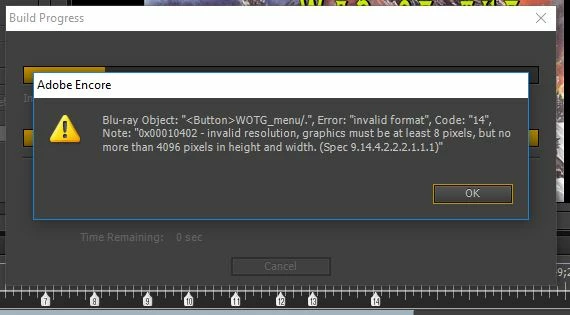
I have authored 10 BluRay discs in Adobe Encore over the last year with no issues. But today, when I had my project ready to Build and burn, Encore made a little window pop up saying something about the menu image size (????) I've done nothing different then all the other times I've made menus but today this kept happening.

I tried changing the size of the image I am using as a menu (still menu, not motion) and the same thing keeps happening.
I've included a screen cap of what it's saying. Can anyone help in fixing this?

Thanks!
This topic has been closed for replies.
Correct answer Stan Jones

Code 14, "invalid format" are a collection of errors that vary based on the content of the "Note."

I found only one other example of  your form of the error ("Note: 0x00010402   invalid resolution, graphics must be at least 8 pixels but no more than 4096 pixels in height and width  Spec  9.14.4.2.2.2.1.1.1").

The solution was not clear in my opinion.

First, what is the name of your object? Is there a button named "WOTG_menu/"? Or is that a menu name, etc.?

Tell us more about the menu.

Issues can be naming, background image of menu, button pixel size (increasing button pixel size may help).

2 replies

Stan Jones
Community Expert
Stan JonesCommunity ExpertCorrect answer
Community Expert
December 12, 2017

Code 14, "invalid format" are a collection of errors that vary based on the content of the "Note."

I found only one other example of  your form of the error ("Note: 0x00010402   invalid resolution, graphics must be at least 8 pixels but no more than 4096 pixels in height and width  Spec  9.14.4.2.2.2.1.1.1").

The solution was not clear in my opinion.

First, what is the name of your object? Is there a button named "WOTG_menu/"? Or is that a menu name, etc.?

Tell us more about the menu.

Issues can be naming, background image of menu, button pixel size (increasing button pixel size may help).

John T Smith
Community Expert
Community Expert
December 12, 2017

I only do DVD, but that message looks like you have a bad button, not the menu itself

Maestro666
Participating Frequently
December 12, 2017

@John T Smith

You were correct! I had a small button which I was using for an "easter egg" and that was what was causing the issue. I made that button just a little larger and presto! Bluray went through the building process and burned perfectly! Thanks!