Inspiring
November 22, 2022
Answered

Encore CS6: Blu-ray build error 13: <button> invalid duration

  • November 22, 2022
  • 2 replies
  • 1527 views

I haven't used Encore for a while but was called upon to create a DVD and Blu-ray. I'm hoping there might still be some users out there with some insight into my issue. I can't fidn any reference to this error online.

My project has one timeline with multiple chapters of a dance performance. There's a main menu, chapter selection menu, performer bio menu, and a menu with info about the dance studio. The first three menus have motion backgrounds and their buttons all have a 2 second transition.

I built a DVD without issue, but the Blu-ray is failing (I'm using exactly the same project). After transcoding and importing assetss the build dialog shows the following error:
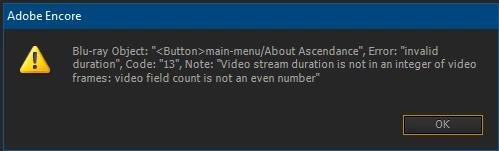
I went to the menu stated in the error and removed that button, but got a similar error referencing a different button on a different menu. All the buttons on every menu are the same style: a text layer with a single highlight. I tried removing the motion backgrounds, and that didn't help.

Removing the transitions did allow me to build successfully. I see in the Help that transitions are not supported for pop-up menus, but mine are normal menus.


Are button transitions not supported for normal menus either?


This topic has been closed for replies.
Correct answer GOTGALLOWS

That did the trick!

Using untranscoded files for the motion backgrounds and transitions and setting Encore to transcode them allowed me to build succesfully.

I wonder if because Encore is so old it doesn't work well with files transcoded with a much newer version of the h264/Blu-ray presets.

Anyway, I'm happy to have it working.

Thanks everyone for chiming in.

2 replies

Stan Jones
Community Expert
Community Expert
November 22, 2022

I do not find in my notes any other report of this error re a button. The error is  being applied to a button object (not the menu), so it makes sense that the motion background is not the issue but the transition.


I would assume that the duration of the transition video is off by one frame - just as the error says, it must be even fields.


Have you looked at the transition video? Can you tell if Encore is transcoding it?


Stan


Inspiring
November 23, 2022

Thanks Stan.


The transition and motion bg videos were exported from AE using media encoder and the h264/Blu-ray preset. They are m4v files with no accompanying sound. The transitions are exactly 2 seconds 0 frames and the menu bgs are 20 seconds and 0 frames.


They are set to "Don't Transcode" in Encore. I'll try creating AVIs for them and let Encore encode to see if that helps.

Stan Jones
Community Expert
Community Expert
November 23, 2022

Hmm. Fields vs frames as an issue? And there is always the odd  Encore bug.


In any event, I like trying to let Encore transcode it.


You'd have other issues if this matters, but BD's always needed Encore being run "as administrator." Can't hurt.


Let us know.


Stan


Averdahl
Community Expert
Community Expert
November 22, 2022
quote

...but the Blu-ray is failing (I'm using exactly the same project).


By @GOTGALLOWS


The problem is probably just that, iow that you use the same project. Use one project for the DVD and a new one for the Blu-ray, ideally with HD menues, HD media and HD transitions instead of the SD material.

Inspiring
November 22, 2022

Thanks Averdahl, but I don't think that is the issue. All my menu and transition assets are FHD (1920x1080). Video assets were exported from AE/ME using the H24/Blu-ray preset.

Averdahl
Community Expert
Community Expert
November 22, 2022
quote

Thanks Averdahl, but I don't think that is the issue.


By @GOTGALLOWS


So if you create a new project you get the very same error message?


Trying to find/fix issues in existing projects has been and is still doomed to fail. It is much quicker and easier to create a new Blu-ray project.