


Participant
March 21, 2024
Answered

Enhance speech downloading 0%

  • March 21, 2024
  • 11 replies
  • 10748 views

HI all,


enhance speech seems not working. It just stays stuck in 0% downloading. 


I also tried to apply enhancing in a just a few seconds clip, but still no result. 


After the final update, it just never worked.


Finally i tried a few things i read in some other posts, but nothing.
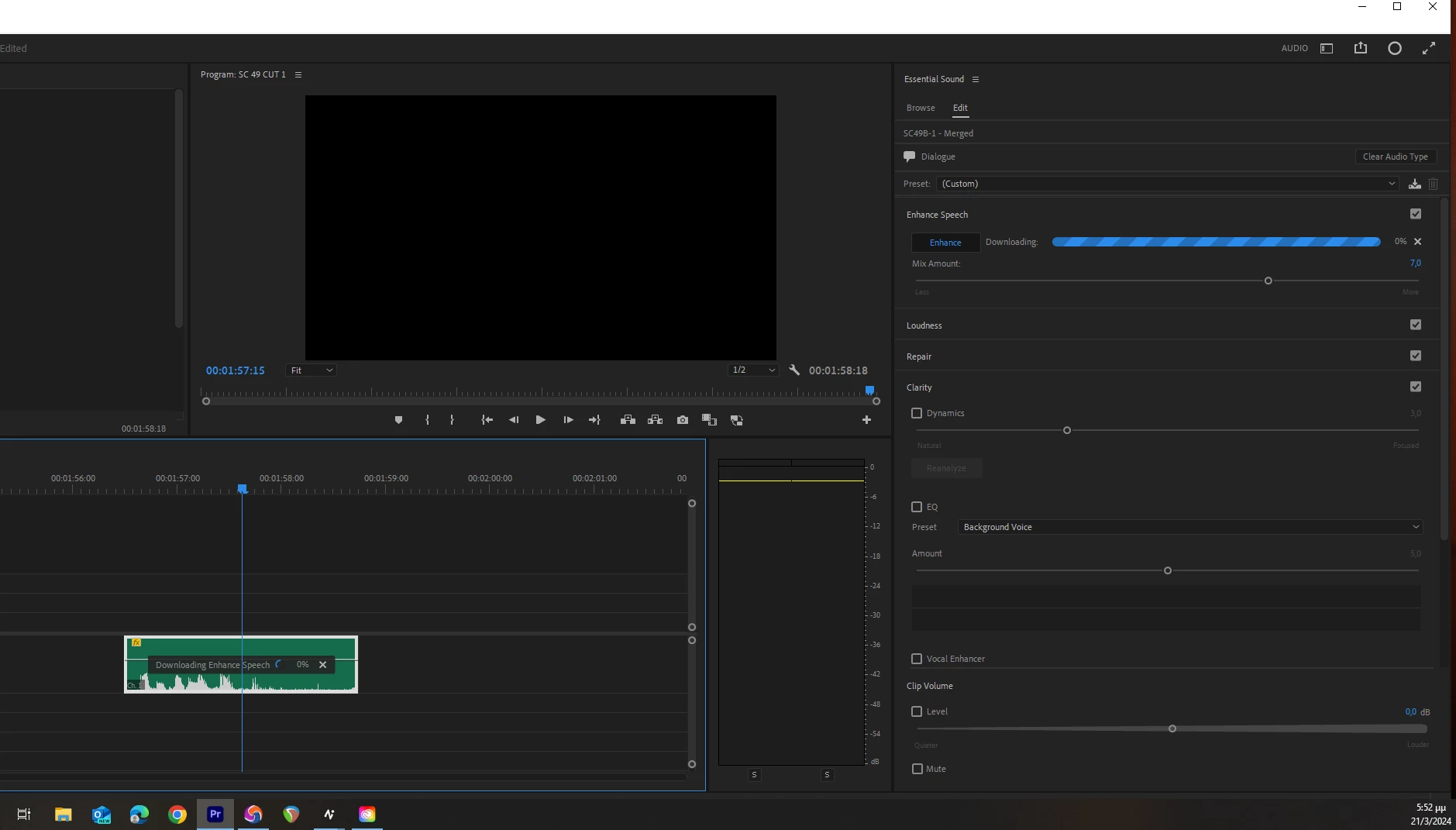


Correct answer mattchristensen

@gpentezid Creative Cloud desktop application manages the downloading of the Enhance Speech component and it looks like something is getting stuck there. If you quit Premiere Pro, open the Creative Cloud app, and navigate to show all installed apps you should be able to find Premiere Pro and clicke the "..." button and find "Add-ons". Opening that up, do you see Enhance Speech there? Can you try cancelling and re-starting the download there?

11 replies

Participant
October 16, 2024

I'm having the same issue. Sonoma 14.6.1 on a Mac Pro and Premiere 2025, latest release

Songket
Participant
October 11, 2024

Also experiencing this problem on Monterey 12.1 and PremierPro 24.6.1, tried suggested remove and re-install  via Creative Cloud with no positive result.

It is now October 11th 2024. Any fix in sight??

Participant
July 22, 2024

I've had this issue since the update pushed out. Installing the add on fixed it. 

Participant
May 22, 2024

when i update my macos from mojave  to sonoma. its solved. try this

Participant
May 16, 2024

I am having this issue too. 😞

Participant
May 15, 2024

tried multiple time and having the same issue
i also tried to connect with an adobe customer care but they don't have any clue regarding this bug.
that guy even told me that your professional recorder audio clips won't work with this feature.

Participant
May 4, 2024

i am having the same problem. I removed an added the add on but nothing changed. I'm running premier pro on a macOS Monterey version 12.6. MacBook Pro M1 16-inch with 32 go if ram.


it was running well when I tried it but it got stuck at 82% so I canceled then tried again. After that it stayed at 0% every time I tried. I would close out the project or make a new project but it would do the same thing on both.


i used it on a file with an .m4a (I don't know what that is. It actually just worked as I typed this. I added an mp3 to test it but once I droped it in from finder the progress bar started to move and completed in 2 seconds.

Participant
April 30, 2024

I do have the same issue. Deleted and uninstalled the add on in the Cloud app but it is still not working.

Kevin-Monahan
Community Manager
Community Manager
March 22, 2024

Hi Community,

Can anyone reproduce this error? Is there someone else seeing the bug that @gpentezid is having? Please let the team know.


Thanks,
Kevin

Kevin Monahan - Sr. Community & Engagement Strategist – Pro Video and Audio
Participant
December 18, 2024

I'm having the same issue.  Tried canceling in creative cloud. restarting PC.  check firewalls.  No change download stuck at 0%

gpentezidAuthor
Participant
March 22, 2024

You are absolutely right, i didn't even now i have to install the add-on.


Thank you.
