


Participant
July 14, 2026
Answered

Error 808004 - Unable to use certain Transitions

  • July 14, 2026
  • 9 replies
  • 69 views

I‘m not sure how to address this error.

For starters, I am editing a vlog and the footage was shot on my iPhone 16 Pro Max, in 4K 30. Typically I keep my transitions simple with dissolves and fades. However, this keep popping up:
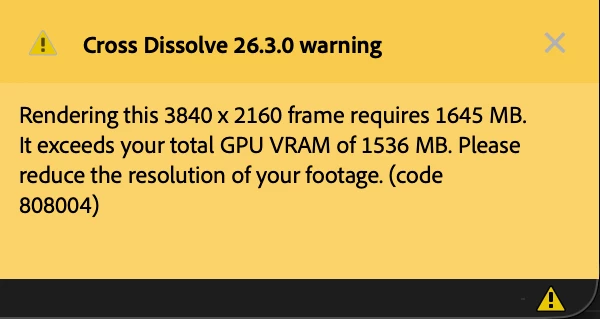
 

I understand that I could change the sequence settings to match 1080p, but, I have two concerns:

  • I recently updated to the new version of Premiere. But, I never encountered this error before with the previous versions of Adobe Premiere.
  • If I change my sequence settings to 1080 (though it was shot in 4K), wouldn’t this reduce my quality in some way?

If anyone has any suggestions or solutions for me please let me know.


Thank you!


Note: OS - Mac

Correct answer caroline_edits

@ayanna.verser Great, thanks for the details!

This GPU in your machine has 1536MB of graphics memory (or VRAM). In the error message, it tells us that rendering 3840x2160 footage requires 1645MB of VRAM. 

  • Do you have any other effects on that clip? (EDIT: I see you answered this in another comment)
  • If you change your sequence settings to 1920x1080 does it allow you to render it?

To change your sequence settings, select your timeline, then use the toolbar at the top to go to Sequence > Sequence Settings and reduce the Frame Size. That should stop this error message from appearing.

Let us know if reducing the frame size helps.

Caroline

9 replies

Community Expert
July 16, 2026

Do you have any effects on the footage that you are applying the Cross Dissolve to?

Participant
July 16, 2026

Nope. Other than trying to add the cross dissolve, I have no other effects. I tried to use other ones but that isn’t work out either :/

Community Manager
July 14, 2026

Hi,

Looks like you have an older Mac with a GPU that is no longer supported. Can we get full details of your Mac? I hope we can assist you.


Thanks,
Kevin

Participant
July 16, 2026

Hello! What all do you need to know?

Thank you!

caroline_edits
Community Manager
Community Manager
July 16, 2026

The error message says that your GPU’s processing power (VRAM) is being exceeded, so we’re curious what GPU is in your Mac. You can see this information by looking at the very top left of your screen to see the Apple logo. Select it, and select About This Mac to see your full details. 

Feel free to share a screenshot, or share the specific details:

  • Chip/CPU
  • Memory
  • Graphics
  • macOS

That might help us give you a more specific diagnosis of the issue. PaulMurphy also made a good point – if your clip has other effects on it, that might be what’s causing the GPU to exceed its own limits.

Let us know about the effects, and the system details!

Caroline