
Participant
October 11, 2020
Question

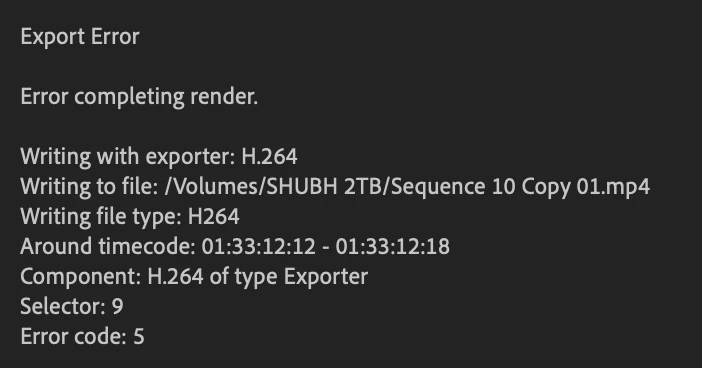
Error Code 5 while exporting sequence

  • October 11, 2020
  • 2 replies
  • 337 views

I have been constantly getting this error when I try to export my sequence. It is a 200-minute long sequence and I have checked that time frame for potential errors and could not find anything. I have tried 'Mercury playback engine software only' and 'gpu accelerated (metal)' as renderers. 
 

This topic has been closed for replies.

2 replies

Legend
October 12, 2020

you could try smart rendering.  in your sequence settings change the preview format to a high quality format like prores 422(HQ) and render the entire sequence.  Play the entire sequence back and see if everything seems kosher (the technical term) then export with "use previews" checked.  

Participant
October 12, 2020

Hey, thanks for the suggestion. I tried this multiple times and am always getting this error: 

Not sure what's going on with it. I checked the space in my harddrive and there's more than 1TB of space so I don't think that's the issue, can't get my head around what else is causing it. 


Legend
October 12, 2020

 you should be able to pinpoint the problem where the render fails.  If you remove the clip at the point, does everything else render?  Then it's possible the clip is corrupt.  Try exporting the clip by itself to a high quality format like prores422 HQ and then replace it in the timeline.  Also possible the sequence is corrupt so might be an idea to create a new sequence and copy and paste everything from the problematic sequence.  

R Neil Haugen
Legend
October 11, 2020

What is going on in that sequence at the timecode given? Have you checked that area of the sequence?


Neil

Everyone's mileage always varies ...
Participant
October 12, 2020

Hi Neil, 

Yes, I did check, there wasn't anything alarming. No effects or edits its a simple clip like most others in the sequence.