jameso91528272
Participant
April 12, 2018
Question

Error compiling movie.

  • April 12, 2018
  • 4 replies
  • 850 views

I've been using this program for years and all of a sudden, I'm getting the follow error when trying to render in to out.
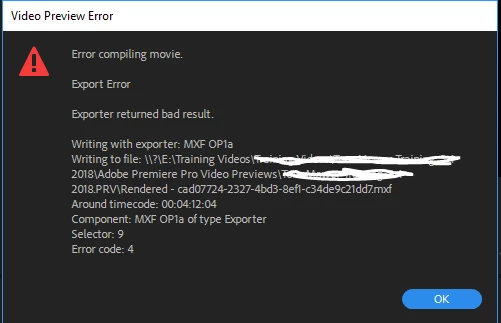
I am also getting failures upon trying to render in Media Encoder. I have tried re-starting, re-booting, starting over in the project and clearing cache with no luck.

    This topic has been closed for replies.

    4 replies

    Kevin J. Monahan Jr.
    Legend
    May 17, 2018

    JamesO,

    Replace and/or rerender the clip at 4:12:04. Does it work now? Let us know.

    Thanks,
    Kevin

    Kevin Monahan - Sr. Community and Engagement Strategist – Adobe Pro Video and Audio
    Community Expert
    April 12, 2018

    GPU accelerated rendering is not working.

    It happens with me sometimes, I just restart Premiere or the system and it works again.

    If the problem persists, check your GPU card status and/or any possible updates

    as far as I had same experiences.

    + the render previews clean your media cache

    My advice but of course Vinay knows better

    Vinay Dwivedi
    Adobe Employee
    Adobe Employee
    April 12, 2018

    Project Settings>General>Renderer.

    jameso91528272
    Participant
    April 12, 2018

    It's not giving me the option to change anything.

    Vinay Dwivedi
    Adobe Employee
    Adobe Employee
    April 12, 2018

    WHat is the Graphics card installed on the machine.

    On Windows go to Device Manager>Display Adapters

    On MAC go to Apple Menu>About this MAC.

    //Vinay

    Vinay Dwivedi
    Adobe Employee
    Adobe Employee
    April 12, 2018

    Hi James,

    Try to check "Use Previews" option in Export window to see the results.

    If, the above step doesn't work, try deleting the rendered files from Premiere Pro Sequence menu>Delete all rendered files. Render them again if you wish and then try export.

    If step 2 fails, go to File menu>General and switch the renderer to Software only mode. Delete Previews if you get a prompt.

    //Vinay

    jameso91528272
    Participant
    April 12, 2018

    Thank you Vinay. I tried everything to no avail. "Use Previews" didn't work. I deleted all rendered files and all rendered in to out files.

    Can you please tell me where I find the area to switch to Software only mode?

    James