



JoannaG
Participant
May 1, 2026
Answered

Error compiling movie.

  • May 1, 2026
  • 2 replies
  • 33 views

Can someone please help me with this error code below. I am beginning to think that my entire project file is corrupted and I have no idea how else to fix this issue. I will list the things I did below that I tried to resolve this issue. I currently have Premiere 25.6.5 installed. Two things happen when I try to do the following, the error message or it just straight up crash. Adobe took away the ability to switch renderers so now that option is greyed out and there is no way to select software rendering. Everytime I press okay on the error window, the program window will just be black but it will still play the video.

  1. Restarted my computer multiple times
  2. full shut down multiple times
  3. Reinstalled premiere
  4. installed version 25.0
  5. installed version 26.0.2
  6. exported through Media Encoder
  7. updated computer
  8. updated graphics card
  9. copy/pasted timeline in another premiere file
  10. Render in and out before exporting
  11. deleted video and broll and tried exporting just audio
  12. tried exporting another sequence in the project
  13. opened different auto-saves 
  14. Deleted media cache

I feel like I’ve run out of options and I don’t know what else to do. I included a screenshot below. 
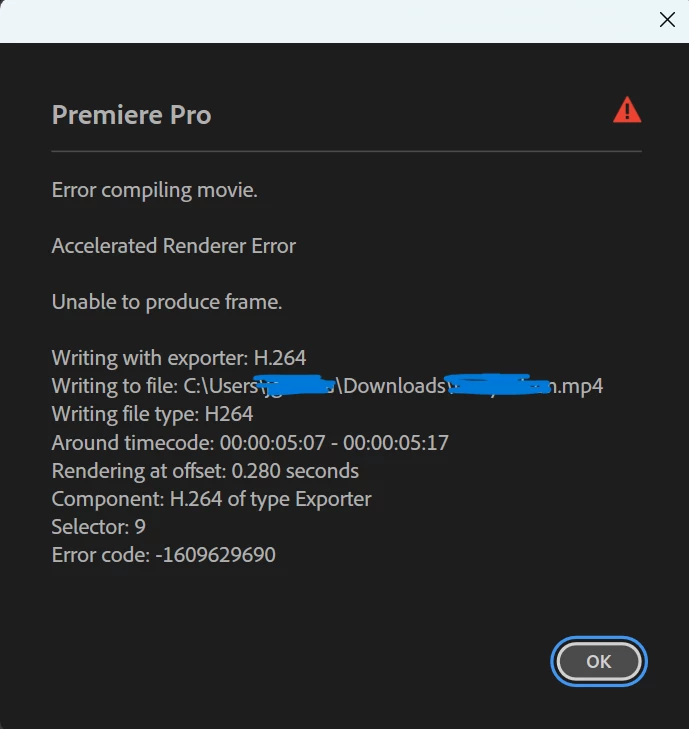
scratched out personal identifiers 

PC system about
Storage 1TB 
Graphics Card NVIDIA 4070 12 GB
RAM 32.0 GB
Processor intel i9
Windows 11 version 25H2

    Correct answer JoannaG

    I posted on Adobe discord and someone answered with such a simple answer. Exporting in ProRes.🤦🏽Premiere Pro for Dummies anyone? (for me actually) I just had to reflavor it in Media Encoder after because it had to be embedded in a powerpoint. 

    2 replies

    JoannaG
    JoannaGAuthor
    Participant
    May 1, 2026

    Hi I forgot to add those steps in that site you linked, in my list of my original post. I tried these steps and it did not work for me. I tried Enabling hardware accelerated decoding which did not work. I’ve also tried different export presets that did not work. As I have said in my original post as well, on 6. exported through Media Encoder which also did not work. I also said that choosing a renderer is not possible because it is greyed out because from what I have been reading in other forums, Adobe took this option out. Holding shift while the program starts does not give me any options as well. 


    JoannaG
    JoannaGAuthorCorrect answer
    Participant
    May 1, 2026

    I posted on Adobe discord and someone answered with such a simple answer. Exporting in ProRes.🤦🏽Premiere Pro for Dummies anyone? (for me actually) I just had to reflavor it in Media Encoder after because it had to be embedded in a powerpoint.