
Participant
July 6, 2016
Answered

Error compiling movie error code -1609629695

  • July 6, 2016
  • 58 replies
  • 79744 views

My System:

Windows 7 ultimate 64bit

Premiere CC2015.3

Graphics Adapter Nvidia Geforce GTX 980

All Drivers and apps updated


Exporting large Premiere projects (Duration appx. 1 hour) with Mercury engine activated don't cause any problem in 2K and 4K as well. But after I have replaced my original Mercalli stabilizer effects by Adobe Warp stabilizer I get the following error Information:
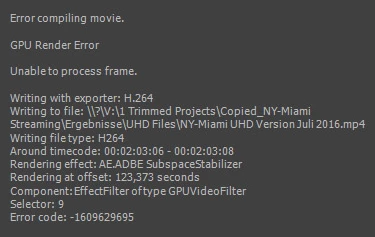
 

Deactivating GPU Support yields excellent results in terribly long time. I am surprised that the error doesn' occur at the  appearance of the first Warp effect but some Warps later.

I found several complaints with respect to "compiling movie error" but none with direct relation to Warp.

Can you help me?

This topic has been closed for replies.
Correct answer Ingkris

Das Problem ist - zumindest für meine Projekte - jetzt gelöst. Seit dem neuesten Update von Premiere CC und Media Encoder tritt der Fehler nicht mehr auf.

58 replies

Kevin-Monahan
Community Manager
Community Manager
June 15, 2020

One Simple Troubleshooting Step Hitting this Common Error

Don't even think about running either Chrome or Spotify while attempting to export. That reduces VRAM, which you often need while exporting. That is, unless you have a GPU with an absurd amount of VRAM - even so....


Thanks,
Kevin

Kevin Monahan - Sr. Community and Engagement Strategist – Adobe Pro Video and Audio
Participant
November 9, 2019

I am having the same problem, everything is updated and current.  My machine is only 2 years old and now my whole channel is on hold.  I'm paying for this to work!  PLEASE HELP ME!

Kevin-Monahan
Community Manager
Community Manager
June 15, 2020

Did you ever end up solving this one, commonstyle? Hope you did. If so, what did you end up doing, if you don't mind me asking?


Thanks,

Kevin

Kevin Monahan - Sr. Community and Engagement Strategist – Adobe Pro Video and Audio
Participant
May 27, 2019

I am continuing to get the error code: 1609629695

I am rendering a 360 video with the plane to sphere effect.  It crashes randomly and does not appear to crash at a specific time code.

Error is:

------------------------------------------------------------

- Encoding Time: 03:56:41

05/27/2019 12:55:06 PM : Encoding Failed

------------------------------------------------------------

Export Error

Error compiling movie.

Accelerated Renderer Error

Unable to produce frame.

Writing with exporter: H.264

Writing to file: \\?\...................Comp 2.mp4

Writing file type: H264

Around timecode: 00;04;42;21 - 00;04;43;00

Rendering at offset: 282.716 seconds

Component: H.264 of type Exporter

Selector: 9

Error code: -1609629695

I'm running

i9-9900K CUP at 3.60GHz  with 64GB ram

SSD Hard Drive containing all project files.

Nvidia GeForce GTX 680 Driver Version 430.86

Comp is H.264 at 4096x2048

Effects used are: Skybox Plane to Sphere

I've tried CUDA, OpenCL, and Software Only.  It continues to crash randomly.

Do I need a new graphics card?

Kevin-Monahan
Community Manager
Community Manager
June 15, 2020

Probaby not enough VRAM to cache the frame due to its scale. I recommend more VRAM for your GPU or render out in "Software Only" mode.

Kevin Monahan - Sr. Community and Engagement Strategist – Adobe Pro Video and Audio
Participant
April 1, 2019

STILL AN ISSUE IN MID 2019.

I finished my film a month ago (spent 4 months making) to be my main portfolio piece applying to jobs. I've been on at least 30+ hours of support calls with roundabout troubleshooting.

In what world are we paying for a professional video editing application where you cannot complete your videos?

Will create a comprehensive guide on how to fix the issue if mine ever gets fixed.

Kevin-Monahan
Community Manager
Community Manager
June 15, 2020

How did you end up solving this, Alex? Sorry for the trouble.

Thanks,
Kevin

Kevin Monahan - Sr. Community and Engagement Strategist – Adobe Pro Video and Audio
turkey90
Participant
March 31, 2019

You get such an error when there is a problem in any image between the images you want to be rendered. During the rendering process, you can see where an error has occurred and check the images at that time.

Lilimeh
Participant
November 23, 2018

I had the same problem, I tried several things but nothing worked (restarted computer, turned off GPU acceleration, etc...)

I wanted to export a project that was using expressions in English but as I usually use After Effects in French, I had to force AE to open in English (adding the file ae_force_english.txt in My Documents folder)... Just because I couldn't be bothered translating all the expressions in my AE project.

I opened AE in French as usual, and took the time to translate all expressions. Now it works, I could export my project in Media Encoder without any problem - I used "Mercury Software only", though. I should try with GPU acceleration to see if it works too.

What I don't understand is that I used to export that very same project with AE in English and I did not encounter any problem. I don't get why now it doesnt work anymore!

Inspiring
August 31, 2018

How the — is this STILL  a SERIOUS widespread problem 2 YEARS LATER!???

September 8, 2018

im pissed too!


I bought a new GTX 1080 Ti for 600€ (700 Bucks) and still the same ‚— Problem. Adobe dont put it on the user! Its your Software thats not working....


Mod Note: Please avoid profanity. We have minors reading here.

Kibrit Creative Solutions
Participant
September 24, 2018

I had a pain along 2 days about rendering my Animation out.

I searched alot but none of them worked for me.

what I did and did not work for me

1- Turn of GPU rendering : does not work

2- Turn of Lumetri : No it did not help neighter.


I was using tga pictures which is rendered out via 3D Studio Max, I finnaly noticed that one of TGA file between frames broken.

I had to create same frame again with photoshop.

soo whereever you get error, pleease check your files are they safe or not.

sincerely


Hüseyin Durak

Participant
August 21, 2018

Also having this exact problem, nothing here has worked for me. The lack of support from Adobe is a downright disgrace considering this has been an ongoing issue for TWO YEARS, and not once have they given any advice on how to solve it. The software we are paying for is rendered UNUSABLE by this bug, and there is seemingly no recourse for those effected.

Inspiring
August 29, 2018

Beyond infuriating. Have a project that worked just fine a few weeks ago. Now i can't get half of the sequences to render out. None of the 'workarounds' fix it. I've tried them all. I have to start from scratch when this happens most times. That's hours upon hours of lost time. Can I send a bill to adobe for lost man hours?

Perhaps instead of adding more garbage features on top of things, just fix your software adobe.

Oh look at that. Another render just failed. Yippy!

Kevin-Monahan
Community Manager
Community Manager
June 15, 2020

L.A.P.
Sorry. It is extremely difficult to troubleshoot this error with no info. Please give us full details of your issue. Hope you have already solved this on your own.


Thanks,
Kevin

Kevin Monahan - Sr. Community and Engagement Strategist – Adobe Pro Video and Audio
Participant
August 19, 2018

EDIT: This ended up failing as well.... So ignore this.

I had this error several times from after effects to media encoder. I rendered it via After effects and gave me a folder error saying my folder path didn't exist. Somehow the system was attempting to grab an old file path - I actually have no idea how it happened. But then I went back to media encoder and changed the file path destination and it totally worked fine.

So my recommendation is to check your folder path - maybe try a different destination. I wonder if this error is just the same error over and over again but the symptoms are completely unique. Error is just a generic failure.

OSX El Capitan 10.11.6

16 GB RAM

NVIDIA 750M

Participant
July 31, 2018

Ditto here with 1609629695 when transcoding using Premiere Pro CC 2018 Version 12.1.2 Build 69.  Dell XPS 8300 PC, i7-2600 CPU at 3.4GHz 4 Core32GB, , Windows 10.0.17134 Build 177134 x64 bit, Nvidia GeForce GTX 780 Ti Driver 398.36 rendering to 2TB Samsung 850 EVO SSD.

Solution - discovered track index references in Premiere Pro were corrupted during transcode/render as though files were no longer available on device (5 Panasonic FZ200 1980x1080 files stored on 4TB USB-3 Lacie files), despite PP timeline properties appearing fine:

File Path: L:\Rotary\Club Meetings\072618 Third Meeting\Lumix FZ200\00000.MTS

Type: MPEG Movie

File Size: 4.00 GB

Image Size: 1920 x 1080

Frame Rate: 59.94

Source Audio Format: 48000 Hz - compressed - Stereo

Project Audio Format: 48000 Hz - 32 bit floating point - Stereo

Total Duration: 00:20:25:31

Pixel Aspect Ratio: 1.0

Video Codec Type: AVCHD H.264 4:2:0

While the files were certainly on the drive, PP Sequence timeline would not recognize the video files after 1609629695 error, despite trying to delete the track files and re-importing them, restarting PP, rebooting PC, etc.  Incidentally, earlier on one occasion I tried applying Warp Stabilizer on a track but after receiving the typical sequence timeline encoding mismatch error I undid it by rolling back the filter.  Judging by others problems I read here, I wonder if a bug in Warp Stabilizer caused a program overrun error to corrupt the track.

Finally, after running out of ideas, I copied the other tracks to a new sequence/timeline and manually re-entered the Panasonic Lumix FZ100 files on the timeline, requiring several hours since it was a 2 camera shoot and separate audio recording (with another track/layer for PNG, JPG and Title slides.  Rendering then worked flawlessly so apparently the original Premiere Pro render corrupted the timeline link to Panasonic FZ100 files.  And rather than start over, the best resolution was to:

- make a copy of the existing sequence to a new timeline sequence in the same project

- remove the (single combined) track

- rename the new sequence to avoid confusion

- copy the working tracks over to a new timeline sequence

- manually lay down the video files again on the new sequence timeline.

Participant
August 4, 2018

I am also effected by this error. Here are my logs:

- Encoding Time: 00:07:30

08/03/2018 08:33:47 PM : Encoding Failed

------------------------------------------------------------

Export Error

Error compiling movie.

Render Error

Render returned error.

Writing with exporter: H.264

Writing to file: \\?\D:\media\projects\wedding\weddingpromo\wedding-promo_AME\wedding-promo_1.mp4

Writing file type: H264

Around timecode: 00;00;30;18 - 00;00;31;12

Rendering at offset: 30.631 seconds

Component: H.264 of type Exporter

Selector: 9

Error code: -1609629695

------------------------------------------------------------

- Encoding Time: 00:02:03

08/03/2018 08:37:55 PM : Encoding Failed

------------------------------------------------------------

Export Error

Error compiling movie.

Render Error

Render returned error.

Writing with exporter: H.264

Writing to file: \\?\D:\media\projects\wedding\weddingpromo\wedding-promo_AME\wedding-promo_2.mp4

Writing file type: H264

Around timecode: 00;00;12;15 - 00;00;13;09

Rendering at offset: 12.512 seconds

Component: H.264 of type Exporter

Selector: 9

Error code: -1609629695

------------------------------------------------------------

- Encoding Time: 00:02:06

08/03/2018 08:40:27 PM : Encoding Failed

------------------------------------------------------------

Export Error

Error compiling movie.

Render Error

Render returned error.

Writing with exporter: H.264

Writing to file: \\?\D:\media\projects\wedding\weddingpromo\wedding-promo_AME\wedding-promo_3.mp4

Writing file type: H264

Around timecode: 00;00;12;15 - 00;00;13;09

Rendering at offset: 12.512 seconds

Component: H.264 of type Exporter

Selector: 9

Error code: -1609629695

------------------------------------------------------------

- Encoding Time: 00:02:07

08/03/2018 08:44:12 PM : Encoding Failed

------------------------------------------------------------

Export Error

Error compiling movie.

Render Error

Render returned error.

Writing with exporter: H.264

Writing to file: \\?\D:\media\projects\wedding\weddingpromo\wedding-promo_AME\wedding-promo.mp4

Writing file type: H264

Around timecode: 00;00;12;15 - 00;00;13;09

Rendering at offset: 12.512 seconds

Component: H.264 of type Exporter

Selector: 9

Error code: -1609629695

------------------------------------------------------------

- Encoding Time: 00:02:04

08/03/2018 08:46:49 PM : Encoding Failed

------------------------------------------------------------

Export Error

Error compiling movie.

Render Error

Render returned error.

Writing with exporter: H.264

Writing to file: \\?\D:\media\projects\wedding\weddingpromo\wedding-promo_AME\wedding-promo_1.mp4

Writing file type: H264

Around timecode: 00;00;12;15 - 00;00;13;09

Rendering at offset: 12.512 seconds

Component: H.264 of type Exporter

Selector: 9

Error code: -1609629695

------------------------------------------------------------

- Encoding Time: 00:01:56

08/03/2018 08:51:05 PM : Encoding Failed

------------------------------------------------------------

Export Error

Error compiling movie.

Render Error

Render returned error.

Writing with exporter: H.264

Writing to file: \\?\D:\media\projects\wedding\weddingpromo\wedding-promo_AME\wedding-promo_2.mp4

Writing file type: H264

Around timecode: 00;00;12;15 - 00;00;13;09

Rendering at offset: 12.512 seconds

Component: H.264 of type Exporter

Selector: 9

Error code: -1609629695

------------------------------------------------------------

- Encoding Time: 00:01:59

08/03/2018 08:53:37 PM : Encoding Failed

------------------------------------------------------------

Export Error

Error compiling movie.

Render Error

Render returned error.

Writing with exporter: H.264

Writing to file: \\?\D:\media\projects\wedding\weddingpromo\wedding-promo_AME\wedding-promo_3.mp4

Writing file type: H264

Around timecode: 00;00;12;15 - 00;00;13;09

Rendering at offset: 12.512 seconds

Component: H.264 of type Exporter

Selector: 9

Error code: -1609629695

------------------------------------------------------------

- Encoding Time: 00:02:03

08/03/2018 08:57:52 PM : Encoding Failed

------------------------------------------------------------

Export Error

Error compiling movie.

Render Error

Render returned error.

Writing with exporter: H.264

Writing to file: \\?\D:\media\projects\wedding\weddingpromo\wedding-promo_AME\wedding-promo_4.mp4

Writing file type: H264

Around timecode: 00;00;12;15 - 00;00;13;09

Rendering at offset: 12.512 seconds

Component: H.264 of type Exporter

Selector: 9

Error code: -1609629695

------------------------------------------------------------

- Encoding Time: 00:02:03

08/03/2018 08:57:52 PM : Encoding Failed

------------------------------------------------------------

Export Error

Error compiling movie.

Export Error

Error finishing encode.

Writing with exporter: H.264

Writing to file: \\?\D:\media\projects\wedding\weddingpromo\wedding-promo_AME\wedding-promo_3_1.mp4

Writing file type: H264

Around timecode: 00;00;12;15 - 00;00;13;09

Component: H.264 of type Exporter

Selector: 9

Error code: -2147287036

------------------------------------------------------------

Kevin-Monahan
Community Manager
Community Manager
June 15, 2020

Sorry, Nickolas. It is extremely difficult to troubleshoot this error with no info about your computer system. Please give us full details of your system, especially VRAM, sequence duration, and list of GPU accelerated effects. Hope you have already solved this on your own.


Thanks,
Kevin

Kevin Monahan - Sr. Community and Engagement Strategist – Adobe Pro Video and Audio