
Participant
July 6, 2016
Answered

Error compiling movie error code -1609629695

  • July 6, 2016
  • 58 replies
  • 79891 views

My System:

Windows 7 ultimate 64bit

Premiere CC2015.3

Graphics Adapter Nvidia Geforce GTX 980

All Drivers and apps updated


Exporting large Premiere projects (Duration appx. 1 hour) with Mercury engine activated don't cause any problem in 2K and 4K as well. But after I have replaced my original Mercalli stabilizer effects by Adobe Warp stabilizer I get the following error Information:
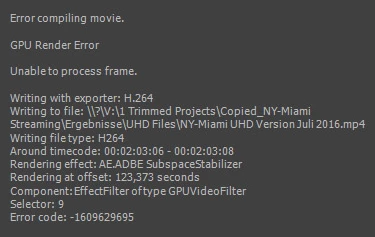
 

Deactivating GPU Support yields excellent results in terribly long time. I am surprised that the error doesn' occur at the  appearance of the first Warp effect but some Warps later.

I found several complaints with respect to "compiling movie error" but none with direct relation to Warp.

Can you help me?

This topic has been closed for replies.
Correct answer Ingkris

Das Problem ist - zumindest für meine Projekte - jetzt gelöst. Seit dem neuesten Update von Premiere CC und Media Encoder tritt der Fehler nicht mehr auf.

58 replies

Participant
December 1, 2016

Same issue here. Brand new install: Dell XPS 15, 32GB RAM, 960M, Windows 10 64-bit.

I am unable to render regardless if GPU CUDA acceleration is enabled or not.  I Transcoded all clips to GoPro Cineform and still same issue. It does not fail at the same point in the video each time but a majority of the time it stops where 2 clips are stacked on top of one another with opacity or blending modes being used.  This is a complete deal breaker. I am one week late on delivery of a wedding project. 
Preliminary testing shows 2015.3 will render but none of my adjustment layers (which are laden with custom transitions) survive export from 2017 to import back into 2015.  Its hours of work to recreate.  This is UNACCEPTABLE. 

Right now as I type this I am rendering from inside After Effects after doing a "Replace with After Effects Composition" of my whole sequence.  It has made it farther than I ever have (still 4 hours to go), however my transitions and adjustments didn't survive the link so would still have hours of work to do.  CC is far too expensive for this to be real. I still can't believe the sun has gone down so many times with this issue still existing.

Jason Leaver
Known Participant
November 30, 2016

I'm having the same problem. I had no issues yesterday. Nothing has changed on my system between yesterday and today.

bladeworxisr
Participant
November 12, 2016

So frustrating... i formated my comp (windows 10), installed al the drivers Nvidia Experience and  AMD...nothing helps

installed again premiere the newest 2017 CC...nothing helps...still get this message

Someone? Adobe?

Participant
August 10, 2016

I had the same problem and am not sure if you found the solution. I installed this Beta driver (linked below) from AMD and it seems to be working now. Hope this helps, if you still need it.

Workstation

Participant
August 2, 2016

Hi all, same error code during 2 days on a big project in DCI 4K with lot of adjustement layer (sharpening), warp stabilizer and time remapping but now it's solved : )

My hardware: MSI GT72 Dragon Edition laptop  with Nvidia GTX 980m 8go DDR5 / 32GB Ram / SSD M2 / Windows 10 (64 bit)

From what I see, we all use Nvidia cards with 64 bits OS and Premiere Pro CC 2015.3 here.

I try a lot of thing before I become crazy with this stupid error grrr ! But the solution for me was to update the Nvidia driver 368.81 WHQL for Windows 10 - 64 bit (release on 14 July 2016 Drivers | GeForce )

Hope it's help, let me know.

IngkrisAuthorCorrect answer
Participant
August 5, 2016

Das Problem ist - zumindest für meine Projekte - jetzt gelöst. Seit dem neuesten Update von Premiere CC und Media Encoder tritt der Fehler nicht mehr auf.

Participant
July 21, 2016

I'm having the same error appearing on my PC.  Windows 10 64Bit, 32GB Ram, Geforce GTX 780, using Premiere CC 2015.3

Participant
July 20, 2016

Hello,

I have the same Error message with Media Encoder : -1609629695, Selector 9.

In my case, I use the new Proxy workflow with 4K Media and I put my project on SSD Hard disk.

Thank you for any new infos about the solving of this bug...

Have e nice day

Valéry (from France)

Mylenium
Legend
July 7, 2016

Einfach System neu starten. Da läuft einfach der Grafikkartenspeicher voll. Das sind Bugs.

Mylenium

IngkrisAuthor
Participant
July 7, 2016

Hi Mylenium,

many thanks for your hint. But sorry - it does not work in my case. The error occurs again after I have shut down the computer, switched power off and on and restarted again. The error occurs exactly a the same spot in timeline where a Warp stabilizer effect is placed.

Wolfgang

Von: Mylenium

Gesendet: Donnerstag, 7. Juli 2016 07:06

An: Wolfgang Lincke

Betreff: Error compiling movie error code 1609629695

Error compiling movie error code 1609629695

created by Mylenium <https://forums.adobe.com/people/Mylenium> in Deutsche Foren - View the full discussion <https://forums.adobe.com/message/8861120#8861120>