
Participating Frequently
December 21, 2020
Question

Error compiling movie error code 3

  • December 21, 2020
  • 3 replies
  • 2306 views

Everything worked well until yesterday. I keep exporting the same layout of the video, everything that's changing is the video itself. The rest of the titles and intro and outro and so on it's the same. I have enough space on the HDD, I have installed, reinstalled the app and even the windows 10. I cannot get rid of this error when I use hardware encoding.
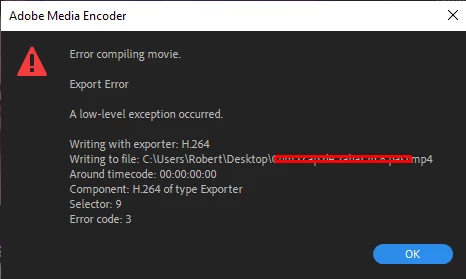
It worked before so I do not want to change to software encoding because it takes 3 times more to export a video so can anyone have any idea what should I do?

This topic has been closed for replies.

3 replies

Participant
February 8, 2024

Participant
February 8, 2024

Please solve my problem


Legend
February 8, 2024

please answer the questions I posed earlier in this thread.

Please tell us your system specs: OS version, Premiere version, amount of RAM, Hardware specs including graphics card and your source properties and sequence settings.


And was any material shot on a smartphone or screen recorder?  If so, the problem may be a variable frame rate clip


The error message notes a specific sequence timecode that's causing the problem.   Any clues there/


And you might try a smart rendering workflow

https://community.adobe.com/t5/premiere-pro-discussions/faq-what-is-smart-rendering/td-p/10648488


Legend
December 25, 2020

Please tell us your system specs: OS version, Premiere version, amount of RAM, Hardware specs including graphics card and your source properties and sequence settings.

Does your system meet minimum specs?

https://helpx.adobe.com/premiere-pro/system-requirements.html


Legend
December 25, 2020

and if your source is from a smartphone or a screen capture, you're probably have problems because of a variable frame rate.  Issues with vfr, are inconsistent and impossible to predict.  Here's how to tell if it is and if so, fix it

use mediainfo to determine whether your source is variable or constant frame rate
https://mediaarea.net/en/MediaInfo/Download
if it's variable use handbrake to convert to constant frame rate
https://handbrake.fr
and here's a tutorial on how to use handbrake
https://www.youtube.com/watch?time_continue=34&v=xlvxgVREX-Y

Participant
December 24, 2020

I'm also having this problem. I believe it is a software bug. I'm new to Premiere Pro and this is my first big movie. Trying to get it done in time for tonight. Anyone know how to report bugs to Adobe?