
jemaiy
Participant
June 24, 2016
Question

Error compiling movie - Import error - Importer returned bad result

  • June 24, 2016
  • 36 replies
  • 81564 views

I am trying to export a sequence (H.264 with youtube HD 1080 preset) where some of the clips have speed increase of 1200% applied to to them. I am trying to emulate a timelapse... I know there is something I am not considering here.

what i get as a message is : Error compiling movie - Import error - Importer returned bad result

see image bellow
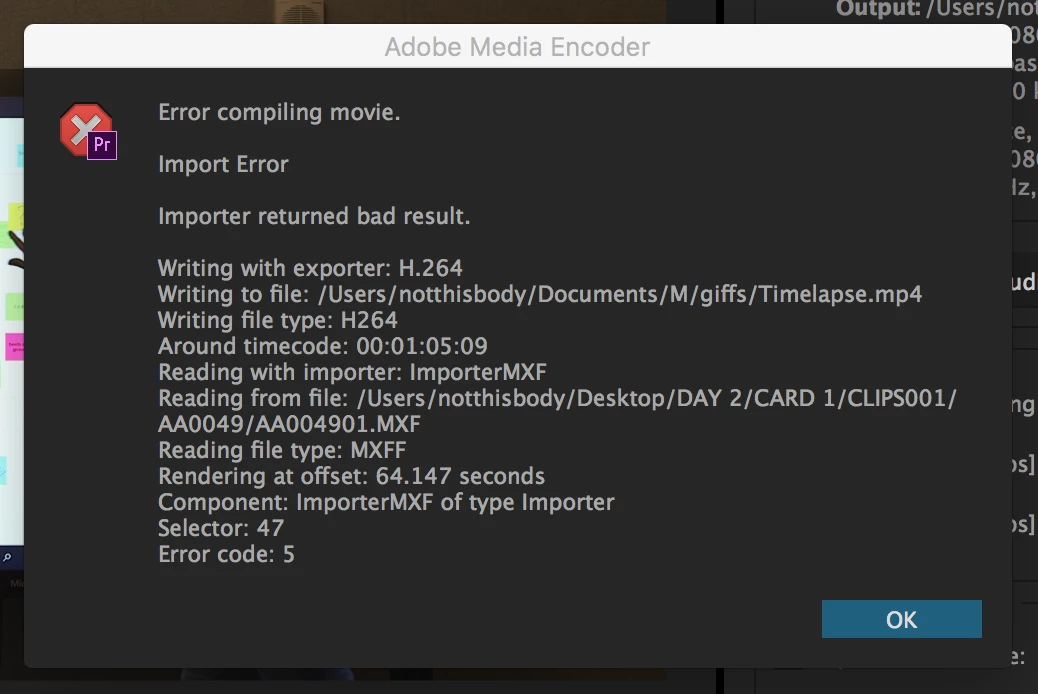
36 replies

Participant
March 2, 2018

I think I found a way to work around this issue. I duplicated the source file, renamed it, imported it into the project, and replaced the corrupt footage. Was able to render after that. Hopefully that helps!

Participant
February 28, 2018

Hello All,

I found my particular solution. The source video cannot exist in the same folder as the project itself. What I did was copy the footage (in windows) to another folder.

From there I used the locate media function and all my footage was found no problem. The video just finished rendering.

stefan_gru
Inspiring
February 28, 2018

Painya​: Can you please elaborate by what you mean by "another folder"? Was it a subfolder within the master project folder or did you place the footage somewhere outside the project folder — same or different drive? Etc. Test a few scenarios and see if you can reproduce the bug.

PetrPetr
Participant
February 20, 2018

The same problem here, I am really really really pissed. I dont have time to solve such stupid problems!!

Participant
February 16, 2018

I have the same problem. Nothing worked so far and the deadline is in 2h. Thx adobe. Might switch to davinci alltogether.

marty2015
Inspiring
February 13, 2018

I wasted half a day reading this thread. It's good to know i am not the only one having this issue. I've tried every method described. Nothing worked. Only this one: Start a new project and make everything again from scratch. This is indeed completely unacceptable, I would even call it a complete rip-off by adobe. Just like the program just crashing completely every time you change workspaces, this kind of stuff is driving professionals and amateurs away from the Adobe CC products at a fast pace.

Participant
January 16, 2018

None of this worked for me and this is a new issue for me. I updated to 2018 and all hell broke lose. What in the world Adobe??? I have been an editor for 20 years and have never seen such a stupid issue. Nothing is working. Nothing.

Participant
February 10, 2018

I am experiencing the same issues "Error code 99", please Adobe explain what this means!

I have tried removing various parts of the video, changing the path where I save it and what I call it, still comes back with Failed. Please can some one help me!

Participant
December 12, 2017

I just encountered this same error and for me the solution was to just change the export destination folder!

stefan_gru
Inspiring
December 12, 2017

Hi Judith: What change did you make to the export destination folder? Was it on the same drive or a different drive? Hopefully there's a difference in the folder destination that others can replicate.

Participant
December 13, 2017

I changed the export destination folder to the root of my external drive and that worked for me. The error occurred when I exported to a folder in a folder on that same drive.

milanb39594792
Participant
October 28, 2017

For some reason NOTHING i have read on this page works for me. I NEED HELP. i'm on the edge of — NOTHING WORKS (in other words i am really frustrated)


The scenario:


Yester day (27th of October) i renderd a video JUST FINE! Today, all i am trying is to render a MP4 file, with an PNG file on top of it... and it won't let me do it for some odd reason no one knows. it says it is the Compiling problem, but i have tried everything on this page, i also reistalled the programs multiple times, i tried (since it's such a simple project) to put it in after effects and render it there, nope didn't work... NOTHING... HELPS... and i do not know why.

Participating Frequently
October 17, 2017

So I closed an opened premiere: nothing. deleted preview folder: nothing. cut the one clip that didn't render: everything else works. undo the cut: crashes.

My solution: just delete the clip and get it the same way I originally did from the source, add the same effects back and move it to where it was before. Tedious, but worked.

Participant
October 8, 2017

Please help, I had tried so many ways but the problem is still existing.