
jemaiy
Participant
June 24, 2016
Question

Error compiling movie - Import error - Importer returned bad result

  • June 24, 2016
  • 36 replies
  • 81695 views

I am trying to export a sequence (H.264 with youtube HD 1080 preset) where some of the clips have speed increase of 1200% applied to to them. I am trying to emulate a timelapse... I know there is something I am not considering here.

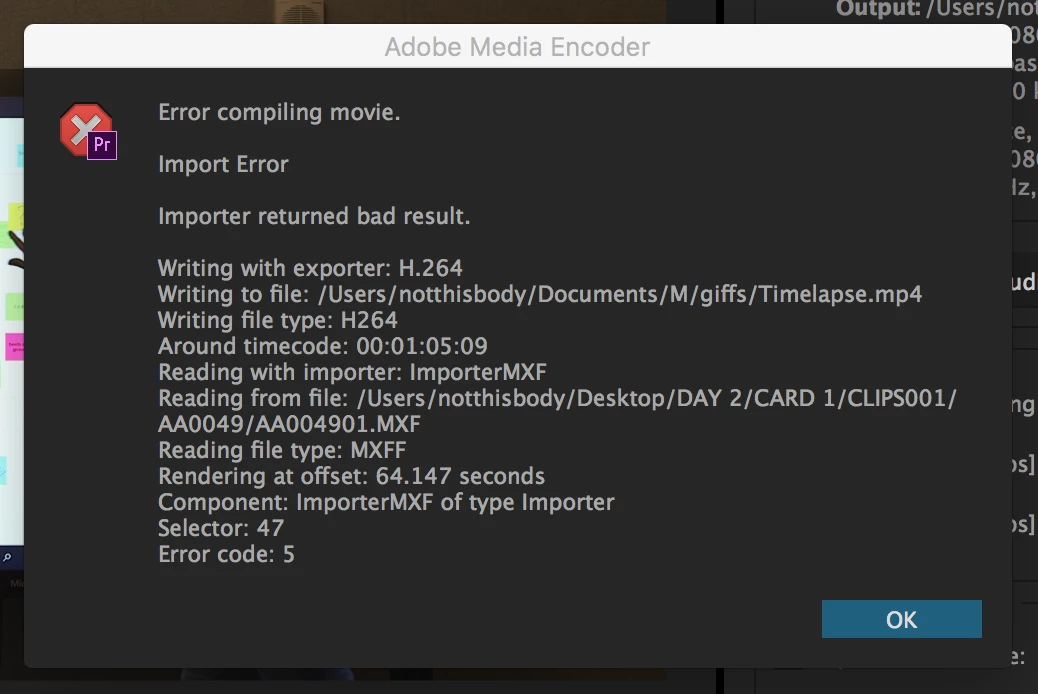
what i get as a message is : Error compiling movie - Import error - Importer returned bad result

see image bellow
36 replies

Participant
August 29, 2016

Hey guys,

I've been battling this same error message for most of the day, and I *think* I have come up with a solution - at least to the way this issue manifested for me.

The Problem:

To give a little background, I had been having no issues with this project during the edit. I was using proxies and it was going fine, but when I relinked to the RAW (RED R3Ds all at 4K or over) and tried to either render my timeline, or export, I was running into this error:

Export Error

Error compiling movie.

Import Error

Importer returned bad result.

Writing with exporter: H.264

Writing to file: [omitted]

Writing file type: H264

Around timecode: 01:00:04:23 - 01:00:05:23

Reading with importer: ImporterRED

Reading from file: E:\2016\FOR ESME - JUST YET\01_RAW FOOTAGE\RAW\CARD 01\A001_0606M1.RDM\A001_C005_0606CU.RDC\A001_C005_0606CU_001.R3D

Reading file type: R3D

Rendering at offset: 10.969 seconds

Component: ImporterRED of type Importer

Selector: 47

Error code: 5

Here are the things I tried that did not work:

- Duplicating the sequence

- Changing the preview file settings on the sequence

- Exporting to multiple codecs and wrappers

- Clearing the cache

- Clearing user settings

- Importing the sequence to a new project

- Updating Premiere

- Updating my graphics drivers

- Copying the entire project to my laptop and attempting it (and all of the above) from there

The fact that I was able to move the project to a laptop (and from Windows on my desktop, to Mac on my laptop) and still have the issue definitely pointed to a Premiere issue.

Solution/Workaround:

I started trying to render the timeline one clip at a time, and could not for the life of me understand why some clips would render and others wouldn't. Then I realized I'd been using Right-Click>"Scale to Frame Size" to scale my 4K media to the 1080p timeline. Turning that off and using "Set to Frame Size" instead seems to have fixed it! I can now render these clips on my timeline, so it's looking hopeful.

So if anyone is having this error and is working with scaled down footage, give this a shot!

Here are a few other things that worked for me, as a rougher workaround:

- Exporting to an uncompressed AVI had no problems

- Ditto rendering to a DNxHD .mxf file

- Nesting all the clips in the sequence also works for some reason.

These aren't great solutions, but if your main issue is just getting the damn thing OUT of Premiere they can be helpful.

Hope that helps!

alexandresiqueira
Participating Frequently
December 31, 2016

It solved my problem, thanks! I had 5-6 clips preventing the rendering and it worked after changing the scale

Participant
July 25, 2016

Having the same issue as well, this is really disappointing Adobe, I've had to work around so many awkward glitches like this when the workflow is simple and straightforward. *THIS NEEDS TO BE FIXED.*

I'm using Avid for my next feature film, I cannot afford all the time and money lost to arbitrary troubleshooting every time I update Premiere.

Participant
July 22, 2016

Same issue, spent 6 hours over 2 days with support,  multiple times they claimed it was an easy fix,  occasionally the problem would go away but inevitably on the following render it would be back.  Exporting as h.265 provided a temporary fix but now the problem is cropping up there as well.....

As a professional, this is completely unacceptable.

Participant
January 6, 2017

The same here, we're a small company, we pay every month... it's absolutely unacceptable.

Kevin J. Monahan Jr.
Community Manager
Community Manager
March 27, 2017

Hi Walther,

Try removing any punctuation from your sequence and export naming schemes.

Thanks,

Kevin

Kevin Monahan - Sr. Community and Engagement Strategist – Adobe Pro Video and Audio
guilhermel15764719
Participant
July 18, 2016

I'm having the same issue, upgraded to 2015.3 and i screwed my render in one especific project, i found out where its getting the error but there was just a video file, 0 changes, im right now trying to export with a "gap" in the video location to Re-render after, 10 hours of work because of my computer ...

Participant
June 29, 2016

I had the same issue when I upgraded to 2015.3.  I ended up restarting, deleting the video previews folders, and then starting Premiere holding Alt+Shift to reset the user profile and that seems to have solved my issue.

Participant
August 20, 2016

it works for me, thx!

Participant
June 29, 2016

I am having the same issue. Now that I know it's the speed ramping it narrows the issue down. But if someone has a fix for this I would love an answer!

Kevin J. Monahan Jr.
Community Manager
Community Manager
March 27, 2017

Hello fishpodular,

Try removing any punctuation from your sequence and export naming schemes.

Thanks,

Kevin

Kevin Monahan - Sr. Community and Engagement Strategist – Adobe Pro Video and Audio
Participant
June 6, 2017

I am getting the same error I have no punctuation in my sequence, I'm just trying to render it. This error compiling problem persists this is effecting my work and jobs!!! What is the fix for this adobe????