
Participant
January 2, 2017
Question

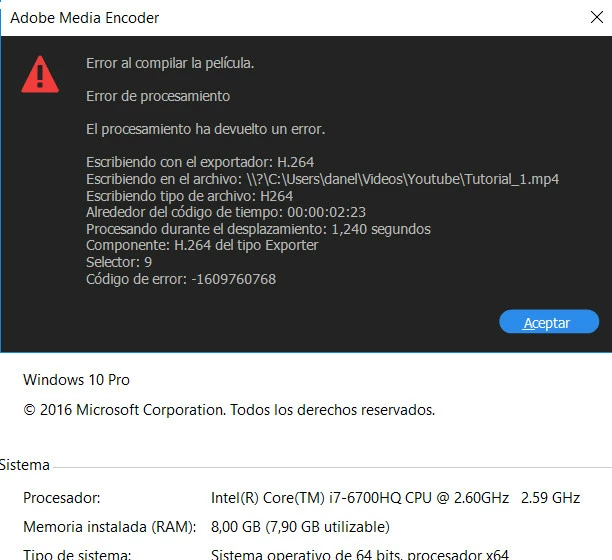
Error compiling the movie, not finded the solution yet.

  • January 2, 2017
  • 1 reply
  • 335 views

I have a Windows 10 and my version of Adobe is 2015.3.

This is the error message and the details of my sistem.

It happened me with H.264 format, but with some others not. Do I need some encoders?
This topic has been closed for replies.

1 reply

Vidya Sagar
Adobe Employee
Adobe Employee
January 3, 2017

Hi Danelo,

In Premiere Pro, Preferences > Media > Uncheck "Enable Accelerated Intel h.264 decoding"

Restart Premiere Pro & try render.

if issue persists,

Change the Renderer,

In Premiere Pro, File > Project Settings > General > Renderer.

Change the Renderer to Mercury Playback Engine software only & try render.

Please let us know the status.

Thanks,

Vidya Sagar.

DaneloAuthor
Participant
January 3, 2017

Hello, thank you for your answer. I did the first step, I restarted, but still not working. About the second step, it was already selected that option, actually the program don't allow me to change it to another. Anyway, the day I intalled the program, it poped up a message talking about missing encoders or something like that, maybe that could be the problem? There is any data base for to donwload the codecs? Or do you think that this is not the problem here?

Vidya Sagar
Adobe Employee
Adobe Employee
January 17, 2017

Hi Danelo,

Might be an issue with the GPU driver. Please update the GPU driver, if issue persists downgrade & test.

Thanks,

Vidya Sagar .