This topic is closed to new replies. Start a new post to keep the conversation going.
Correct answer David Arbor

Are you still having this issue? If reinstalling Universe and making sure Premiere is up-to-date didn't help, then you'll probably have better luck contacting Red Giant Support. I've done this several times myself and they always have great people who are often able to help you out.

6 replies

Participant
May 6, 2021

Same issue, did someone solved this before?

coreyh11071902
Participating Frequently
September 6, 2021

Same issue, no resolution found

R Neil Haugen
Legend
September 6, 2021

You'll have to check with RedGiant, which is now Maxon support. Their app manager is required to be running for their plugins to work. And Maxon has made some changes and you probably need to uninstall the RedGiant app manager and install the Maxon equivalent.


I had to do that last week myself.


Neil

Everyone's mileage always varies ...
David ArborCorrect answer
Inspiring
February 24, 2021

Are you still having this issue? If reinstalling Universe and making sure Premiere is up-to-date didn't help, then you'll probably have better luck contacting Red Giant Support. I've done this several times myself and they always have great people who are often able to help you out.

Graeme Bull
Community Expert
Community Expert
February 11, 2021

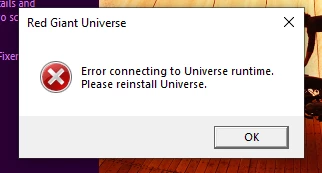
Have you tried reinstalling Universe? You must have installed it at some point and then did an update to Premiere possibly?

neelg60678665
Participant
February 15, 2021
I did uninstall it but it is still giving me the same error
Tried reinstalling it and still the same