
Inspiring
January 6, 2025
Answered

Error export frames from markers in sample project [SDK]

  • January 6, 2025
  • 4 replies
  • 1331 views

Hi folks

I'm getting an error running exportCurrentFrameAsPNG function in the sample ppro panel.

It's complaining about an illegal parameter type.
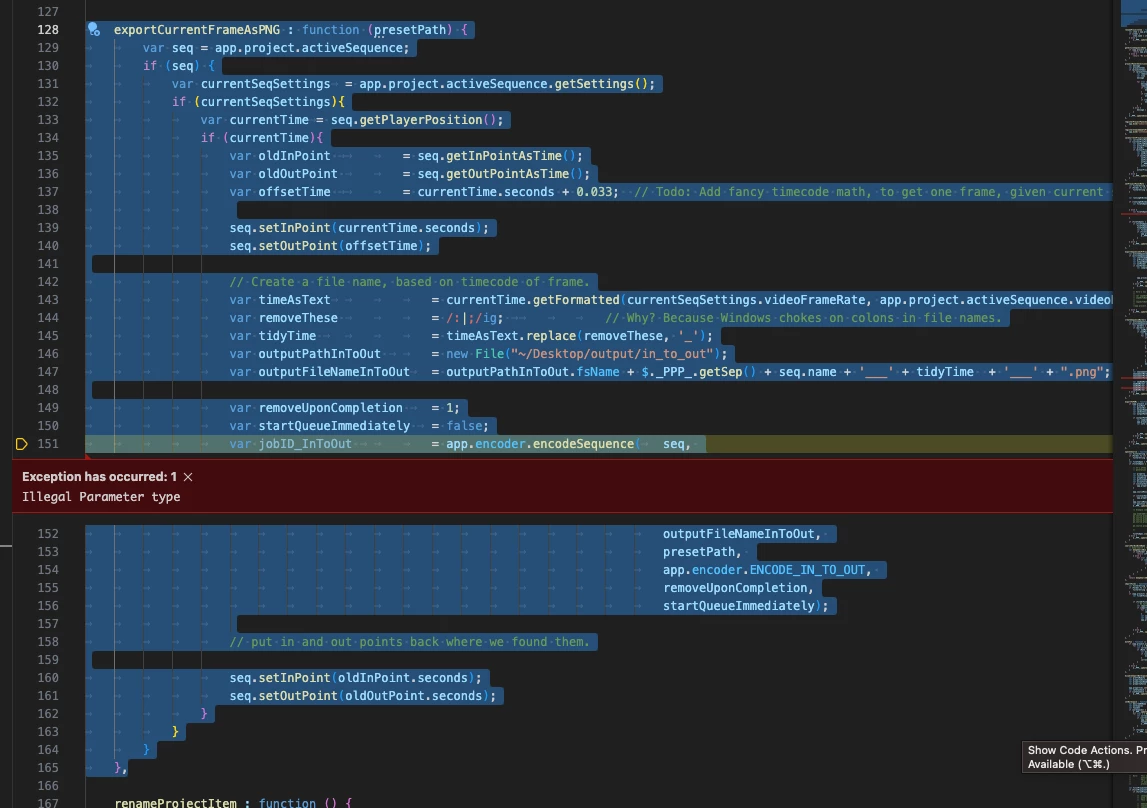
I'm also having issues using 

activeSequence.exportFramePNG(time, outputFileName);
It is ignoring a burn-in track I have on v3, and only exporting the video on track v1. Is that expected behaviour? Clicking the export frame button in the UI does export the burnins, which is the metadata effect applied to a video clip.

I'm on mac premiere 2025.
 
Many thanks
Correct answer Justin Taylor-Hyper Brew

I'd check each param to ensure it's not null at that point in time, but my best guess just by looking at it is that you need the .fsName of each of the paths, not the file object. More info in the docs: https://ppro-scripting.docsforadobe.dev/general/encoder.html#encoder-encodesequence

4 replies

Adobe Employee
January 9, 2025

Also, if anyone is still listening; Adobe Premiere Pro scripting is moving from CEP to UXP
See documentation here: https://developer.adobe.com/premiere-pro/uxp/

and samples here: https://github.com/AdobeDocs/uxp-premiere-pro-samples


Inspiring
January 13, 2025

Thanks Dan

I will start reading up on how to port my extensions over to UXP

Adobe Employee
January 7, 2025

Hi, Imkindofabigdeal,

What are you passing for the parameter, presetPath? All of the other paraemeters appear to be defined

(I keep a file named "test.epr" on my desktop within easy reach, just for such occasions.)

Also, life hack: you could set breakpoints in your code, before calling that function, so you can check which param(s) might be invalid.

I hope this helps,

Dan


Also, thanks Kevin and Justin for weighing in, you guys are great.

Inspiring
January 7, 2025

Hey Dan, 


I was initially just trying out the PProPanel and got the error, not sure why presetPath was not populated for me. I have the QE exportFramePNG() working in my own panel, but I wanted to test this non-qe method as a fallback.

Now that I understand what was missing, and that I need an epr file, I should be good to go

Justin Taylor-Hyper Brew
Community Expert
Community Expert
January 7, 2025

I'd check each param to ensure it's not null at that point in time, but my best guess just by looking at it is that you need the .fsName of each of the paths, not the file object. More info in the docs: https://ppro-scripting.docsforadobe.dev/general/encoder.html#encoder-encodesequence

Inspiring
January 7, 2025

Hey Justin,

Thanks for the reply. I figured it out with your help, presetPath was undefined, it's a property of the function
exportCurrentFrameAsPNG : function (presetPath)

But in the panel, no preset is passed into it.

 
	exportFramesForMarkers : function () {
		var activeSequence = app.project.activeSequence;
		if (activeSequence) {
			var markers 	= activeSequence.markers;
			var markerCount = markers.numMarkers;
			if (markerCount) {
				var firstMarker = markers.getFirstMarker();
				if (firstMarker){
					var previousMarker;
					activeSequence.setPlayerPosition(firstMarker.start.ticks);
					$._PPP_.exportCurrentFrameAsPNG();
					var currentMarker;
					for (var i = 0; i < markerCount; i++) {
						if (i === 0) {
							currentMarker = markers.getNextMarker(firstMarker);
						} else {
							currentMarker = markers.getNextMarker(previousMarker);
						}
						if (currentMarker) {
							activeSequence.setPlayerPosition(currentMarker.start.ticks);
							previousMarker = currentMarker;
							$._PPP_.exportCurrentFrameAsPNG();
						}
					}
				}
			} else {
				$._PPP_.updateEventPanel("No markers applied to " + activeSequence.name + ".");
			}
		} else {
			$._PPP_.updateEventPanel("No active sequence.");
		}
	},


I exported a png preset from media encoder, hard coded that, and it worked as expected.

Justin Taylor-Hyper Brew
Community Expert
Community Expert
January 7, 2025

In the sample panel you're testing with it is, it's just in exportCurrentFrameAsPNG() not in exportFramesForMarkers()


You need to make an EPR preset file with Media Encoder and ship it with your panel

Kevin-Monahan
Community Manager
Community Manager
January 6, 2025

Hi @Imkindofabigdeal,

Thanks for the post and welcome to the forum. Perhaps one our Adobe experts like @Justin Taylor-Hyper Brew can assist with this issue. I hope we can help you shortly. Sorry for the hassle.


Cheers,
Kevin


Kevin Monahan - Sr. Community and Engagement Strategist – Adobe Pro Video and Audio