Inspiring
August 15, 2024
解決済み

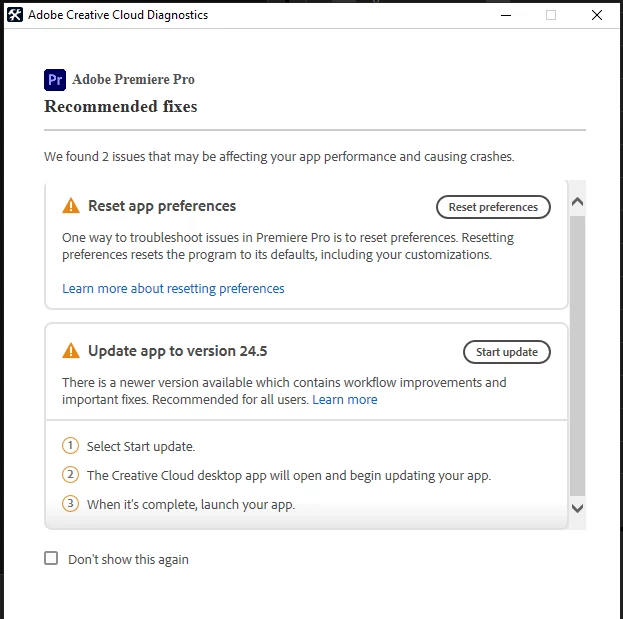
Error in CC Diagnostics dialog box advising to update application that is already installed

  • August 15, 2024
  • 返信数 3.
  • 677 ビュー


But I'm already on 24.5...


Mod note: I changed the title of your bug report to reflect the actual issue.

このトピックへの返信は締め切られました。
解決に役立った回答 sebrame

Thanks Kevin! I just started having Premiere lock up after opening a particular project. I've reset my Preferences and so far that seems to have worked.

返信数 3

Kevin J. Monahan Jr.
Community Manager
Community Manager
August 29, 2024

Sounds like the issue is resolved for now, so I'll move this thread to "Discussions," @sebrame.


Thanks,

Kevin

Kevin Monahan - Sr. Community and Engagement Strategist – Adobe Pro Video and Audio
sebrame作成者解決!
Inspiring
August 16, 2024

Thanks Kevin! I just started having Premiere lock up after opening a particular project. I've reset my Preferences and so far that seems to have worked.

Kevin J. Monahan Jr.
Community Manager
Community Manager
August 16, 2024

Cool! Thanks for letting me know, @sebrame!

Cheers,
Kevin

Kevin Monahan - Sr. Community and Engagement Strategist – Adobe Pro Video and Audio
Kevin J. Monahan Jr.
Community Manager
Community Manager
August 15, 2024

Yes, I've seen that before, Steve. Thanks for the screenshot and the information you gave. I'm not sure why it shows that message. As an editor, I would interpret that as "see if reinstalling the application might help." I'd need to ask the devs about it, though. There seems to be a bug in that dialog box. Let's move this post to the bugs forum.


In the meantime, I hope the community can help you solve this issue. What trouble are you having? Let us know. I hope we can help. Sorry for the frustration.


Thanks,
Kevin

Kevin Monahan - Sr. Community and Engagement Strategist – Adobe Pro Video and Audio