


Participant
June 27, 2025
Answered

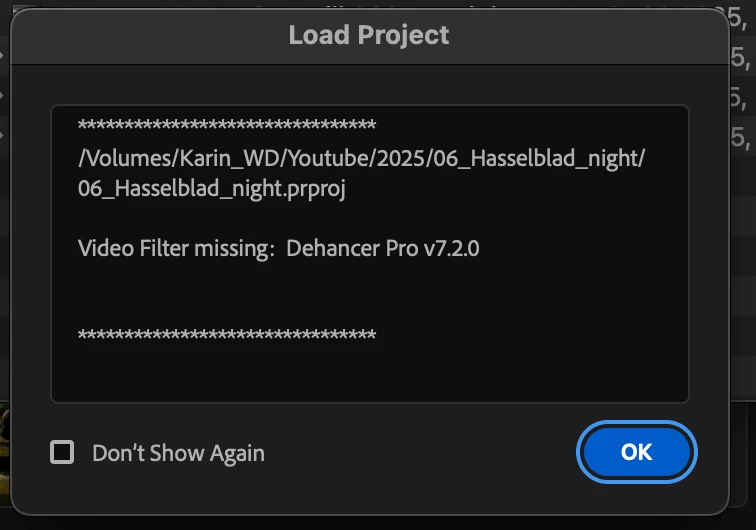
Error notification "Video Filter Missing"

  • June 27, 2025
  • 4 replies
  • 1009 views

Hi!

I am running Adobe Premiere Pro 2025 on my Mac M1Max Sonoma 14.6.1 (23G93).

Out of sudden, the program crashed and after re-opening it, this error notification popped up. I am using the Dehancer Pro plugin to color grade my footage and the plugin is no longer usable in Premiere. I've tried uninstalling and re-installing Premiere. I've tried reinstalling Dehancer as well us upgrading and downgrading to newer versions and nothing has worked so far.

I am working on a time critical project where I need to be able to use the plugin. Does anybody have any solution on how to find a workaround for this "Video Filter Missing" issue?

Thank you!
Correct answer Karin34491555ybts

Thanks so much for the help! The issue was resolved now. In case anybody else runs into the same issue, here is what solved it:


Clearing the media cache and reseting the preferences didn't help.

Downloading and installing the latest version of the Dehancer plugin didn't work either.  


I reached out to Dehancer and they told me to click on the three lines next to the video effect manager and open the window "manage video effects". Here, I was able to tick the missing filters and re-activate the plugins again, after a restart of Premiere, everything worked like it should again.

4 replies

Participating Frequently
April 4, 2026

I got the same two “missing” filters.  Tried Karin’s fix.  Effects>Manage Video Effects> select missing filters.  However, nothing is listed on that page, it is blank with a search box at the top.  I entered the missing filters and nothing came back for either.  I am running version 26.0.2 (Build 2).

Roy

Karin34491555ybtsAuthorCorrect answer
Participant
June 27, 2025

Thanks so much for the help! The issue was resolved now. In case anybody else runs into the same issue, here is what solved it:


Clearing the media cache and reseting the preferences didn't help.

Downloading and installing the latest version of the Dehancer plugin didn't work either.  


I reached out to Dehancer and they told me to click on the three lines next to the video effect manager and open the window "manage video effects". Here, I was able to tick the missing filters and re-activate the plugins again, after a restart of Premiere, everything worked like it should again.

Ishan Y
Inspiring
June 27, 2025

Thanks for sharing the solution with us! I'm glad you found a fix.

Ishan Y
Inspiring
June 27, 2025

Hey Karin,

Sorry for the issue. I see there's a new update available for this plugin (https://adobe.ly/3I01R6N). Please install it and check if you still see the issue.


Thanks,

Ishan

Please tag me (@) in your replies so that it notifies me and helps me respond promptly.
Community Expert
June 27, 2025

try to clean your media cache and reset the preferences, then restart