hmdigiart.com
Participating Frequently
April 16, 2019
Answered

Error retrieving frame **** at time **

  • April 16, 2019
  • 58 replies
  • 267560 views

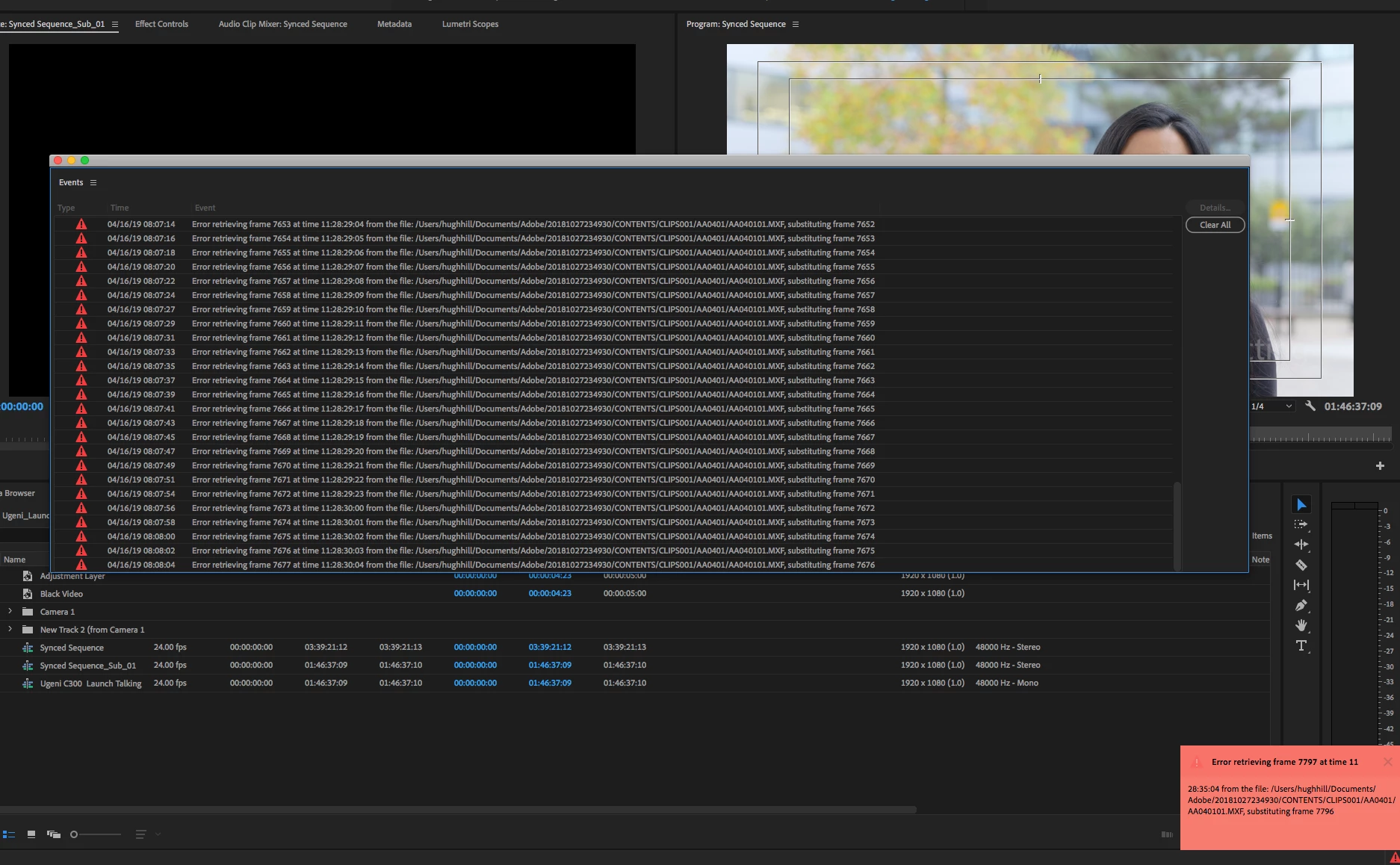
I am trying to footage taken at a recent event that I shot with one camera, I imported it into premiere pro cc 2019 and then exported it only to get this error message every few seconds.


"Error retrieving frame **** at time **:**:**:** from the file"


The footage was shot on a C300 at 24 fps, in full HD, the sequence is 24 fps 1920x1080 which is a match./

it's only when I try to export it out that I start getting the error.


Please help.


Thanks


H&M


included is a screen capture (hope it helps)


Correct answer Jens Trimmer

Here's an updated article with some troubleshooting steps to try if you are experiencing the error: https://videowithjens.com/premiere-pro-error-retrieving-frame/


If you prefer watching a video, I've made that too: 

58 replies

HarrySHF
Known Participant
June 10, 2019

Having the same issue here. ProRes 422 HQ source and export. If I have an illustrator file in the timeline but disabled, I get the error. If I remove the unused AI file, it's good.

Except for the sequence I originally got the error on... even after removing the AI files, that particular sequence gives me the error. If I go frame by frame on the output, however, there are no black or duplicated frames.

Is everyone checking the output to make sure it's actually creating a bad export?

I'll try emptying the cache and restart, see if that helps the one sequence.

Cheers,

Harry

HarrySHF
Known Participant
June 10, 2019

No joy with the restart.

I tried the 444 workaround, and while it does export error free, when I play back the .mov file, I get a weird glitch on a all the dissolves: the incoming clip's frames are overexposed and contrasty during the dissolve, then snap back to correct exposure when the dissolve ends. The outgoing clip ends without fading to black. This happens in dissolves between motion footage and stills. Dissolves between stills seem fine.

Very obvious and jarring.

If I render the sequence first, it still does this in 444.

If I export an H.264, it's perfectly fine.

One more data point. One more error.

C'mon Adobe, you can do better. We are all on the hook for $22 per month minimum for the rest of our lives. Spend a few bucks. Solve this problem. Don't hire the cheapest programmers. Throw us a solid.

Please.

H.

HarrySHF
Known Participant
June 10, 2019

It's really astounding. CEO makes $22MM per year, and we can't make a product that... just... works.

It was better in 1997.

H.

Participant
May 21, 2019

I found a solution that worked.

Premiere stores cache per project, so no matter what you do the same will happen.

How to Fix It:

Go to file, save as copy(save a copy) make this your main project.

Import the file again and it will not have any frame substitution.

Let me know if this worked for you.

miket24511498
Inspiring
May 21, 2019

Sorry, R_BRONNER, that didn't work for me. For me, closing PP down and then reopening it fixes it, provided that I haven't saved after the error.

josephp2618680
Participating Frequently
May 15, 2019

Update on our end.  We're running 13.1.2.

We're exporting to ProRes 422 HQ with most, if not all media being ProRes 422 HQ.  If we do a match source, then we get those errors.  If we choose to export to an H264 mp4, then we don't get the errors.  If we export to ProRes 4444, then we don't get the errors either.

There seems to be an in our case in which selecting Match Source causes an issue.

ScottieB1
Known Participant
May 15, 2019

This matches my experience. ProRes HQ source to ProRes HQ output. 13.1.2

josephp2618680
Participating Frequently
May 15, 2019

The current work around is go to ProRes 4444, then re-export to ProRes HQ.  It's not ideal, but we get less errors that way.

miket24511498
Inspiring
May 12, 2019

Further update - I can confirm that this happens fairly reliably after about 6 hours of constant editing. The video I have has 8 video tracks (most are 4k), 9 audio tracks (mix of stereo and mono), with a couple of clips with AfterFX compositions.

I've tried experimenting saving when the error occurs, then reloading - all is fine. So it's not something intrinsic to the edit itself.

I haven't yet tried REVERTING when the problem hits, nor have I rolled back to the previous version. However, I've never had this problem with >8h edit sessions on this project with the previous version.

I'm now saving, shutting down and reloading every hour or so.


I'm running PPCC 13.1.1 (the latest that CC gives me, although I see from the site that 13.1.2 is supposed to be available).

miket24511498
Inspiring
May 11, 2019

I'm having exactly the same problem. I get the red error box bottom right.

This is on i9 Windows 10 Pro system on internal SSD drive, duplicated on an external HD, and the problem occurs on both - but it's not possible to predict when it will happen - and it is simply not reliably reproduceable.

The trigger (for me) is adding a new effect to a clip on the timeline - up pops the error as soon as I try and play. Remove the effect or the clip, and the error goes away. Add the clip back and then the effect (it doesn't seem to matter which effect) the error comes back.

BUT … eventually PPCC suddenly starts using a LOT of CPU time, even when nothing is happening … and then, trying to play the timeline, everything is running very slow … no video is rendered and eventually the program crashes.

If I restart from the last save, and go through EXACTLY the same actions that led to the problem, everything is absolutely fine.

Trying to look closely at the system when all this happens (which is usually after several hours of working with PPCC) it looks as though there's something in the program tying up more and more system resources. I suspect that the missing frame error is simply because PPCC cannot find the time to retrieve it.

I also think that this must be a bug that was introduced in the last update, as it has only just started since this latest update. As a programmer, it feels something like a memory leak problem.

Sadly, I'm not able to complete and send the error report that pops up - but a bit more info - in Task Manager I see the Premiere ProCC, sub tasks of After Effects CC, Adobe Dynamic Link Manager, Premiere Pro CC and Team Projects Local Hub.

Inspiring
May 11, 2019

I have the same error retrieving frame problem with PPCC 13.1.2.  I have a project with three cameras (all Canon XF305 with identical settings).  Each camera shot a two act play (not recording between acts), so I have six folders with the sequential .mxf files.  These are stored on an internal SSD with the entire Canon file structure intact (per an earlier recommendation from an Adobe representative at NAB.)  Of the six videos, only one of them has this problem.  I record dual slot, so I have two “independent” recordings of both acts, and each recording of the problem video has the same error retrieving frame problem.

I have cleared the caches, I have renamed the folders, and nothing solved the problem.  Running PPCC 12.1.2 using the exact same files produces no problem.  The error retrieving frame problem occurs only between about 17 minutes to about 40 minutes, and always occurs on the same frames (on either recording).

Prior to this project, I edited two other projects, each shot by the same three cameras, with each project being two act plays with each act being the same approximate how long.  I did not have a problem with any of those clips.

The Adobe tech suggested renaming files and folders, which did not resolve the problem.  But I did find a work around.  Renaming individual files (201.mxf became 201A.mxf, 202.mxf became 202A.mxf, etc.) broke the association between the sequential files so that PPCC sees them as individual clips.  As individual clips, PPCC did not produce the error retrieving frame problem.  So, I went into my three camera video sequence from which the multi cam sequence was created and dropped the fourteen different clips into another video track, aligning the first one with the "bad" hour long clip.  This got me by for this project.

After a long time tonight chatting with an Adobe tech, I gave him the link to this forum and said he would report the issue to the Adobe team.

Community Expert
May 10, 2019

I thin best is to contact Adobe Care so that they have remote access over your system

as this is the best way they can monitor what's happening, and reply us back here please

Community Expert
May 9, 2019

anyone tried cleaning media cache? from both premiere pro and AME side

try out manually deleting media cache as well...check your scratch disks location

if so, I guess it might be a problem in render files, anyone tried deleting the render files?

that happens especially when migrating from older version projects to newer version ones

when any rendering was done before...

also check here: How to fix issues that cause errors when rendering or exporting

and Jim Simon's bible: Unofficial Premiere Pro Troubleshooting Guide

switching renderers to software only solved such issues for some users as well

ScottieB1
Known Participant
May 9, 2019

Yes tried all of that and my project has no render files. Also tried with gpu acceleration on and off in both project and ame. Also tried export from ame and direct from premiere. Tried replacing media files with new ones. Tried moving entire project to new drives, SSD, raid, hdd. Same error

josephp2618680
Participating Frequently
May 8, 2019

We're currently having the same issue as well.  We've tried switching from OpenCL to Software Only and that didn't work.  We're also working directly off a server over 10Gb copper.  This only came up after updating to the latest version of Premiere Pro CC 2019.

Gemstone Chris
Participating Frequently
May 8, 2019

I am having this same "Error retrieving frame" problem as well. Multiple attempts to export the sequence produced the same multiple errors at the same places in the sequence. Curiously, I noticed that every error happened right before a dissolve. Just for kicks, I removed the dissolves and the sequence exported perfectly with no errors.

So is Premiere looking ahead to the dissolve and stumbling, sort of like what I do when I look around while on the treadmill?

It's obviously not acceptable that I can't have dissolves, so some help from Adobe would be most welcome. I've only been using Premiere for a week, but this is the first time this has happened.

My specs:

Premiere CC 2019, latest version

MacPro5,1 (2010 8-core)

macOS High Sierra

16 GB RAM

Media are ProRes 422 QT files on a dedicated external RAID.

***EDIT***

I just re-encoded the clips from the error log. Good new clips. Different location on disk. Same error.

Folks, it ain't the media. It's something to do with those dissolves.

Also, I have tried switching between "Mercury Playback Engine GPU Acceleration (OpenCL)" and "Mercury Playback Engine Software Only". There is no difference. Same error both ways.

ScottieB1
Known Participant
May 8, 2019

I'd agree with you about the dissolves, except I had the same issue and no dissolves... but exporting to a different codec worked for me.

Smells like a BUG...