stefanocps
Inspiring
July 7, 2020
Question

error when exporting

  • July 7, 2020
  • 2 replies
  • 1484 views

hello

all of a sudden my project give me error when exporting
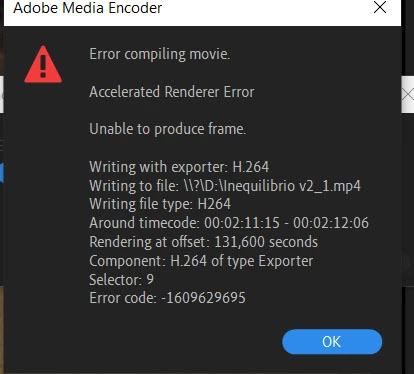
 

it is a well know error (or similar), it happened to me other times. I used to go on setting the rendering to software, but it is not a good option for this project, it will take ages

So whar can i do?

thanks

This topic has been closed for replies.

2 replies

Community Expert
July 7, 2020

In addition to all solutions provided, I can add the following:

error compiling movie is caused many times because of preview files or render files,

so try to go to sequence and delete render files. Many times I used to manually delete

the video preview files from outside of premiere pro.

Also try to export to something other than H.264 which requires lot of processing,

so try to export to something like QuickTime GoPro Cineform yuv 10 bit.

if you can also find a way to unlock your laptop to using the intel integrated graphics card

as the primary one that would be great. I use gfxCardStatus to know which one my laptop is using,

and I can also manually switch between discreet and integrated or choose dynamic switching,

but that might not be recommended by everybody.

you can also check this out:

https://support.serato.com/hc/en-us/articles/202305784-Changing-graphics-card-settings-to-use-your-dedicated-GPU-on-a-Windows-computer-

stefanocps
Inspiring
July 8, 2020

hi Carlos want to know more about the graphic card.I have  the 630 integrated pkus the 1050. so you say that laptop might not be using the nvidia?please tell  me more

Community Expert
July 8, 2020

yes it might be locked to the integrated graphics and not using your 1050

Joëlle Bh
Community Expert
Community Expert
July 7, 2020

Can you please provide us with more details about your pc specs please?

you might need to update your gpu driver, please send us a screenshot of the renderer options in Premiere Pro, check File > Project Settings under the General tab

stefanocps
Inspiring
July 7, 2020

ok when i finish rendering i'll do that

About the update of gpu, i have to uninstall the latest nvidia driver few days ago as would cause trouble to the clips..sowhat shall i do?

win10, premiere latest version,  gpu nvidia 1050(notebook), i7 7700, 16gb ram

Ann Bens
Community Expert
Community Expert
July 7, 2020

Leave the gpu driver as is.

You need to fix whatever is on the timeline at the given time in the error message.

Best is to delete section and do it again.

Post screenshot export settings with left tab to output with image.