
Known Participant
November 14, 2016
Question

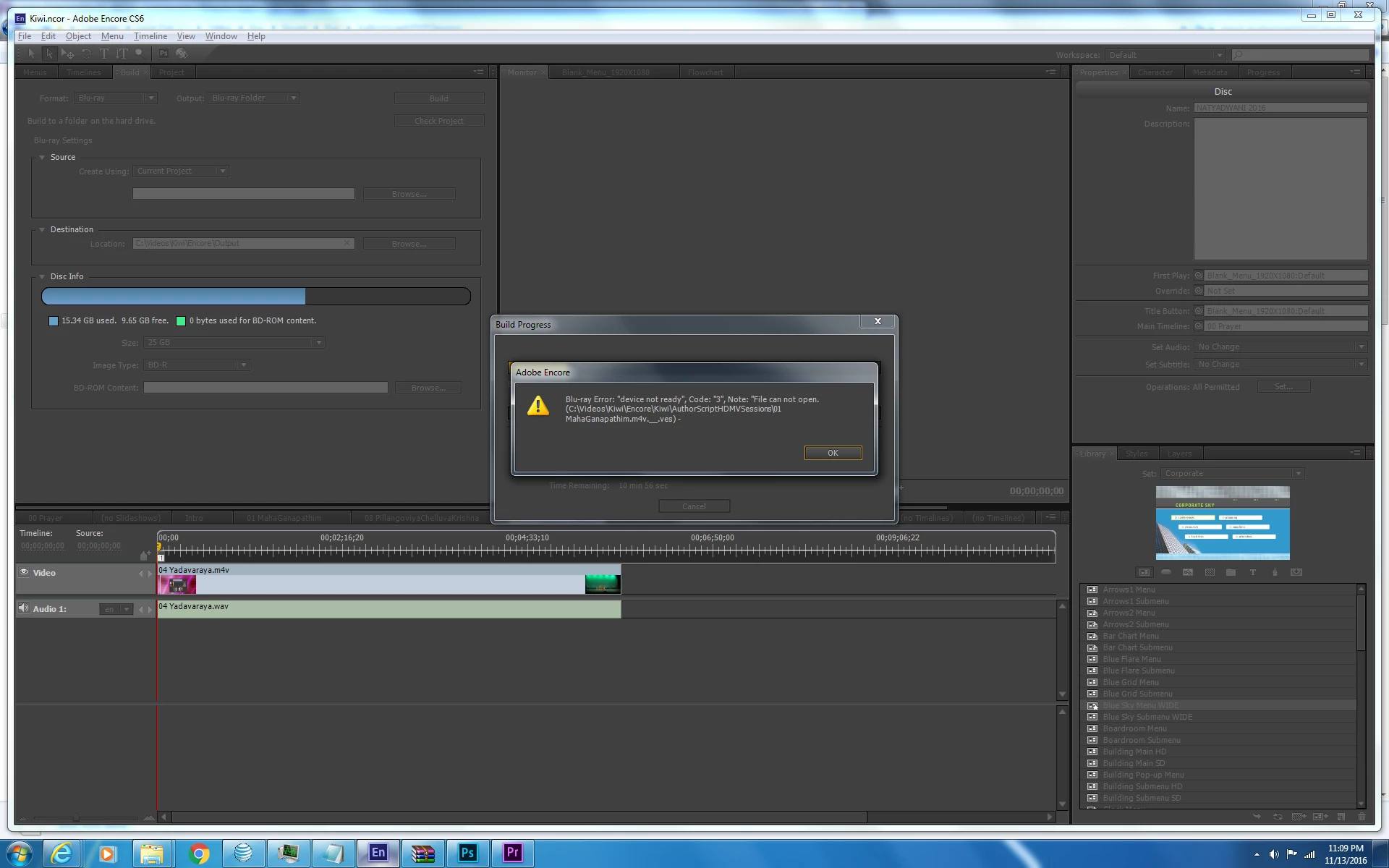
Error While exporting Blu-Ray from Encore CS6 - CODE 3 Can Not open file.

  • November 14, 2016
  • 6 replies
  • 4167 views

Team,

Getting the following error while exporting Blue-Ray project to the local drive on my PC. I have 25GB of free space. And this content is only 15GB. I have the latest version of Encore CS6, I have all the updates installed. I rebooted PC and also restarted encore. But no change. Same error.

Kindly Advise.

Thanks,

Venky
This topic has been closed for replies.

6 replies

neil wilkes
Legend
January 11, 2017

You should also be more careful with file names.

Having a trailing underscore is not a good idea (the file is ending _.ves) and multiple . in the name is also a bad idea.

Use only alphanumeric characters and avoid dots, dashes and anything else - use an underscore for a space and please, never a leading or a trailing one if it can possibly be avoided.

Participant
November 24, 2016

Blu ray Error: "device error", Code "3"
Note: CreateStcSequence: Fail can not open

I was not able to burn BD, folder and image file.
After two days of fighting, reinstalling Encore recreating new files nothing help.

This how I got work!
Click with right mouse on Encore, properties, compatibility select "Compatibility mode" Run this program in compatibility mode for: windows 7

I hope it will work for you!

Inspiring
January 10, 2017

joec37725596 wrote:

Blu ray Error: "device error", Code "3"
Note: CreateStcSequence: Fail can not open

I was not able to burn BD, folder and image file.
After two days of fighting, reinstalling Encore recreating new files nothing help.

This how I got work!
Click with right mouse on Encore, properties, compatibility select "Compatibility mode" Run this program in compatibility mode for: windows 7

I hope it will work for you!

i've been fussing with this error all weekend long. changing properties to windows 7 compatibility mode, and checking the box for run as admin fixed it for me as well.

Stan Jones
Community Expert
Community Expert
January 10, 2017

Thanks for reporting. Both good steps, and I generally believe the "run as administrator" is essential.

Just to illustrate how tricky Encore can be, I am Win10 and do not use Win7 compatibility. Also, when I just checked, Encore is no longer set to run as administrator.

Inspiring
November 21, 2016

How much free disk space dI'd you have available on you mac before you exported?

Inspiring
November 15, 2016

Make a simple DVD project, so your import video should be to the lower DVD resolution, and already transcoded correctly, so Encore can skip that step.  Use only one timeline, keep it short, around 5 minutes.  No menu, set the properties to play the timeline (first play), and all actions to stop.  In theory, you put your DVD in the player, it automatically plays the one timeline and stops.  If you press any button on the remote, playback stops.  I'm also assuming, you have no subtitles, close captions, region coding, or have macro vision enabled.  Check your project, then try creating both the folder based export, and image (ISO) export.

I don't think there's any simpler way to create a DVD, so if Encore can't create the finished folder or disc image, it may be Encore itself that's broken.

Steve

Stan Jones
Community Expert
Community Expert
November 14, 2016

I agree with Steve.

There are many Blu-ray Code 3 errors, and I do not find any other occurrence of this particular error (File Can Not Open). The _ves file and location in AuthorScriptSession folder does point to Steve's point about the size of temporary files Encore creates during BD build, whether for burn or image creation.

VenkyLAAuthor
Known Participant
November 15, 2016

Steve and ACP, I cleared files now, I have 91GB available space. And it is giving me the same error. Any other though what else might be going on?

Inspiring
November 15, 2016

As an experiment, save your Encore project with a new filename, and change the build from Blu-ray to DVD, and then export again.  if that works, it may still be pointing to lack of disk space.

I assume you have no external storage (USB HDD or flash drive) of sufficient capacity to just point the (Blu-ray) output to?  it doesn't have to be fast data transfer, as you're just trying to prove where the issue lies.  These are output files, so Encore doesn't care about the speed.  Given the anticipated size of your exported content, even a 128GB USB flash drive would allow you to test further.

Steve

Inspiring
November 14, 2016

Encore creates quite a few temporary files when exporting your finished projects, even if you're only creating the blu-ray folder structure.  Even more free space is consumed if you create an iso file.  If the only drive you have is drive C:, you're working perilously close to complete failure of the operating system, even without trying to export your project.  As a rule of thumb, I'd allow a minimum of 3X your anticipated final output file size.  In your case, you also need to leave some disk space for the operating system to function as well.  You need at least 80GB free disk space.

Steve