Essential Graphics: Text not appearing on Screen, yellow-triangle appears as Icon over Clip
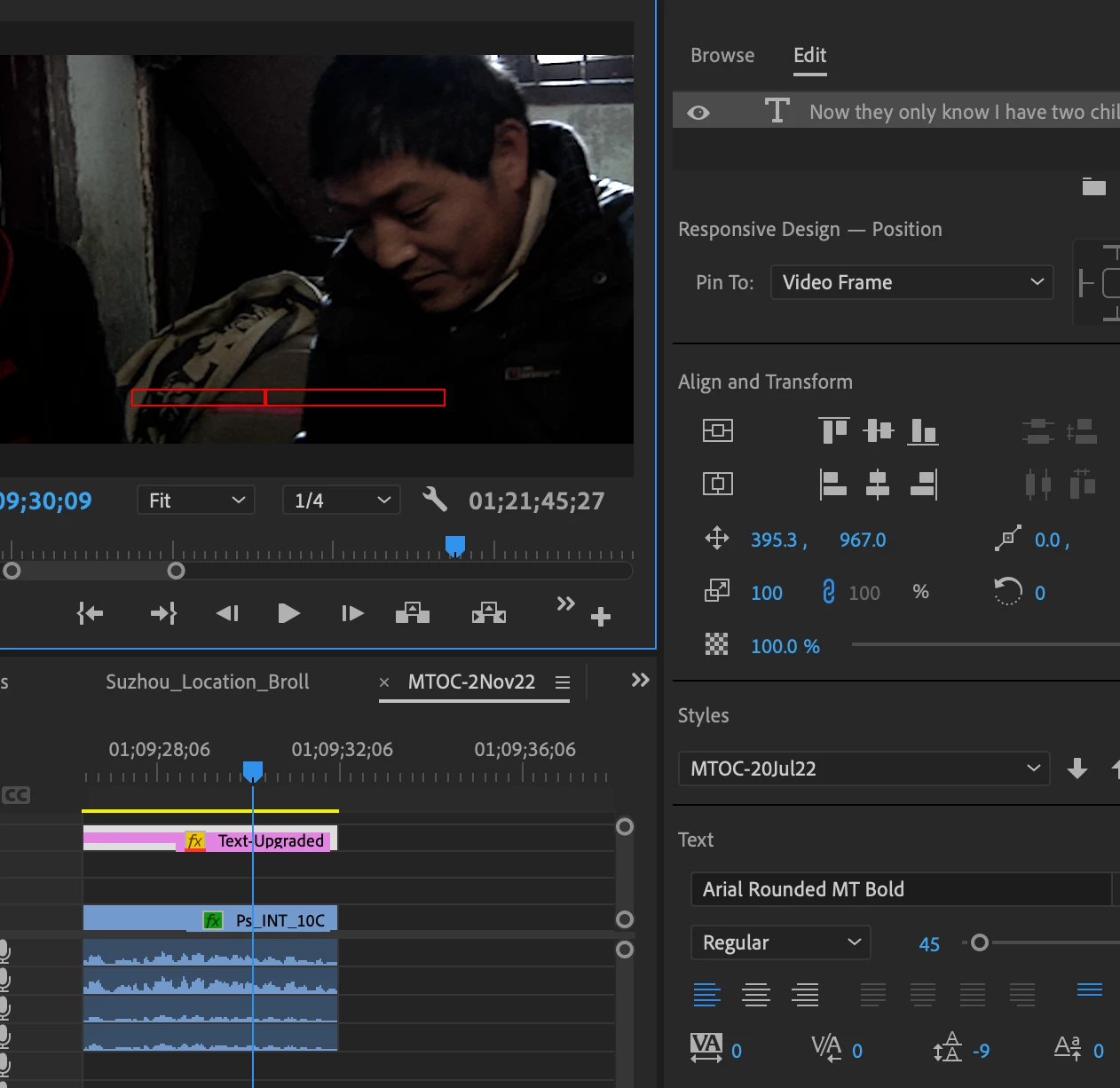
You can see from the image that there is a Red Box that is supposed to show Text written into it that does appear under the Edit Panel for Text but does not appear on the Timeline.
Background Block is Grey at 30%; Text is 100% Opacity and of the color White so it should appear. ALL of my Graphic Texts have become like this.
Seems to be a glitch because it was working an hour ago.
Something odd I noticed also: the image appearing on the Right or Program Panel is zoomed in like 200%. This off-set parameter is maybe why the Graphics Text does not appear.
I do not want to reset the Preferences because the film I am working on is nearly 90 minutes of Graphic Text subtitle with over 1000 small adjustments made that would need to be re-corrected once Preferences is re-set.
Any way to solve this?
I am using Adobe Premiere CC 2020 (v.22.6.2) (Build 2) on a MBP 15" (2014) with Big Sur as OSX v.11.7.1
All Media is on an external 4TB SSD connected via USB-C to USB-3.0, and 150GB free space on SSD, and over 60GB free space on HD.
 AdChoices