
Participant
June 27, 2020
Answered

Essential graphics won't show, small yellow triangle with exclamation mark over all templates

  • June 27, 2020
  • 5 replies
  • 4449 views

Hi all, 

My essential graphics don't show on my video... when I drag and drop it appears as though it has inserted however no text shows over the top of my videos. 


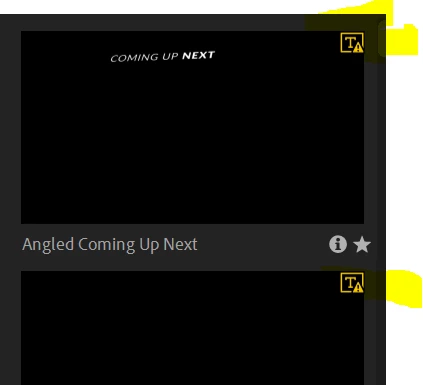
All files in the browse section look like this and I think the yellow triange has something to do with it?


This topic has been closed for replies.
Correct answer Erica34492214xw5i

Pretty sure you just have to right click, then select Sync Missing Fonts

5 replies

Erica34492214xw5iCorrect answer
Participant
December 28, 2023

Pretty sure you just have to right click, then select Sync Missing Fonts

Community Expert
November 7, 2022

I just tried to use another preset that comes with Pr, it has the same yellow badge. When I dragged it to the timeline, I got a message from the CC application that a certain font was installed and activated, and the template worked fine.

So, I assume that the yellow badge means that the used font is not installed in your system, and I beleive that, if your CC app is working in the background, the font will be installed automatically for you from Adobe Fonts.

Participant
November 7, 2022

have u solved it?? i am facing the same issue 

Community Expert
June 27, 2020

Something worth trying is reset the presferences. Here is a page with how to do this:
https://community.adobe.com/t5/premiere-pro/faq-how-to-reset-trash-preferences-in-premiere-pro/td-p/8236158?page=1

R Neil Haugen
Legend
June 27, 2020

Have you hovered the cursor over the triangle and clicked on it?


Neil

Everyone's mileage always varies ...
Participant
November 9, 2022

I'm having same problem with all of my motion graphics within the templates