

Exendscript bug? A variable defined twice keep caching latest value an ignores its 1st definition
Hello, maybe this is my fault for defining a variable with the same name twice?
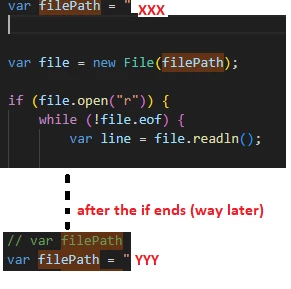
In this code
The "line"s read are from a "filepath" variable located elsewhere in the code (waay below), whereas it should have taken the value given to it just above it! (In other words the value given at the top is ignored and it keeps pointing to a new value given way later (after the IF))
I don't know if I can reproduce it with a non personal code, but the description is that I have a :
1) var filepath = xxx (top of the code)
2) Then I read its line with var line (inside the IF, below the first filepath definition)
3) later in the code I have a new var filepath = yyy (after the IF is done and line = xxx done)
The problem is that during (2) the "line" showed values from yyy not from xxx!
As if extendscript "cached in" the latest value of filepath (yyy) THEN started running the code (the if... var line =..) which is written before.
What's even more surprising is that I ran this code many times in the past and never had this issue, maybe it was the way I run this time I somehow (***) let the program give filepath the value of yyy in (1) (whereas it should have been xxx) I triedre running the code and I could not give "line" the values from xxx (1), "line" would only get values from yyy (3) which is defined way later/below it.
(***) In the past I used to run a script before it (that had filepath defined once not twice) THEN run this script where filepath is defined twice. Maybe the first script finishing without an error would tell visual code that filepath has the ability to get multiple values/definitions, hence when I run the second script, filepath would get the value (xxx) and the IF .. line = would read xxx, and somehow later visual would know how to redefine it later with a second value. But if I run this script without the first one, the fact that no script has ever finished its run (an error happens because my line gets from yyy) makes it that filepath is STUCK with the value of yyy EVEN WHEN I RE RUN this script. (Rare phenomenon but It is persistent that I felt the need to share it, I am sure if I run a script that has the value filepath without its ending with an error then RE RUN the current script shown on the screenshot, the error would dissapear somehow and i would be able to define "var filepath = ..." twice with no problem).


 AdChoices