
Participant
January 11, 2017
Answered

Exponential Fade Won't Drag to Clip

  • January 11, 2017
  • 11 replies
  • 77897 views

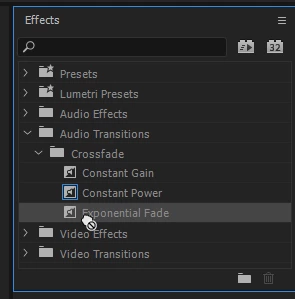
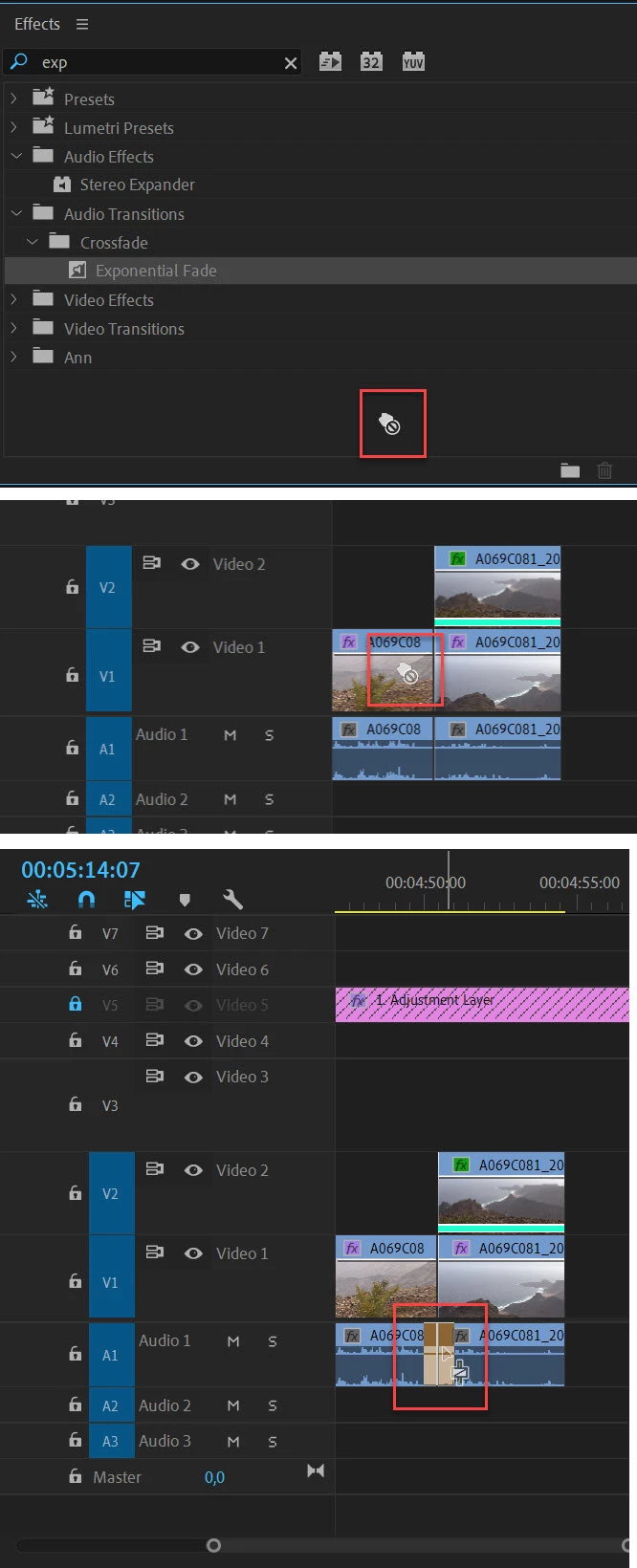
I'm trying to drag exponential fade onto the end of an audio clip, and whenever I click to drag it, the little hand icon gets a crossbar next to it indicating I cannot drag it. How do I fix this? Screenshot below of the crossbar next to the hand
    Correct answer Ann Bens

    Ditto - exactly the same here. No change after resetting.


    Need to drag it all the way to cut in the timeline.


    11 replies

    Participating Frequently
    January 21, 2022

    For fade out, dragging it anywhere the end works.

    But for fade in, I had to drag it onto the little white box on the left end of the audio clip.

    Participant
    April 30, 2021

    In my situation, none of the responses here helped.


    I was not only struggling with applying the audio transistions, specifically the "Exponential Fade," to my audio ("A1") track. It would work on other audio tracks ("A2") but not A1. None of these answers helped me. The solution I found that worked for me was to turn off my audio keyframes (click the "Clip Keyframes" under the "Show Keyframes" button on the A1 "sources"). It turned off my keyframes but I was able to apply the audio transition(s) and then turn the audio keyframes back on after the fact. 


    Good "luck."

    Participant
    October 16, 2020

    Hi,

    I know this question was posted ages ago, but I came here looking for the solution to this problem today so I assume it may still be relevant for some people.

    I right-clicked on exponential fade and selected 'set selected as default transition'. Then I right-clicked on the audio I wanted to apply it to and clicked 'apply default transition'. Hope this helps.

    Participant
    October 16, 2020

    Yea, does.
    The problem is also solved by dragging the exponential fade to the very end of the clip, I myself missed that detail at first, and thought it didn't work – but I was not dragging it close enough to the end.

    Participant
    July 10, 2020

    Hello - was having the same problem - read all the replies but nothing worked. Had a thought and simply moved the blue timeline marker back to anywhere on the film/audio and dragged the effect across and it worked. Must have the blue timeline marker in the timeline, not after it. Cheers.

    Participant
    November 12, 2020

    It worked!!! that's the only thing that worked to me, thank you very much! Blue timeline marker BEFORE the transition!

    sherylw87263581
    Participant
    April 6, 2023

    Well!!!  I have been using Adobe Premiere for about 20 years now and this is a new glitch I have never encountered!!  But THAT was the solve!!!  Put your blue timeline marker- the one that tells you where you are in the timeline, BEFORE you try to drop in the effect!  Who knew?  That's crazy!  I tried every which way but that!  


    fashionable_artistry5E0F
    Participant
    May 26, 2020

    It is not about dragging the transition outside of the Effects window! In order to place the effect on the clip you have to put at the end ON TOP of the clip, not next to it. 

    SandySummers
    Participant
    September 28, 2024

    I tried and tried a hundred times but didn't realize it had worked because the length of the fade out was so tiny I couldn't see it. Once I zoomed in as far as possible, I could see the tiniest of fade outs. Then I dragged the inner corner leftward and lengthened it to the 5 seconds I wanted. There is a little gray and black box you can see when it's zoomed out, and once zoomed in you can see it gets bigger and can be manipulated

    mattharvey001
    Participant
    April 2, 2020

    I was having the same issue - thought I was losing it!

    Turned out the timeline was bunched up so much on quite a large film (8mins) that I could not see the EFade was added.   It only became apparent when I zoomed out on the timeline.

    Problem solved!  (for me anyway).

    Let me know if it works.

    RadamBrown
    Known Participant
    March 19, 2020

    So I was having the same issue and do use this and for some reason it wasn't working. I tried one last time and drug it to the very end of the audio clip (I mean literally the very end) and dropped it and it worked! Hopefully this works for others...fingers crossed...stay safe and healthy out there as we're all dealing with this crazy pandemic!

    grega68691671
    Participant
    February 24, 2020

    Drag exponential fade, even with the crossbar, out of the effects box. Here's the important part: Drag exponential fade to the end of the audio clip to place it, otherwise it won't work.

    Participant
    February 24, 2020

    Thanks for getting back. Very appreciated. I'm dragging it out of the effects box to the end of the audio clip. I honestly can't remember exactly the last time I've used it but what once worked now is unresponsive. The is just the symbol letting you know it won't work. I'll try calling Adobe today and get back to everyone on this. Thanks again.

    Participant
    February 22, 2020

    I'm having exactly the same problem. Cannot get Exponential Fade to work in any way. It simply will not move out of the effects panel. Frustrating!!!

    Ann Bens
    Community Expert
    Community Expert
    January 12, 2017

    Did you actually dragged the transition onto the clip?

    As long as you stay in the Effect window with the mouse the no no hand will stay, you need to drag it outside the Effects window on to the clip.

    Participant
    January 16, 2020

    I am still having this issue, I am dragging outside the box and nothing happens when i try to apply the effect on my audio

    Participant
    January 22, 2020

    I'm having the exact same issue, even after resetting preferences.