Participant
January 20, 2017
Question

EXPORT 16 AUDIO CHANNEL FROM PREMIERE PRO

  • January 20, 2017
  • 1 reply
  • 1445 views

Does anybody know if this is possible to export from Premiere Pro.

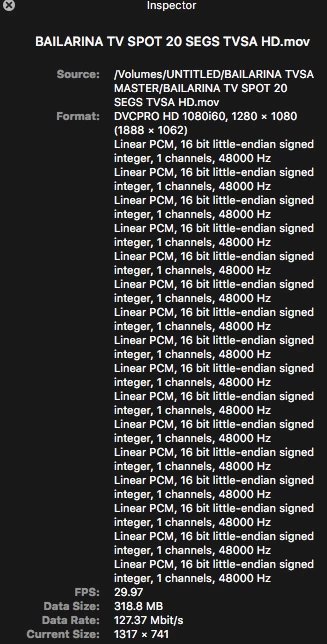
I´m Attaching this image.

this is a sreen shot from the file that I export from Final Cut 7, I want to know if there is possible to export it whit the all 16 audio channels because I tried it but only exports 2 audio channels.

Tnks for your help
    This topic has been closed for replies.

    1 reply

    Legend
    January 20, 2017

    Yes I do this all the time.

    Trick is your sequence needs to be 'multichannel' not stereo & you can't change it after (although you can copy/paste from one to another).

    Just like FCP7 you can then set the outputs the timel tracks route to & they can be multiple destination (e.g. 1&2 and 7&8). You can route direct to master or output via sub-mixes if that helps.

    I find that working with that many audio outputs causes PPro to drop frames so toggle multichannel outputs (above master fader) to 2 when editing. When I get those drop frames I have toggle to 2 outputs & restart app to stop getting them).

    i switch back to 8 for file export PLUS you can't use 'match sequence' in the export settings - you have to manually set audio to multichannel (save a preset for reuse).