
JimmyMcV
Participant
March 31, 2023
Answered

EXPORT bug - Media Encoder does not include LUT color, Direct Export does

  • March 31, 2023
  • 2 replies
  • 387 views

I'm on 23.2.00 Build 69 of Premiere. 


When I export my sequence and select SEND TO ENCODER - the resulting export does not include the color correction implemented by my selected LUT in Lumetri. 


HOWEVER, when I export and simply click EXPORT and directly export from Premiere, the color is totally fine. .


Am I missing something or is this a bug? 


This topic has been closed for replies.
Correct answer R Neil Haugen

I would expect with this, that you "parked" or added that LUT to the ones in the Premiere Pro program/package files locations. As this would be the expected behavior if you've messed with those files. If you parked them in the "proper" places, it would be buggy behavior.


The Program/Package Lumetri/LUT folders are expected to be identical between Premiere, MediaEncoder, and AfterEffects. So the programs access those by relative location in the sorted folder, not by LUT name. Me just went to the Nth LUT down the folder sorted in computer-ese alphanumeric style.


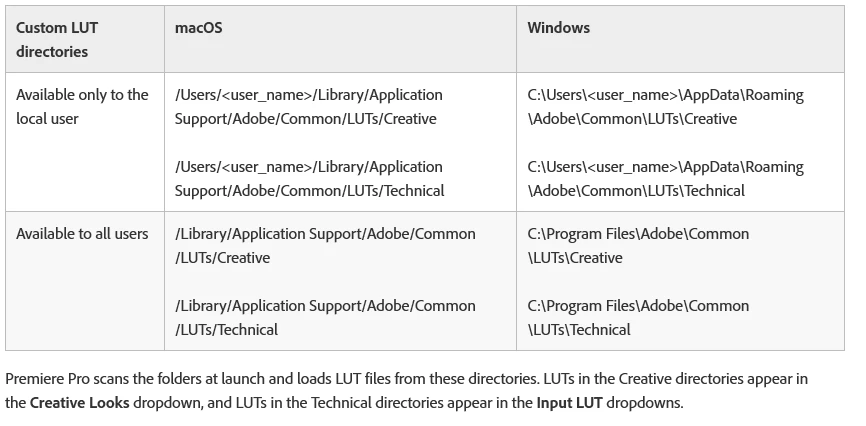
They have a pair of locations, listed in the Help files, both on Macs and PCs, that you can put your LUTs into, and on launch, all three apps check those folders. And apply the LUTs in them, as accessed by the various effects, by name. You need to use those folders.


Neil


2 replies

JimmyMcV
JimmyMcVAuthor
Participant
April 5, 2023
Ok, that makes sense. Now I just need to find out what those folders are.
R Neil Haugen
R Neil HaugenCorrect answer
Legend
March 31, 2023

I would expect with this, that you "parked" or added that LUT to the ones in the Premiere Pro program/package files locations. As this would be the expected behavior if you've messed with those files. If you parked them in the "proper" places, it would be buggy behavior.


The Program/Package Lumetri/LUT folders are expected to be identical between Premiere, MediaEncoder, and AfterEffects. So the programs access those by relative location in the sorted folder, not by LUT name. Me just went to the Nth LUT down the folder sorted in computer-ese alphanumeric style.


They have a pair of locations, listed in the Help files, both on Macs and PCs, that you can put your LUTs into, and on launch, all three apps check those folders. And apply the LUTs in them, as accessed by the various effects, by name. You need to use those folders.


Neil


Everyone's mileage always varies ...