
Participant
September 26, 2025
Question

Export Error only on Team Projects

  • September 26, 2025
  • 2 replies
  • 117 views

Export error. Where do I begin to troubleshoot?
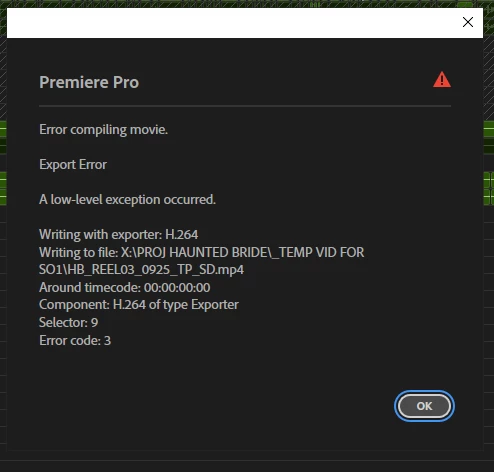
Only on Team Projects
I converted the Team Project to a regular PPro project and was able to export
Adobe PPro V25.2.3 (Build 4)

Windows 10 Pro - 10.0.19045 (Build 19045)
NVIDIA GeForce GTX 1060 6GB - Studio Driver Version 576.80

2 replies

Participant
October 1, 2025

I had the time to look into this again. The error resolved itself. I don't remember if I got this same error previously.

"Offline material is present in this export and has online Proxies attached. Offline material will be encoded using the Proxies."

Yes we are working with proxies, I was able to scrub and playback as normal and didn't think there was any issue with the proxies. But I went on ahead and toggled the "Toggle Proxies" button. The export completed with no errors via PPro.


I would like to document that before toggling the "Toggle Proxies" button several times - export via Media Encoder was giving me these warnings.

AFTER, toggling proxies - I still had the same warnings - but export still completed successfully. 

I did not move on the uncheck "Enable hardware accelerated decoding (requires restart)".

I can work with this for now, Toggle Proxies did it for me.


Adobe Employee
September 29, 2025

Hi @Bryan Dumaguina and sorry for your troubles. 
Does export via Media Encoder work in your Team Project? 
Does it help to uncheck the option for "Enable hardware accelerated decoding (requires restart)" under the Media preferences?
Would it be possible to invite me to the troublesome Team Project (I'll send you an email)?