
CTOverton
Participating Frequently
August 8, 2017
Answered

Export .mov 1080i60 (59.94i) 29.97 fps

  • August 8, 2017
  • 1 reply
  • 17107 views

I've done this before in an older version of adobe premiere but I can't seem to remember how to get the export settings correct.

I need to export in:

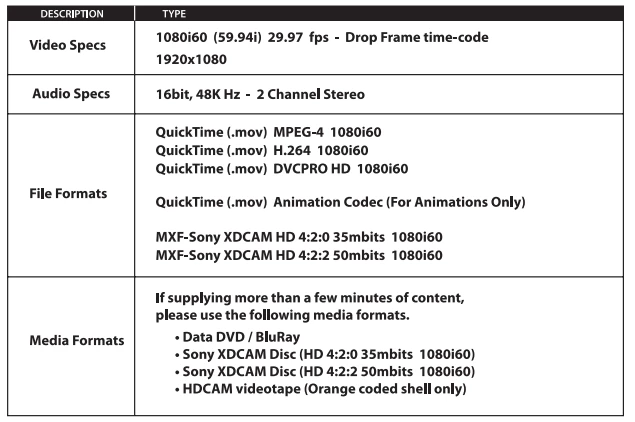
1080i at 29.97fps with resolution 1920x1080 as a .mov file

I found these settings under H.264 and HD1080i 29.97 but it forces a .mp4 file. Under quicktime I don't seem to have the 1080i presets. Am I missing the settings or is there something I can do to make this work?

Here is a chart for the standards I'm trying to follow:
This topic has been closed for replies.
Correct answer Ann Bens

Do you have QT installed?

If you do you are missing a bunch of codec.

Uninstall

Use Cleanertool

Reinstall

Use the Adobe Creative Cloud Cleaner Tool to solve installation problems

1 reply

Ann Bens
Community Expert
Community Expert
August 8, 2017

Select Quicktime and set codec to H.264

Match source

Set field to upper that will make in 60i

CTOverton
CTOvertonAuthor
Participating Frequently
August 8, 2017

I don't seem to have that codec available, the closest one forces the frame to be 1280x1080

Ann Bens
Community Expert
Ann BensCommunity ExpertCorrect answer
Community Expert
August 8, 2017

Do you have QT installed?

If you do you are missing a bunch of codec.

Uninstall

Use Cleanertool

Reinstall

Use the Adobe Creative Cloud Cleaner Tool to solve installation problems