

ZenGeekDad
Inspiring
November 9, 2018
Answered

Export recently stopped displaying settings panel ("video", "audio", ...).

  • November 9, 2018
  • 1 reply
  • 1124 views

Starting a few weeks ago (after some Adobe-fed update of Premiere Pro CC) I no-longer see panel for reviewing and changing the export settings.  So, in my screenshot below, the "Effects, Video, Audio, Multiplexer, Options, Publish" panel won't open.  As a result, I'm stuck with the default settings from whatever format and preset I chose.  Chosing different export formats or presets makes no difference.  This problem is the same for me for both Premiere Pro CC v12.1 Kentos, and in Premiere Pro CC v13.0.1.

I can't find any settings (Edit > Preferences) that might explain this.  And I can't find any hidden GUI interfaces that, say, twirl down the missing panels.

Any ideas?

Thanks!
This topic has been closed for replies.
Correct answer ZenGeekDad

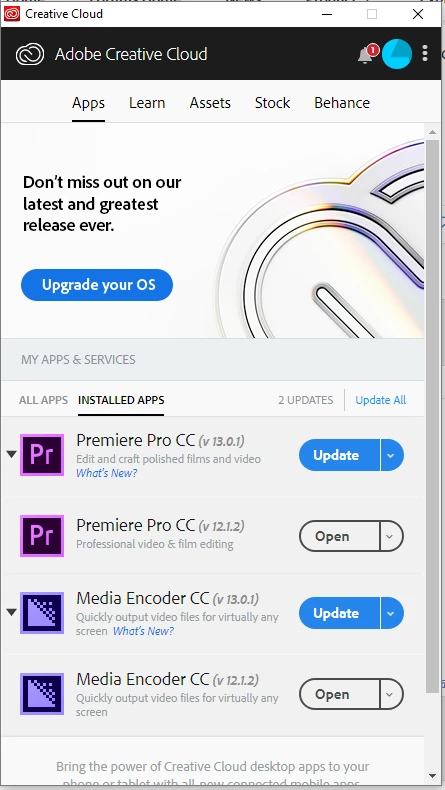
I tried again.  This time I uninstalled everything in Creative Suite, expect the desktop Creative Cloud desktop app itself (see screenshot below), cold rebooted, tried to ran the Adobe cleaner at this URL:

Use the Creative Cloud Cleaner Tool to solve installation problems

Which did not seem to actually clean anything; it just had a DOS level crude menu for uninstalling, but everything was already uninstalled, so I just exited it, then cold rebooted yucks.

Then I redownloaded  just PrP -- in this case 12.1, since it's the one I'd been using for the last project (not yet finished) and I don't want a migration to 13 to introduce any risks on 100 hours of work.

This time, the export options are back.  Don't know why, really.  Never really ran the cleaner.  Maybe some of the different generation versions of the same Adobe apps, being installed at the same time (PrP 12.1 and 13 for example) was the cause?

1 reply

Ann Bens
Community Expert
Community Expert
November 9, 2018
ZenGeekDad
Inspiring
November 10, 2018

Thanks for the suggestion.  I tried that.  The preferences successfully reset (all the expected user customizations were lost).  But the export options still don't show up.

Sooo, as the next attempted fix, I just uninstalled both PrP_CC 12 & 13, deleting preferences.  Then reinstalled PrP 12.  Opened with Alt depressed (extra insurance on deleting preferences).  Still no export options visible.

Any other ideas?

ZenGeekDad
ZenGeekDadAuthorCorrect answer
Inspiring
November 10, 2018

I tried again.  This time I uninstalled everything in Creative Suite, expect the desktop Creative Cloud desktop app itself (see screenshot below), cold rebooted, tried to ran the Adobe cleaner at this URL:

Use the Creative Cloud Cleaner Tool to solve installation problems

Which did not seem to actually clean anything; it just had a DOS level crude menu for uninstalling, but everything was already uninstalled, so I just exited it, then cold rebooted yucks.

Then I redownloaded  just PrP -- in this case 12.1, since it's the one I'd been using for the last project (not yet finished) and I don't want a migration to 13 to introduce any risks on 100 hours of work.

This time, the export options are back.  Don't know why, really.  Never really ran the cleaner.  Maybe some of the different generation versions of the same Adobe apps, being installed at the same time (PrP 12.1 and 13 for example) was the cause?