
Participant
February 18, 2017
Answered

Export size is huge than the source file

  • February 18, 2017
  • 3 replies
  • 3487 views

Hello guys, I am trying to encode a tutorial my friend created. It is around 5 hours of video. The total size of the original videos combined is 772 MB .

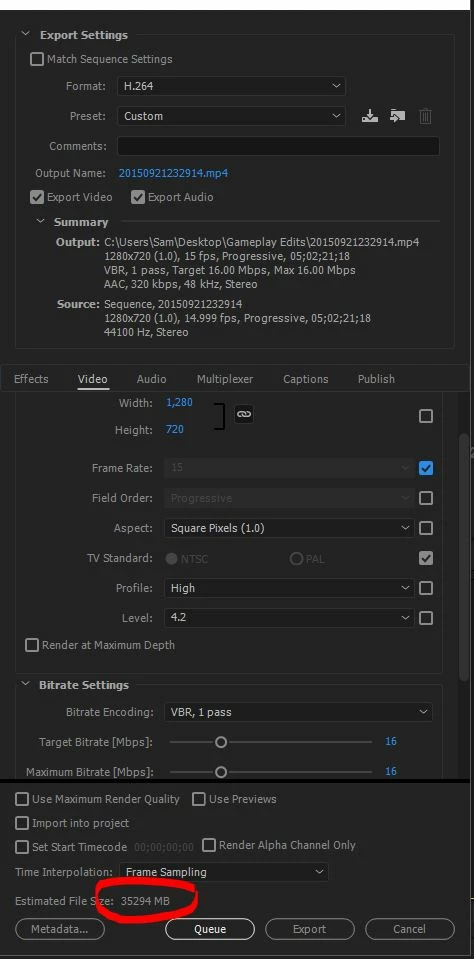
When i try to combine the videos into one for youtube 720p HD, the output size displayed is huge. Have a look at the screenshot below for the settings at which I am willing to encode the video. It shows 32GB. I am on Adobe Premiere pro CC 2017.

This is a problem i am observing in CC 2017. I have encoded videos earlier also at same settings, however the file size has never been this crazy as in CC 2017.
Please provide your expertise on this matter .

Screeshot :
This topic has been closed for replies.
Correct answer excited_Genie16B8

File size = bitrate x duration.  To get a smaller file, you need either a lower bitrate, a shorter video, or both.

3 replies

DJ-Skip
Participating Frequently
November 18, 2021

nice story I set that it should be the same as source file . and it is still almost 6 times as large. the same with making proxies even make it bigger. Adobe is very bad at making small files. I think they have shares in the harddisk suppliers.You just have to leave export to other software

DJ-skiphttp://dj-skip.ddns.nethttp://dj-skipmixcloud.ddns.netdj.skip.rotterdam@gmail.com
R Neil Haugen
Legend
November 18, 2021

Neither Premiere nor Resolve give the users some of the higher compression options that say ffmpeg can do. Which as someone that uses both, I see complaints of in both their forums.


The BM forums have a couple threads on how to export out of Resolve then what settings to use in ffmpeg on that file. Same issue as here.


Neil

Everyone's mileage always varies ...
excited_Genie16B8Correct answer
Legend
February 19, 2017

File size = bitrate x duration.  To get a smaller file, you need either a lower bitrate, a shorter video, or both.

R Neil Haugen
Legend
February 19, 2017

Bit rate of the export is really the prime determiner of file size.

Try a setting of target 10, max 14 ... what does that show? And on export, what's it look like?

Neil

Everyone's mileage always varies ...