
Participant
April 5, 2018
Question

Export stopping at 3% - URGENT

  • April 5, 2018
  • 4 replies
  • 1014 views

I have a 35 minute short film that I have been attempting to export for the last week. When I run it through Premiere, the export always freezes at 3% and when I run it through Encoder, for each millisecond that passes, an additional minute is added to the final export. For example, when the export had been running on Encoder for 8 hours, the amount left was 236 hours. This obviously won't work. My video has a release for this Saturday night and all help is appreciated. I will put specs and other information below. Thank you.
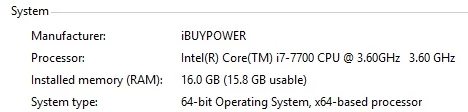
I also have 24.3 GB available on my 118 Windows hard drive - Windows (C:)

I am running the latest versions of Premiere and Encoder and have attempted exporting in both YouTube 4K and YouTube 1080p

This topic has been closed for replies.

4 replies

Kevin J. Monahan Jr.
Community Manager
Community Manager
May 14, 2018

Hi MasonK,

Did you ever get your project exported? Please let us know.

Thanks,
Kevin

Kevin Monahan - Sr. Community and Engagement Strategist – Adobe Pro Video and Audio
Legend
April 5, 2018

Let's get a few more details, Mason.  Use the guide below.

How To Ask For Help

Participating Frequently
April 5, 2018

Often when a render keeps stopping at the same point, there is perhaps a glitchy video clip or image at that point in the timeline that the system is choking on. Get in there and zoom in and look for anything weird, even for instance a one-frame gap in the video track, or one video frame that has a glitch in it (remove that bad frame!).

Mark an IN and OUT point to encompass the "problem area" of the timeline, and RENDER just that area (make GREEN bar) if you can. Now go to Export and see if you can Export just that area, and check USE PREVIEWS. If you can successfully export that segment, take that NEW clip you exported and drop into timeline on a track right above the problem area. Now export the whole thing to desired codec and you should be golden. If previous steps work, that is! Have been in this situation many times over the years and the steps above will usually get me by.

Of course, for the Render codec and Export (of fixed area), use something high-quality intermediate like Cineform or DNxHD to minimize any quality loss.Then of course final export to whatever you need there.

Based on failure at about 3% of 35 minutes, the issue should be within the first minute and a half, so that tells you where to start looking.

EDIT: also, do yourself a favor and get a decent fast hard drive dedicated to video, never a good idea to use the C: drive. On the PC, something with USB 3.0 or USB-C will work. There are good units from G-Tech, Glyph, and LaCie meant for video work and they don't cost that much and many are portable (small and bus-powered).

Thanks

Jeff Pulera

Safe Harbor

yenaphe
Inspiring
April 5, 2018

Have you tried to render in "software mode" only ? It seems like it could be an issue with the GPU.

Do you have your GPU specs?

Participant
April 5, 2018

Is this the information you're looking for?

SVL02
Participant
April 5, 2018

Same issue on mac, when starting a new project it will render but not an older one (also new project and import the old one in that project didn't work). Also it stop rendering when luts apply in lumetri.

Render with no hardware acceleration so software only will work until they find a solution.