

markkoskg15941118
Inspiring
March 3, 2021
Question

Export without losing quality (read).

  • March 3, 2021
  • 3 replies
  • 548 views

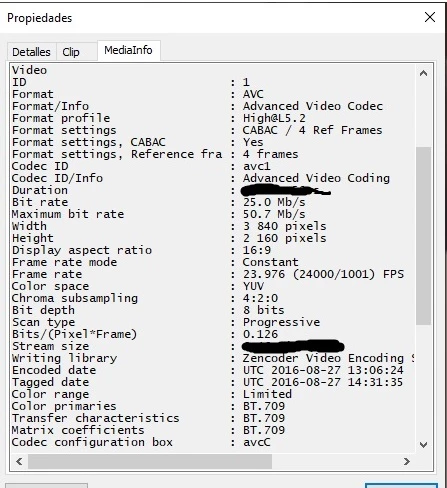
If I had a 3 minute video in MP4 / 10bits / 4k and with a bit rate of 50 mb / s. I would like to cut 10 seconds of scenes from that video, and when exporting the video I would like it to keep the same quality even in the hair. What should the output configuration to export and not lose any details?
The video is not mine nor did I edit it, nor do I have the raw files with which they were edited. That is why I ask you what I should do to avoid losing quality when exporting the video.
 

This topic has been closed for replies.

3 replies

MyerPj
Community Expert
Community Expert
March 3, 2021

Why did you redact the Bit rate and Stream Size?

R Neil Haugen
Legend
March 3, 2021

If you're just cutting bits out, especially for long-GOP H.264/5 media, then actually ... the above suggestion is correct.


There's a vast different between a "muxing" app and an NLE.


The mux operation takes the current file, applies your cuts, re-stitches it back together (generating frames in-between i-frames if it must) and leaves you with the same file, just your cuts removed. It doesn't re-encode to a new file.


An NLE like PrPro import the file, you do your cuts, and it exports a completely different file out. In that it completely re-makes every frame in the new file.


Neil

Everyone's mileage always varies ...
markkoskg15941118
Inspiring
March 4, 2021

What is the most accurate muxing tool you know?
I used to trim videos with MKVtolnix and the app wouldn't trim exactly at the second set point.
Sorry for my english (google translate)

Inspiring
March 3, 2021

You don't need PremierePro for this, use tools like Avidemux, FFMpeg, VidCutter, LosslessCut, etc

markkoskg15941118
Inspiring
March 3, 2021

You have not read well. I need to cut and edit about 10 seconds of video. That is why it is inevitable that the video goes through a premiere.