
Participating Frequently
July 14, 2023
Answered

Exportation déroulant fin

  • July 14, 2023
  • 13 replies
  • 507 views

Bonjour,

je viens de faire un déroulant de fin et je n'arrive pas à l'exporter. Adobe me sort une image fixe de la longueur du déroulant !!!

Cela fait 2h que je cherche une solution...

Si quelqu'un a une idée... D'avance merci

Thierry
This topic has been closed for replies.
Correct answer jstrawn

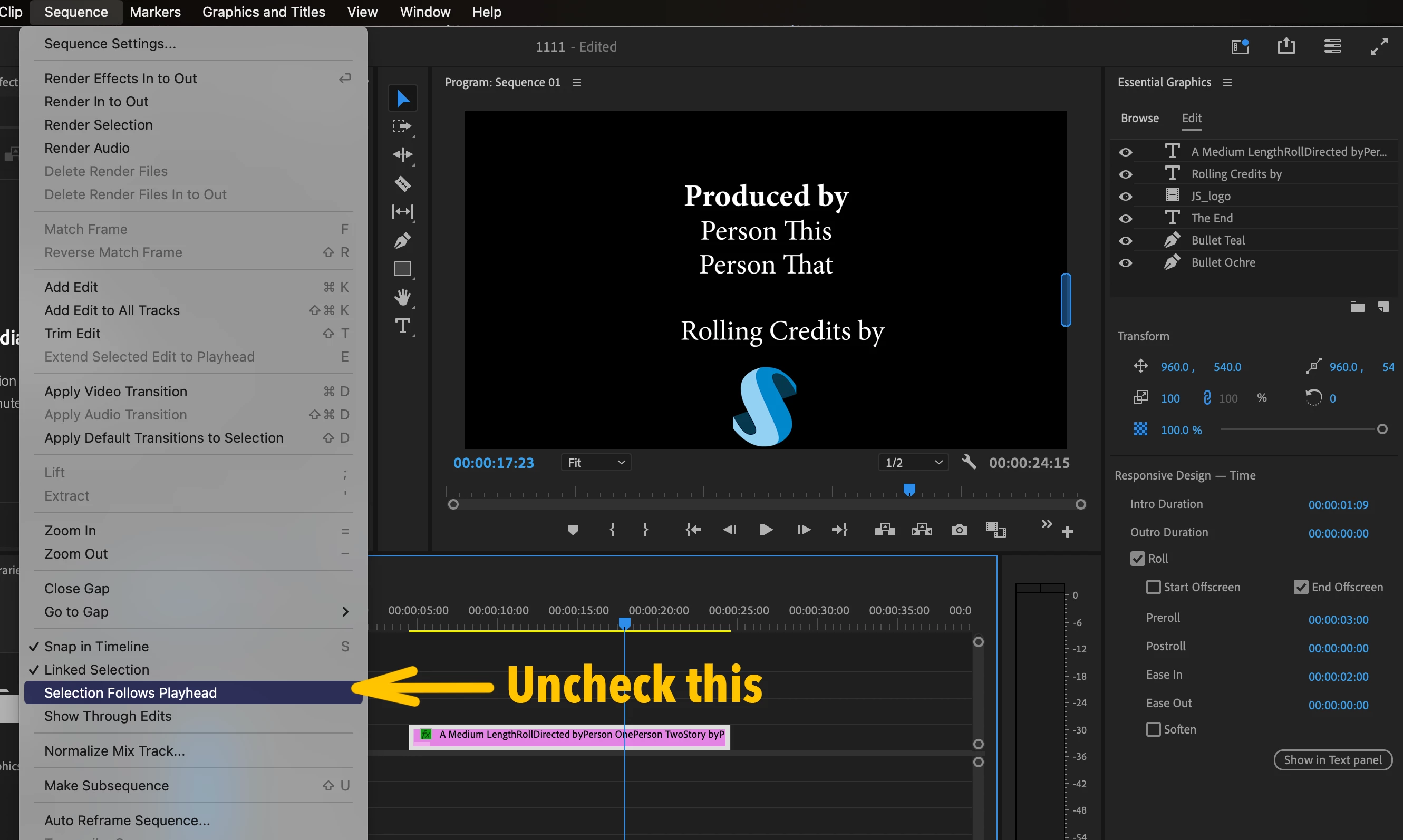
Greetings @defaultbhk9lownmj8c and anyone else browsing this topic. Thank you for working with me directly on this. We know what the problem is now. Under the Sequence menu, find "Sequence Follows Playhead" and make sure that is unchecked. Now use Ctrl/Cmd + M or choose File > Export Media and it should work regardless of which Export Settings you use.

Huge thank you to my colleague @270120 who helped me figure out this simple but hard to find workaround. We have an internal bug in place to fix the root problem as well.

13 replies

jstrawn
jstrawnCorrect answer
Legend
July 26, 2023

Greetings @defaultbhk9lownmj8c and anyone else browsing this topic. Thank you for working with me directly on this. We know what the problem is now. Under the Sequence menu, find "Sequence Follows Playhead" and make sure that is unchecked. Now use Ctrl/Cmd + M or choose File > Export Media and it should work regardless of which Export Settings you use.

Huge thank you to my colleague @270120 who helped me figure out this simple but hard to find workaround. We have an internal bug in place to fix the root problem as well.

jstrawn
Legend
July 20, 2023

Let's try another approach. I sent you a direct message.

Participating Frequently
July 20, 2023
Here they are
jstrawn
Legend
July 20, 2023

@defaultbhk9lownmj8c Thierry, I see no images attached.

Participating Frequently
July 20, 2023
Good morning.
Here are the requested screenshots.
Small clarification: exporting a video/audio edit works very well.
Only the export of this end drop-down is problematic.
Adobe provides the still image of the mouse position on the timeline during
the entire scroll!
Where is my mistake?
Thank you for your help.
Thierry
Participating Frequently
July 18, 2023
Hello,
Thanks for your help!
As requested, I send you the project with the sequence and the end credits.
For the export settings, I don't know if that's what you need...
Have a good day.
Thierry
jstrawn
Legend
July 17, 2023

@defaultbhk9lownmj8c Your English is a lot better than my French. 🙂 It's fine to write in French and then I can use the translate button which seems pretty accurate.

I'm still not sure what is failing for you. I think you said that the roll is being exported as a static image. But are you also saying that it is format specific? So the roll exports OK as an H264 mp4 but not as a ProRes mov? Can you make it happen if you export a project + sequence with ONLY the roll? If so, can you send me that project + sequence + graphic with no media? And also please send me a screenshot of your export settings. You can use the direct message feature if you click on my user name in this thread. Thanks in advance. We want to help you!

Participating Frequently
July 16, 2023
Thank you for your help and sorry for my poor English...
I obviously tried to change the various settings (format - codec etc...). The
only possibility was to do a Quick Export (see attachment). But this one is
in H264 whereas I have to send a ProRes HQ 4K to the colorist!
jstrawn
Legend
July 14, 2023

OK thank you @defaultbhk9lownmj8c. Now that we can at least see your roll Graphic and your Export mode details, we have some idea about what you're trying to do. So you're saying that the roll look correct in Pr's Program Monitor but when Exported as a ProRes mov, it is just exporting a static image for the duration of the Roll? Does the same thing happen if you try a different Format or Codec? And what about if you send it to Adobe Media Encoder? Does the same thing happen there?

Participating Frequently
July 14, 2023

D'habitude tout fonctionne normalement comme sur les photos mais depuis hier impossible d'exporter ce générique de fin...