allytal
Participant
May 17, 2017
Answered

Exported file never saves color edits

  • May 17, 2017
  • 2 replies
  • 497 views

Hi All,

I've seen similar threads but haven't found my answer yet. I'm a novice Premier user and basically only use it for simple color corrections and such, so please explain like I'm 5.

Very recently my exported video files do not save any of the color changes I've made to the video. The saved Premier file looks fine and color changes are saved in that working file, but every single export contains just original video condition. This randomly started a couple weeks ago and I haven't been able to figure out what's changed. 

Any advice? Thanks!

This topic has been closed for replies.
Correct answer R Neil Haugen

If you're adding a bit of contrast & saturation in PrPro, then exporting an H.264 to be viewed in QuickTime, you'll get this. Or at least most people will.

QuickTime is designed to "enhance" the video experience for the Stoopid. So it's built with internal controls that are rather dated by today's standards, as to what "video" signal should be. Including it expects that unless a clip includes specific info in the header to ​say​ it's "full dynamic range", it will assume the clip is 16-235 or perhaps 16-255, rather than 0-255. And sets the gamma for the clip a bit off from "modern" also as it used to be different in ye olde video tape days.

PrPro puts out full-range 0-255 media ... period. Apparently, it doesn't put the marker in to ​say​ so as that's rather a dated ... anachronistic ... form of media.

Hence, a PrPro H.264 output viewed in QuickTime will have the blacks (the 0 end of the scale) lifted to 16, and the whites at times dropped to 235 from 255 (pure white). This flattens contrast, muddies the darks, and kills saturation.

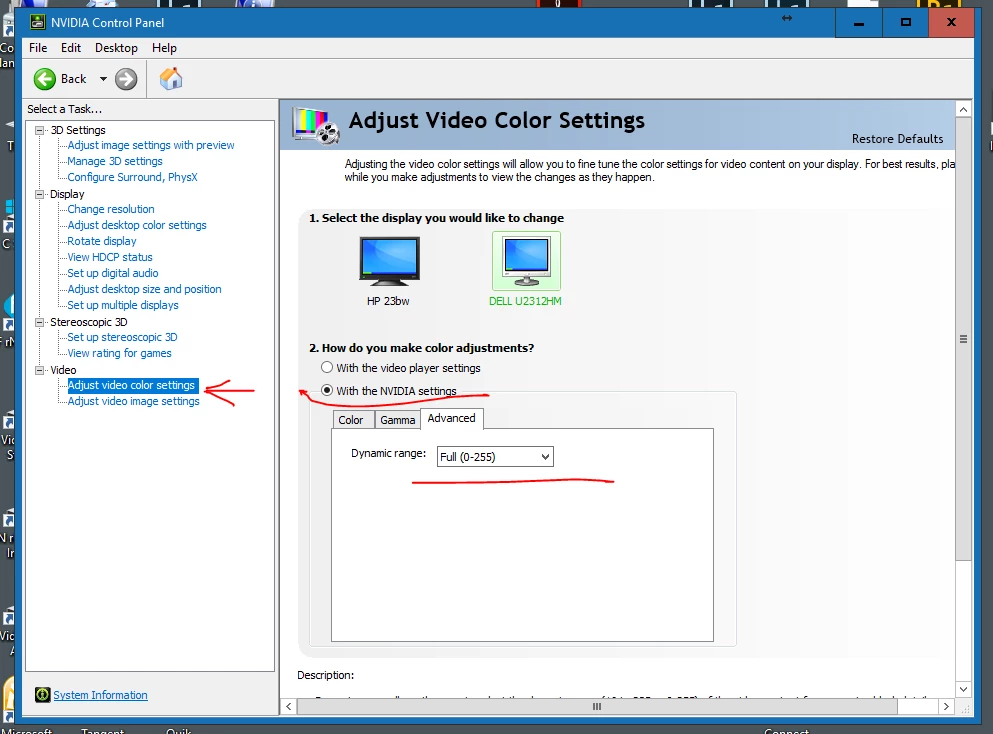
On some Nvidia GPU's you can go into the card's setting file, and as shown here, set the Video section to Full Dynamic range, and select the option that the Nvidia settings are supposed to prevail over video player settings. That works ... for some.
Also you might try using the DNxHD/R codecs within a QuickTime wrapper ... as shown here:
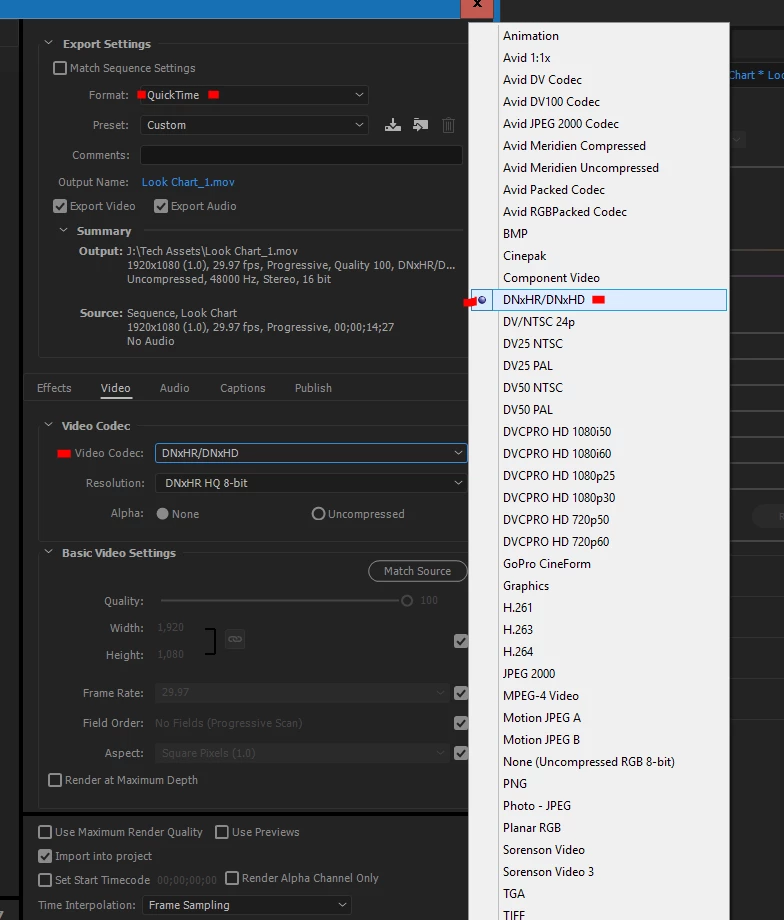
For some people, this gets around both the QuickTime and YouTube issues of dynamic range and gamma.

But past that ... QT is really one of the worst players you could use for really seeing the video. I'd highly recommend PotPlayer or VLC over QT.

Neil

2 replies

Participant
September 16, 2024

Please my video export save please 

R Neil Haugen
Legend
May 17, 2017

How about a bit of information?

Generally, it's good to include OS/CPU/RAM/GPU/vRAM, and the precise numbered version of PrPro. Also the type of media involved, any 3rd party or plugins or major effects involved?

Second, which app are you looking at the files in after export? Re-imported into PrPro, QuickTime, whatever?

Plus ... a screen grab of your sequence with the effects applied, a screen-grab of the export settings box, a screen grab of the file imported back into PrPro showing what that looks like ... and if you've got a different video player involved, a screen grab of that image.

Use either drag/drop a png onto your reply box or the flower-icon in the middle of the formatting box at the top of your reply box.

Neil

Everyone's mileage always varies ...
allytal
allytalAuthor
Participant
May 18, 2017

Yes, sorry I gave no details!

It's whatever the most updated PremierPro CC is and I'm on a Macbook Pro OS X El Capitan 10.11.6. Media Encoder is up to date, too.

No major effects. Just video from either iPhone or Canon/Nikon camera (what I've always used in PrPro). Simple cuts in the video and then MINOR contrast/brightness/exposure edits. These are what don't seem to translate to the final file, which I've tried saving in several formats (typically I do the Vimeo 720HD one) and always view in QuickTime.

THANKS!

R Neil Haugen
R Neil HaugenCorrect answer
Legend
May 18, 2017

If you're adding a bit of contrast & saturation in PrPro, then exporting an H.264 to be viewed in QuickTime, you'll get this. Or at least most people will.

QuickTime is designed to "enhance" the video experience for the Stoopid. So it's built with internal controls that are rather dated by today's standards, as to what "video" signal should be. Including it expects that unless a clip includes specific info in the header to ​say​ it's "full dynamic range", it will assume the clip is 16-235 or perhaps 16-255, rather than 0-255. And sets the gamma for the clip a bit off from "modern" also as it used to be different in ye olde video tape days.

PrPro puts out full-range 0-255 media ... period. Apparently, it doesn't put the marker in to ​say​ so as that's rather a dated ... anachronistic ... form of media.

Hence, a PrPro H.264 output viewed in QuickTime will have the blacks (the 0 end of the scale) lifted to 16, and the whites at times dropped to 235 from 255 (pure white). This flattens contrast, muddies the darks, and kills saturation.

On some Nvidia GPU's you can go into the card's setting file, and as shown here, set the Video section to Full Dynamic range, and select the option that the Nvidia settings are supposed to prevail over video player settings. That works ... for some.

Also you might try using the DNxHD/R codecs within a QuickTime wrapper ... as shown here:

For some people, this gets around both the QuickTime and YouTube issues of dynamic range and gamma.

But past that ... QT is really one of the worst players you could use for really seeing the video. I'd highly recommend PotPlayer or VLC over QT.

Neil

Everyone's mileage always varies ...