Exported video is only audio, has two files
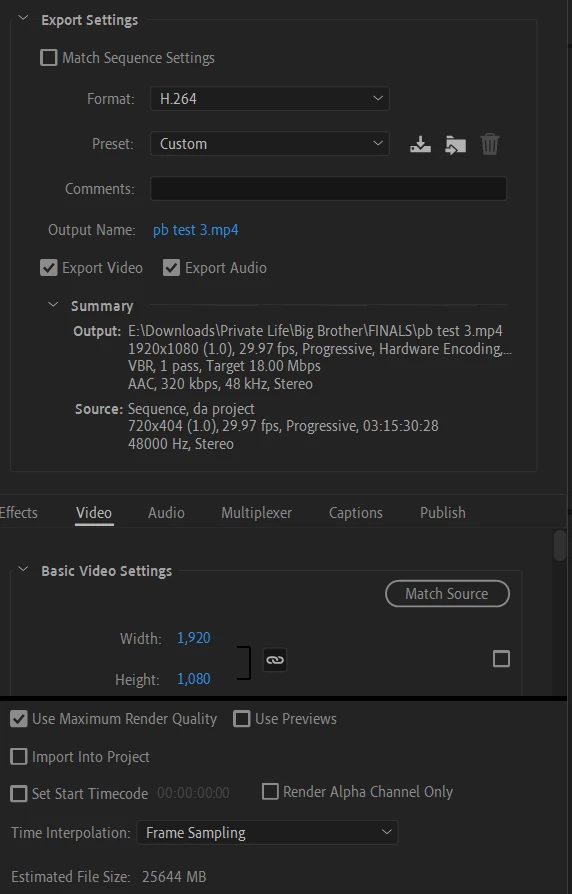
When I export my very large video, which is estimated to be about 25gb by Premiere, the end result is a 450mb mp4 file which is a blank (black) video with only the audio intact, and it also produces a 4 gb m4v file that is unplayable. I attached a screenshot of my export settings. In addition, occasionally during export, Premiere Pro crashes with no error report or explanation. It took me four tries but I was finally able to export the video, albeit it came out as blank/black with only audio. It only takes about 1.5 hours to export this blank video, so I know something must be wrong in the settings, but I don't understand what I'm doing wrong.
A few things I have already tried:
- Exporting the same sequence in a different project (same blank result)
- Exporting in Adobe Media Encoder (it shows the video preview while exporting, but same blank result)
- Exporting only a portion of the video (I exported one minute and seven minutes, and it exported perfectly with the exact same settings)
- Changing the bitrate to make it a smaller file size (same blank result)
I am at a loss what I can do. Is it possibly because I am exporting to an external hard drive? I don't have 25gb+ of free space to export this three hour long video to my laptop's hard drive. Is it because my CPU isn't good enough on my laptop? Is it because the file size is too large? Originally I thought it was potentially because in the first minutes of the video, there is some SD content (while the rest is HD), but I exported the first seven minutes of the video and this was no problem (I also exported other 1-7 minute sections of the video with no problem).
Please let me know if there is a solution to this. I am on the fence about buying a further Adobe subscription, so if technical support is really able to help me solve this problem, I'm hoping to continue my subscription. But right now, I am really frustrated at this issue.
 AdChoices