
ericf50707306
Known Participant
May 9, 2017
Answered

Exporting 17 minute video, only 1kb when done?
  • May 9, 2017
  • 7 replies
  • 20394 views

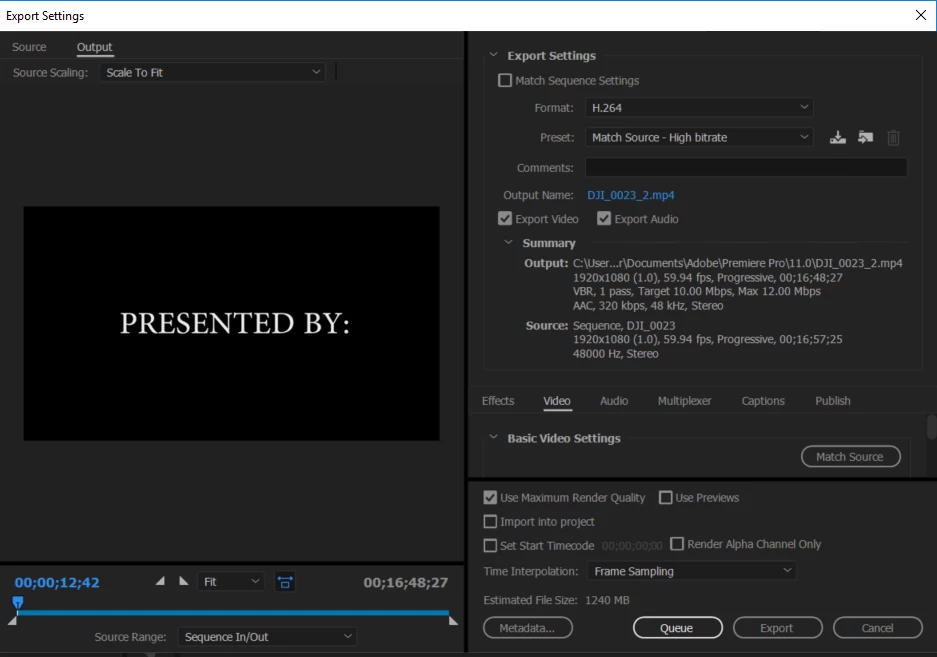
I shot and edited a 17 minute video with a Phantom 3 pro.  The video was recorded in 1080p/60fps, no effects, I added a soundtrack and transitions.  When I export it takes about 3 hours and it is only 1kb when done.  What am i doing wrong?

This topic has been closed for replies.
Correct answer R Neil Haugen

First, doing an export to the same disc as your media, programs, cache, and project files is going to take for-e-v-e-r.

Second, you need at LEAST three times the final exported file size free ... on an SSD. On a spinning-disc drive, you'll need a lot more than that or it will take forever if it can finish. Having 4-5 times the final file size available is more workable.

Neil

7 replies

Participant
February 5, 2023

If it can help someone, on my side, after many attempts with an export at 1kb, I finally successfully exported my project using another disk. Both had plenty of space (>500GB for a 5 minutes 4k videos) and I exported many times on the same disk. I still don't know what causes this issue but is now working !

just edit
Known Participant
January 20, 2023

It's a known Pr bug in version 23.1
Try to check that your project folder has not any special character (space, symbols, etc.)
A first test would be to export at the root of a drive.

Hope this helps. This bug has been reported to Adobe since 23.1 came out. No update since...

noar

neonfr
Known Participant
October 29, 2022

Hey boys. I had the same issue but the solution actually was very simple. I was out of space on my local disk. I deleted some files this fixed the issue.

ericf50707306
Known Participant
May 10, 2017

Ok thanks, I need to save some money up.

R Neil Haugen
Legend
May 10, 2017

Editing hardware ... especially with drones and/or 4k ... can take some serious cash. I'd recommend going over to the Hardware forum, and seeing what sort of things they're talking about.

https://forums.adobe.com/community/premiere/hardware_forum

Neil

Everyone's mileage always varies ...
ericf50707306
Known Participant
May 10, 2017

I appreciate it. Im doing what I can with this until I can work up to a

professional set up. It took me forever just to get the drone. I shoot only

1080p for now.

ericf50707306
Known Participant
May 10, 2017

ok that explains a lot.  Im making more room and trying again.  Can I export to an sd card?

R Neil Haugen
Legend
May 10, 2017

I don't think so ... PrPro seems to need fully connected drives. USB flash-drives can work, however. I've got a PNY 128GB flash that I put in a USB3 port and it works fine.

If you could get a Samsung T3 drive connected via USB3, those run sustained throughput way above virtually any other SSD on a USB connection, via test by Bill Gehrke, THE guru on hardware with PrPro. Put your project files & media on the T3, leave the cache files on the system drive, it would improve things for you a lot.

Neil

Everyone's mileage always varies ...
ericf50707306
Known Participant
May 10, 2017

That did not help.  Still 1kb

R Neil Haugen
R Neil HaugenCorrect answer
Legend
May 10, 2017

First, doing an export to the same disc as your media, programs, cache, and project files is going to take for-e-v-e-r.

Second, you need at LEAST three times the final exported file size free ... on an SSD. On a spinning-disc drive, you'll need a lot more than that or it will take forever if it can finish. Having 4-5 times the final file size available is more workable.

Neil

Everyone's mileage always varies ...
Participant
August 8, 2022

Thank you so much for this, been chasing this issue down intermittently forever and found out somehow my drive path was pointing to an SSD that was filled. 


Pointed the project towards my working drive and BOOM, fixed it. 

ericf50707306
Known Participant
May 10, 2017

I'm hoping this was due to low storage.  I just deleted some files and now I'm trying again.